React-native-fs: writeFile not working in new version
What means that the last version Removed attributes from writeFile and appendFile? I want to use writeFile in version 2.3.2 function but is not working anymore.
 agrass
All 13 comments
Whats your code?
 itinance
on 10 Aug 2017
itinance
on 10 Aug 2017
I have the same feeling that writeFile is no longer working:
I just did this:
      RNFS.writeFile(RNFS.DocumentDirectoryPath + '/test.txt', 'teste', 'ascii')
        .then((success) => {
          console.log('FILE 2 WRITTEN!')
        })
        .catch((err) => {
          console.log(err.message)
        })
In the console, I see "FILE 2 WRITTEN".
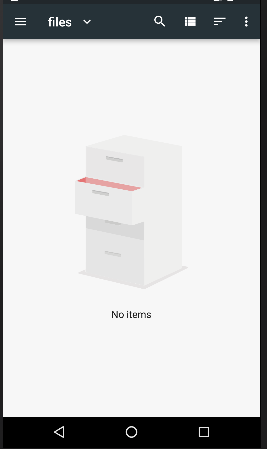
However, when I go to the "Explore" of my cell hone (and/or the emulator), I don't see any files. Screenshot of the file system storage of my emulator for the app I'm working on right now ...
 fredbt
on 24 Aug 2017
fredbt
on 24 Aug 2017
I'm doing the same of @fredbt. Working with RN 0.41
agrass
on 24 Aug 2017
Just to add more info, this is my setup:
"react": "16.0.0-alpha.12",
"react-native": "^0.46.4",
"react-native-fs": "^2.5.1",
I also tried to write in ExternalDirectoryPath and I could not find the files. Another data point: RNFS.MainBundlePath is "undefined" for me: console.log(RNFS.MainBundlePath) shows "undefined" in the console, in this setup.
fredbt
on 24 Aug 2017
@fredbt I recommend you to check react-native-fetch-blob. I changed the library due I needed a fast solution
agrass
on 24 Aug 2017
Thanks @agrass
I will try it, then.
fredbt
on 24 Aug 2017
@fredbt MainBundlePath is not defined on Android as stated in README:
_
On Android, use "RNFS.DocumentDirectoryPath" (MainBundlePath is not defined)
_
itinance
on 24 Aug 2017
Thanks @itinance !
I will send a PR changing the README to also add this info in the constants section!
https://github.com/itinance/react-native-fs#constants
fredbt
on 24 Aug 2017
much appreciated
itinance
on 24 Aug 2017
https://github.com/itinance/react-native-fs/pull/338 all yours @itinance :)
fredbt
on 25 Aug 2017
The same issue... Ondroed 4.4.2
"react-native": "0.53.0",
"react-native-fs": "2.9.11"
 apoterenko
on 14 Mar 2018
apoterenko
on 14 Mar 2018
It is 100% working code. I have also same issue in signature image save.
import RNFS from 'react-native-fs';
const file_path = RNFS.DocumentDirectoryPath + "/customer_signature.png";
RNFS.writeFile(file_path, result.encoded, 'base64').then(()=>{
        console.log('onSaveEvent success', file_path)
        thisThat.props.updateSignature(true, file_path);
    }).catch((error) => {
        console.log('onSaveEvent error', error)
        thisThat.props.updateSignature(true, '');
    });
 dayachand-systematix
on 12 Dec 2018
dayachand-systematix
on 12 Dec 2018
It is 100% working code. I have also same issue in signature image save.
import RNFS from 'react-native-fs';
const file_path = RNFS.DocumentDirectoryPath + "/customer_signature.png";
RNFS.writeFile(file_path, result.encoded, 'base64').then(()=>{console.log('onSaveEvent success', file_path) thisThat.props.updateSignature(true, file_path); }).catch((error) => { console.log('onSaveEvent error', error) thisThat.props.updateSignature(true, ''); });
Similar issue using latest version
 xgenem
on 22 Jan 2021
xgenem
on 22 Jan 2021
Related issues
 wmonecke
·
3Comments
wmonecke
·
3Comments
 quietautumn
·
4Comments
quietautumn
·
4Comments
 duckmyanmar
·
3Comments
duckmyanmar
·
3Comments
 PimDeWitte
·
4Comments
PimDeWitte
·
4Comments
 ToJen
·
4Comments
ToJen
·
4Comments
Most helpful comment
@fredbt MainBundlePath is not defined on Android as stated in README:
_
_