React-native-fs: The file seems to have been downloaded successfully,But i can't find it in the folder.
android version is ‘6.0.1‘
react-native version is ‘ 0.43.1’
Here is the code:
    var formUrl = common.baseUrl+'/enclosures/IMG_20170617_093953.jpg';
    const downloadDest = `${RNFS.DocumentDirectoryPath}/IMG_20170617_093953.jpg`;
    const options = {
           fromUrl: formUrl,
           toFile: downloadDest,
           background: true,
           begin: (res) => {
            console.log(res);
        },
        progress: (res) => {

        }
    };
    try {
        const ret = RNFS.downloadFile(options);
        ret.promise.then(res => {
            console.log(res);

        }).catch(err => {
            console.log(err)
        });
    }
    catch (e) {
        console.log(e)
    }
question
 quietautumn
All 4 comments
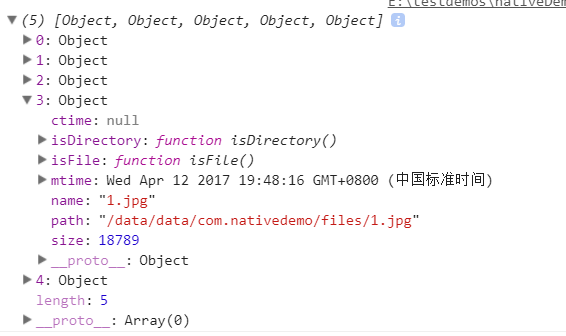
Hi, I'm not sure if you can view it from file manager, can u try this code to see content of document directory:
RNFS.readDir(RNFS.DocumentDirectoryPath).then((res)=>{console.log(res)});
This will verify your issue.
 ngrj
on 14 Jul 2017
ngrj
on 14 Jul 2017
👍2
@ngrj @ngrj
yes ,I can get an array,like this.
quietautumn
on 19 Jul 2017
so the file exists, afaik it just that you can't access content of document directory from other applications, only your own application can access it.
ngrj
on 19 Jul 2017
@ngrj Ok,thank you very much.
quietautumn
on 19 Jul 2017
Was this page helpful?
0 / 5 - 0 ratings
Related issues
 AbdelkaderOumrani
·
3Comments
AbdelkaderOumrani
·
3Comments
 zaheerahmad92001
·
3Comments
zaheerahmad92001
·
3Comments
 wangfpp
·
3Comments
wangfpp
·
3Comments
 PimDeWitte
·
4Comments
PimDeWitte
·
4Comments
 npomfret
·
4Comments
npomfret
·
4Comments
Most helpful comment
Hi, I'm not sure if you can view it from file manager, can u try this code to see content of document directory:
RNFS.readDir(RNFS.DocumentDirectoryPath).then((res)=>{console.log(res)});This will verify your issue.