React-native-fbsdk: Could not invoke FBGraphRequest.start null
Working fine in iOS but getting error in Android.
react-native-fbsdk is a wrapper around the Facebook SDKs for iOS and Android. GitHub Issues in the facebook/react-native-fbsdk repository are used exclusively for tracking bugs in the React Native wrapper.
To report a bug in the iOS or Android Facebook SDK, please visit https://developers.facebook.com/bugs/.
To report an issue with the
react-native-fbsdkpackage, please pick a different template at https://github.com/facebook/react-native-fbsdk/issues/new/choose.

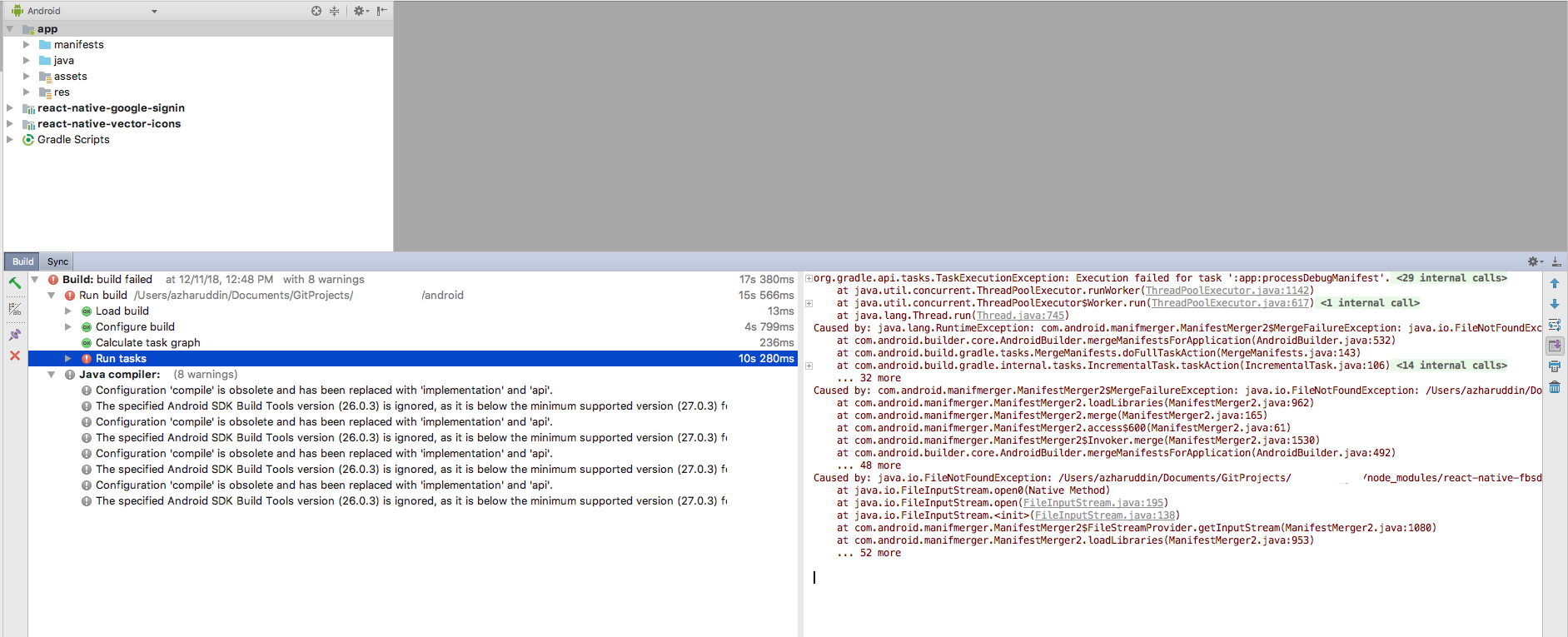
while attempting to run on Android Studio getting error on FileInputStream.java:138
 ramsagar003
All 15 comments
Hello @ramsagar003, have you found solution for your issue. I meet the same issue as you when I enable multidex with over 65536 methods on Android. Please give me solution if you solved. Thank you so much.
 vantb9x
on 14 Nov 2018
vantb9x
on 14 Nov 2018
@vantb9x This is actually bug from android studio configuration, I just close all things and restarted android studio and clean project, Android studio automatically installed needed dependency and changed some version in Gradle.
Then install build from android studio. Its working fine at my end
ramsagar003
on 14 Nov 2018
@ramsagar003, Thank you for your response. I tried but it not work for me. Thank you anyway
vantb9x
on 15 Nov 2018
@ramsagar003 : you must change GraphRequestConfig to null and add your fields parameters like this:
const infoRequest = new GraphRequest('/me?fields=id,name,email', null , responseFacebookInfoCallback);
 duyv
on 15 Nov 2018
duyv
on 15 Nov 2018
The solution above didn't helped me as I need the page access_token. And adding it like this:
const infoRequest = new GraphRequest('/yyyyy/published_posts?fields=id,story,created_time,message,full_picture&access_token=xxxxx', null , responseFacebookInfoCallback);
Is not working.
And when I do it supposedly the right way:
const infoRequest = new GraphRequest(
      '/yyyyyy/published_posts',
      {
        accessToken: 'xxxx',
        parameters: {
          fields: {
            string: 'id,story,created_time,message,full_picture'
          }
        }
      },
      this._responseInfoCallback);
I get the: "Could not invoke FBGraphRequest.start null" on Android.
On iOS works though.
 Symyon
on 21 Dec 2018
Symyon
on 21 Dec 2018
Same problem here
 marf
on 21 Dec 2018
marf
on 21 Dec 2018
I fixed it by restricting a single SDK version, adding to android/build.gradle file the code bellow:
def versionOverrides = [
"com.facebook.android:facebook-android-sdk": "4.37.0",
]
allprojects {
repositories {
...
}
configurations.all {
resolutionStrategy.eachDependency { DependencyResolveDetails details ->
def overrideVersion = versionOverrides[details.requested.group + ":" + details.requested.name]
        if (overrideVersion != null && details.requested.version != overrideVersion) {
            details.useVersion overrideVersion
        }
    }
}
}
Taken from here:
https://developers.facebook.com/support/bugs/260814197942050/?disable_redirect=0
edit: Sorry, can't figure-out how to format the code.
Symyon
on 23 Dec 2018
Hi everyone,
On iOS, everything is working fine but on Android, I have exactly the same problem has described above.
I tried all solutions, but none of these worked...
Can anyone has already fixed this problem ?
Thank you
 danielrybakov
on 30 Jan 2019
danielrybakov
on 30 Jan 2019
Thank you @Symyon your solution worked for me.
 hachther
on 16 Feb 2019
hachther
on 16 Feb 2019
Thank you @Symyon . Your solution worked for me too. Can you please explain what we exactly did in the gradle file and is this a workaround, which might break on higher version of fb android sdk.
 arkhamsushant
on 25 Feb 2019
arkhamsushant
on 25 Feb 2019
Just use implementation 'com.facebook.android:facebook-android-sdk:4.37.0'.
4.38 and above seems to have this issue.
 superandrew213
on 26 Apr 2019
superandrew213
on 26 Apr 2019
4.37.0
I did this and it worked like a charm! The only problem is that it is asking to open browser the second time I'm logging into the app, but if I press cancel it prompts the inputs to login in again. :/
 Gustavomagalhaes
on 22 Jul 2019
Gustavomagalhaes
on 22 Jul 2019
4.37.0 not working for me :/
 salmanbukharihitori
on 12 Aug 2019
salmanbukharihitori
on 12 Aug 2019
@duyv thanks works for me, cheers :)
 rishabhsaxena9
on 23 Aug 2019
rishabhsaxena9
on 23 Aug 2019
I have the following code and it is not working? Does anyone know a solution?
`import React, {Component} from 'react';
import {View} from 'react-native';
import {LoginButton, AccessToken, GraphRequest, GraphRequestManager} from 'react-native-fbsdk';
class FBLoginButton extends Component {
_responseInfoCallback(error, result) {
if (error) {
console.log('Error fetching data: ' + error);
} else {
// console.log('Success fetching data: ' + result.email);
console.log('Success fetching data: ' + JSON.stringify(result));
}
}
render() {
return (
onLoginFinished={
(error, result) => {
if (error) {
console.log("login has error: " + result.error);
} else if (result.isCancelled) {
console.log("login is cancelled.");
} else {
console.log('RES', result)
AccessToken.getCurrentAccessToken().then(
(data) => {
console.log(data.accessToken.toString())
const profileRequestParams = {
fields: {
string: 'name, email'
}
};
const profileRequestConfig = {
httpMethod: 'GET',
version: 'v5.0',
parameters: profileRequestParams,
accessToken: data.accessToken.toString()
}
const infoRequest = new GraphRequest(
'/me?fields=id,name,email',
profileRequestConfig,
this._responseInfoCallback,
);
new GraphRequestManager().addRequest(infoRequest).start();
}
)
}
}
}
onLogoutFinished={() => console.log("logout.")}/>
);
}
};
export default FBLoginButton;`
 OmarBasem
on 24 Jan 2020
OmarBasem
on 24 Jan 2020
Related issues
 yanguyt
·
4Comments
yanguyt
·
4Comments
 pranny
·
6Comments
pranny
·
6Comments
 stevesaygoodbuycom
·
5Comments
stevesaygoodbuycom
·
5Comments
 coryb08
·
4Comments
coryb08
·
4Comments
 peymancyb
·
6Comments
peymancyb
·
6Comments
Most helpful comment
@ramsagar003 : you must change GraphRequestConfig to null and add your fields parameters like this:
const infoRequest = new GraphRequest('/me?fields=id,name,email', null , responseFacebookInfoCallback);