React-native-chart-kit: How do I remove the extra space on the right side on line charts?
This is basically a resurrection of #134 - the issue still persists today.
It's claimed in that issue that PR #189 fixed the issue, but I can see that file has been moved and refactored somewhat since the PR.
 Hoffi-Coffi
All 13 comments
@Hermanya any ideas?
Hoffi-Coffi
on 10 Feb 2020
Not sure, I haven't looked at this for awhile
 Hermanya
on 10 Feb 2020
Hermanya
on 10 Feb 2020
I'm having that issue too
 umtpz
on 28 Feb 2020
umtpz
on 28 Feb 2020
I'm having the same issue.
 Skullcan
on 10 Mar 2020
Skullcan
on 10 Mar 2020
I'm having the same issue.
 wolfzer44
on 16 Apr 2020
wolfzer44
on 16 Apr 2020
I've faced this issue, in my case, I applied marginLeft and marginRight in (-)minus value
style={{
           alignItems: 'center',
           justifyContent: 'center',
           marginRight: -10,
           marginLeft: -10
 }}
 preetam52
on 24 Apr 2020
preetam52
on 24 Apr 2020
What causes this? Does anyone have a solution? Facing the same issue
 tayloraleach
on 19 Jun 2020
tayloraleach
on 19 Jun 2020
Any news about that issue?
 peter1a
on 29 Jul 2020
peter1a
on 29 Jul 2020
Any news? I have the same problem :/
 mtwzim
on 10 Nov 2020
mtwzim
on 10 Nov 2020
Actually +1 here, I'm trying all kind of different things but non seems to works so far
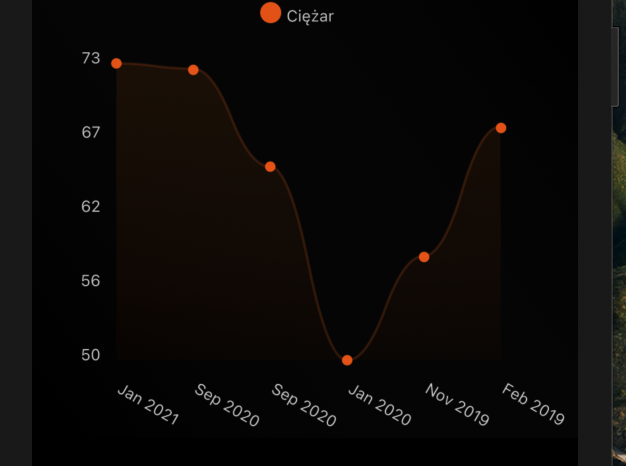
 Fortidude
on 25 Feb 2021
Fortidude
on 25 Feb 2021
I'm having the same issue, don't need that extra column
 maalishanjami
on 18 Mar 2021
maalishanjami
on 18 Mar 2021
help
 Salman9000
on 8 May 2021
Salman9000
on 8 May 2021
+1
 NemyaNation
on 6 Jul 2021
NemyaNation
on 6 Jul 2021
Related issues
 Ivanrs297
·
6Comments
Ivanrs297
·
6Comments
 stebogit
·
3Comments
stebogit
·
3Comments
 briaclg
·
4Comments
briaclg
·
4Comments
 ighormartins
·
3Comments
ighormartins
·
3Comments
 dahudson88
·
5Comments
dahudson88
·
5Comments
Most helpful comment
I'm having that issue too