react-native-calendars moved 1 day forward
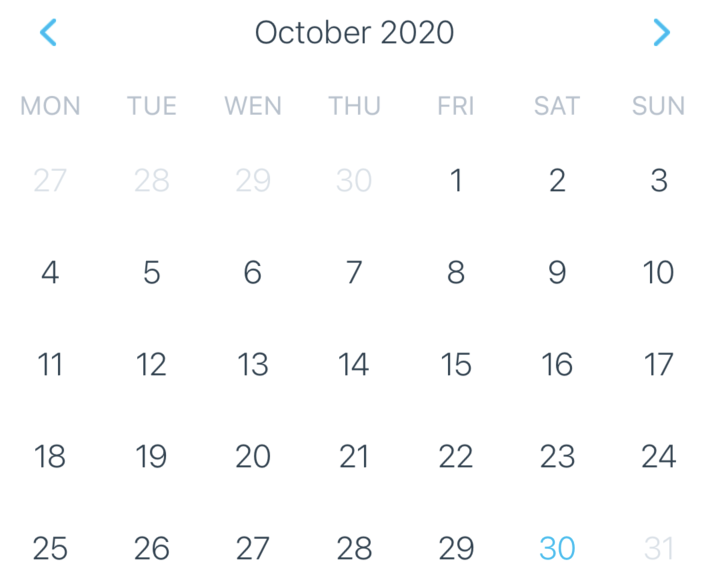
At the time of creating the post, it was Friday 30th. For some reason, my calendar displays this day as Saturday:
<Calendar
            style={{width: Dimensions.get('screen').width - 10}}
            theme={{
              selectedDayBackgroundColor: '#00adf5',
              selectedDayTextColor: '#ffffff',
              dotColor: '#00adf5',
            }}
            onDayPress={this.onDaySelect}
            markedDates={this.state.markedDates}
            markingType="single"
            minDate={minDate}
            maxDate={maxDate}
            disableAllTouchEventsForDisabledDays={true}
          />
 mparkhomenko
All 9 comments
This is likely a UTC issue where you're local time is now "tomorrow" in UTC. You should set the current property to today's date string. In my own, I use it like this:
const date = new Date();
<Calendar
current={date.toLocaleDateString()}
... // other props
/>
 lostchopstik
on 31 Oct 2020
lostchopstik
on 31 Oct 2020
@lostchopstik Thank you for your help, but It doesn't work for me :(
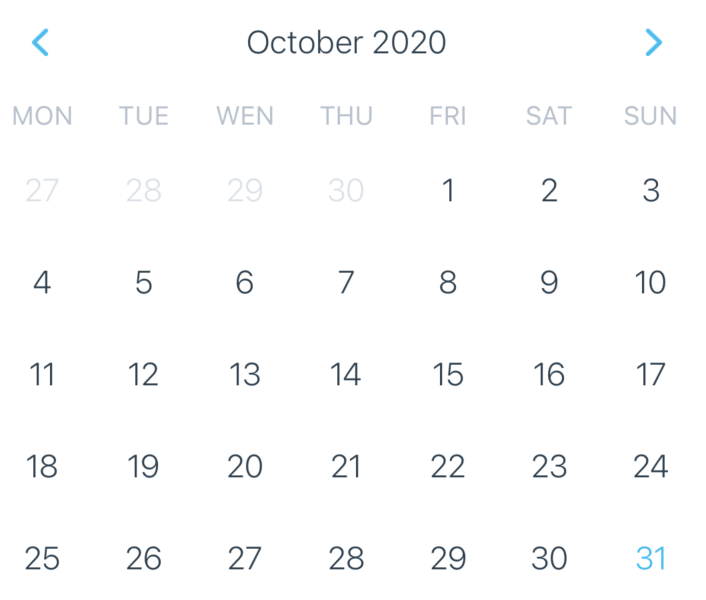
console.log(new Date().toLocaleDateString()); shows 10/31/2020 (current date). console.log(new Date()); also shows current date (Sat Oct 31 2020 10:41:14 GMT+0300 (Moscow Standard Time)), but in calendar I also see incorrect variant.
mparkhomenko
on 31 Oct 2020
I have faced same issues. Please help me
 jaiminp-nimblechapps
on 6 Nov 2020
jaiminp-nimblechapps
on 6 Nov 2020
@mparkhomenko Please added parameters firstDay={6}.
jaiminp-nimblechapps
on 9 Nov 2020
@jaiminp-nimblechapps It didn't help :(
Do you have other variants?
mparkhomenko
on 9 Nov 2020
@mparkhomenko
Go to this file location
react-native-calenders -> src -> calendar -> header -> index.js
and changed
let weekDaysNames = weekDayNames(this.props.firstDay);
to
let weekDaysNames = weekDayNames(6);
I have faced the same issue
I have resolved this issue from the above solution
jaiminp-nimblechapps
on 9 Nov 2020
@jaiminp-nimblechapps thank you!!!
mparkhomenko
on 9 Nov 2020
@mparkhomenko Glad to help!!!!
jaiminp-nimblechapps
on 10 Nov 2020
This issue has been automatically marked as stale because it has not had recent activity. It will be closed if no further activity occurs. Thank you for your contributions.
![stale[bot] picture](https://avatars.githubusercontent.com/in/1724?v=4&s=40) stale[bot]
on 8 Feb 2021
stale[bot]
on 8 Feb 2021
Related issues
 matieux
·
4Comments
matieux
·
4Comments
 akhilsanker
·
4Comments
akhilsanker
·
4Comments
 filippoitaliano
·
3Comments
filippoitaliano
·
3Comments
 anishtr4
·
3Comments
anishtr4
·
3Comments
 AleksandrZhukov
·
3Comments
AleksandrZhukov
·
3Comments
Most helpful comment
@mparkhomenko
Go to this file location
and changed
I have faced the same issue
I have resolved this issue from the above solution