React-native-calendars: ScrollPad error with Agenda
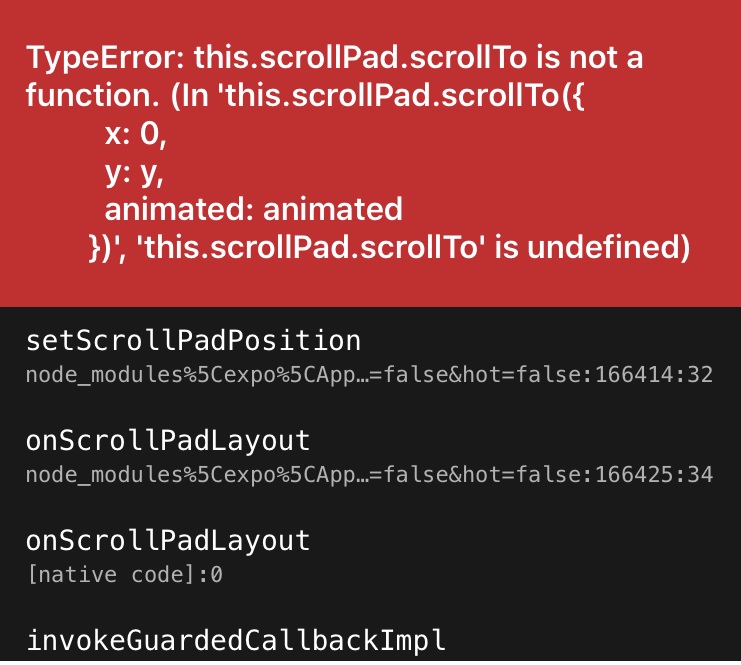
I am trying to use the
I am wondering if I need to update some other library or something. My package.json file tells me I am using the following:
"react-native": "https://github.com/expo/react-native/archive/sdk-37.0.1.tar.gz",
"react-native-calendars": "^1.282.0",
"expo": "~37.0.3",
"react": "~16.9.0",
I've been trying to load this on a real iPhone 7 device.
Any help appreciated!
 neebiz
All 16 comments
Can you please paste a code snippet?
 chenei
on 6 Jun 2020
chenei
on 6 Jun 2020
I am also getting this error and it is a new issue.
 jpgarcia99
on 6 Jun 2020
jpgarcia99
on 6 Jun 2020
@jpgarcia99 Can you please explain how to reproduce the bug?
chenei
on 6 Jun 2020
Thanks for your help and feedback. Calendar and CalendarList worked straight away but I am really struggling with this scrollPad error for the Agenda component. Here is the simple screen I am trying to run:
import React from 'react';
import {View, StyleSheet, Text} from 'react-native';
import {Agenda} from 'react-native-calendars';
const DiaryHomeScreen = () => {
return (
'2020-06-01': [{name: 'item 1 - any js object'}],
'2012-06-02': [{name: 'item 2 - any js object'}]
}}
renderItem={(item, firstItemInDay) => {
return (
);
}}
/>
);
};
const styles = StyleSheet.create({
container: {
backgroundColor: 'white'
}
});
export default DiaryHomeScreen;
neebiz
on 6 Jun 2020
Sorry using the code insert function this time to make sure some of my tags don't get removed:
`import React from 'react';
import {View, StyleSheet, Text} from 'react-native';
import {Agenda} from 'react-native-calendars';
const DiaryHomeScreen = () => {
return (
'2020-06-01': [{name: 'item 1 - any js object'}],
'2012-06-02': [{name: 'item 2 - any js object'}]
}}
renderItem={(item, firstItemInDay) => {
return (
);
}}
/>
);
};
const styles = StyleSheet.create({
container: {
backgroundColor: 'white'
}
});
export default DiaryHomeScreen;
`
neebiz
on 6 Jun 2020
Huh my View and Text tags around 'I am here!' keep getting removed but hopefully you get the idea!
neebiz
on 6 Jun 2020
@chenei, I am currently having the same issue, I am using the Expo SDK ~37.0.3. I tried to use earlier versions but the issue persists, any advice on that?
 brunokiafuka
on 6 Jun 2020
brunokiafuka
on 6 Jun 2020
I have the same problem with the expo. I tried all versions. Created an empty expo project, added the example and this problem happened.
 sterfanno
on 6 Jun 2020
sterfanno
on 6 Jun 2020
Hi all,
This is an issue with expo 37.
Expo 37 uses React Native 0.61. We already updated our library to 0.62.
In RN 0.62, a new warning is introduced:
https://stackoverflow.com/questions/60910385/upgraded-to-react-native-0-62-0-getting-warning-sign-calling-getnode-on-t
We remove getNode() to remove the warning but this causes Expo 37 not to work.
chenei
on 6 Jun 2020
Hi, I've downgraded to [email protected] and it is working fine on my side. I hope the Expo team can update the next SDK using RN 0.62.
brunokiafuka
on 6 Jun 2020
Fixed in 1.287.0.
chenei
on 6 Jun 2020
Hi Chen, really appreciate the fix!
I upgraded to 1.287.0 but unfortunately I am still getting the scrollTo not a function error. Below are the dependencies in my package.json file:
"dependencies": {
"@react-native-community/masked-view": "^0.1.6",
"@react-navigation/material-top-tabs": "^5.2.9",
"expo": "~37.0.3",
"react": "~16.9.0",
"react-dom": "~16.9.0",
"react-native": "https://github.com/expo/react-native/archive/sdk-37.0.1.tar.gz",
"react-native-calendars": "^1.287.0",
"react-native-gesture-handler": "~1.6.0",
"react-native-reanimated": "~1.7.0",
"react-native-safe-area-context": "0.7.3",
"react-native-screens": "~2.2.0",
"react-native-tab-view": "^2.14.2",
"react-native-web": "~0.11.7",
"react-navigation": "^4.3.9",
"react-navigation-stack": "^2.5.1",
"react-navigation-tabs": "^2.8.13"
},
Any other help or ideas much appreciated.
Thanks!
neebiz
on 6 Jun 2020
@neebiz try run yarn add [email protected] or npm install
brunokiafuka
on 6 Jun 2020
Thanks for the advice but I've tried that and I can see I have the new version in my package.json file but I still get the same error. I've also tried uninstalling the module then reinstalling it. This is a real shame as the Agenda component looks awesome.
neebiz
on 7 Jun 2020
@neebiz Ensure that your dependency on package.json looks like this instead "react-native-calendars": "1.287.0" of "react-native-calendars": "^1.287.0",

brunokiafuka
on 7 Jun 2020
Thanks all. After playing with the package dependencies a little I managed to get it working with the new released version. Thanks again!
Sent from Yahoo Mail for iPhone
On Saturday, June 6, 2020, 11:49 pm, Bruno Kiafuka notifications@github.com wrote:
Ensure that your dependency on package.json looks like this instead "react-native-calendars": "1.287.0" of "react-native-calendars": "^1.287.0",
—
You are receiving this because you were mentioned.
Reply to this email directly, view it on GitHub, or unsubscribe.
neebiz
on 7 Jun 2020
Related issues
 chapeljuice
·
3Comments
chapeljuice
·
3Comments
 sonnguyenit
·
3Comments
sonnguyenit
·
3Comments
 akhilsanker
·
4Comments
akhilsanker
·
4Comments
 matieux
·
4Comments
matieux
·
4Comments
 dobiedad
·
4Comments
dobiedad
·
4Comments
Most helpful comment
Fixed in
1.287.0.