React-native-calendars: calendar not rendering properly with expo web
🐛 Bug Report
react-native-web is not working properly with react-native-calendars.
A similar issue was opened with react-native-calendars and they suggested that an issue was opened with the expo team
Details are given about what could be the problem
This is most probably not an issue with react-native-calendars, but with expo / webpack config. I'm using calendars fine with my web webpack setup. react-native-calendars needs transpilation (just like most react-native libraries), so I guess your webpack babel rule needs to be told to include node_modules/react-native-calendars for transpilation. If I was you, I'd close this issue and open a new one in the expo community.
Environment
  Expo CLI 3.0.10 environment info:
    System:
      OS: macOS High Sierra 10.13.6
      Shell: 3.2.57 - /bin/bash
    Binaries:
      Node: 10.15.1 - /usr/local/bin/node
      Yarn: 1.15.2 - /usr/local/bin/yarn
      npm: 6.4.1 - /usr/local/bin/npm
      Watchman: 4.9.0 - /usr/local/bin/watchman
    IDEs:
      Xcode: 10.1/10B61 - /usr/bin/xcodebuild
    npmPackages:
      @types/react: ^16.8.23 => 16.9.2
      @types/react-native: ^0.57.65 => 0.57.65
      expo: ^34.0.1 => 34.0.4
      react: 16.8.3 => 16.8.3
      react-native: https://github.com/expo/react-native/archive/sdk-34.0.0.tar.gz => 0.59.8
      react-navigation: ^3.11.0 => 3.11.1
    npmGlobalPackages:
      expo-cli: 3.0.10
The target with the problem is web. ios and android are both working fine
Steps to Reproduce
use react-native-calendars with react-native-web on expo
Expected Behavior
The calendar should look like this (ios pictured)

Actual Behavior
This is what it looks like on web
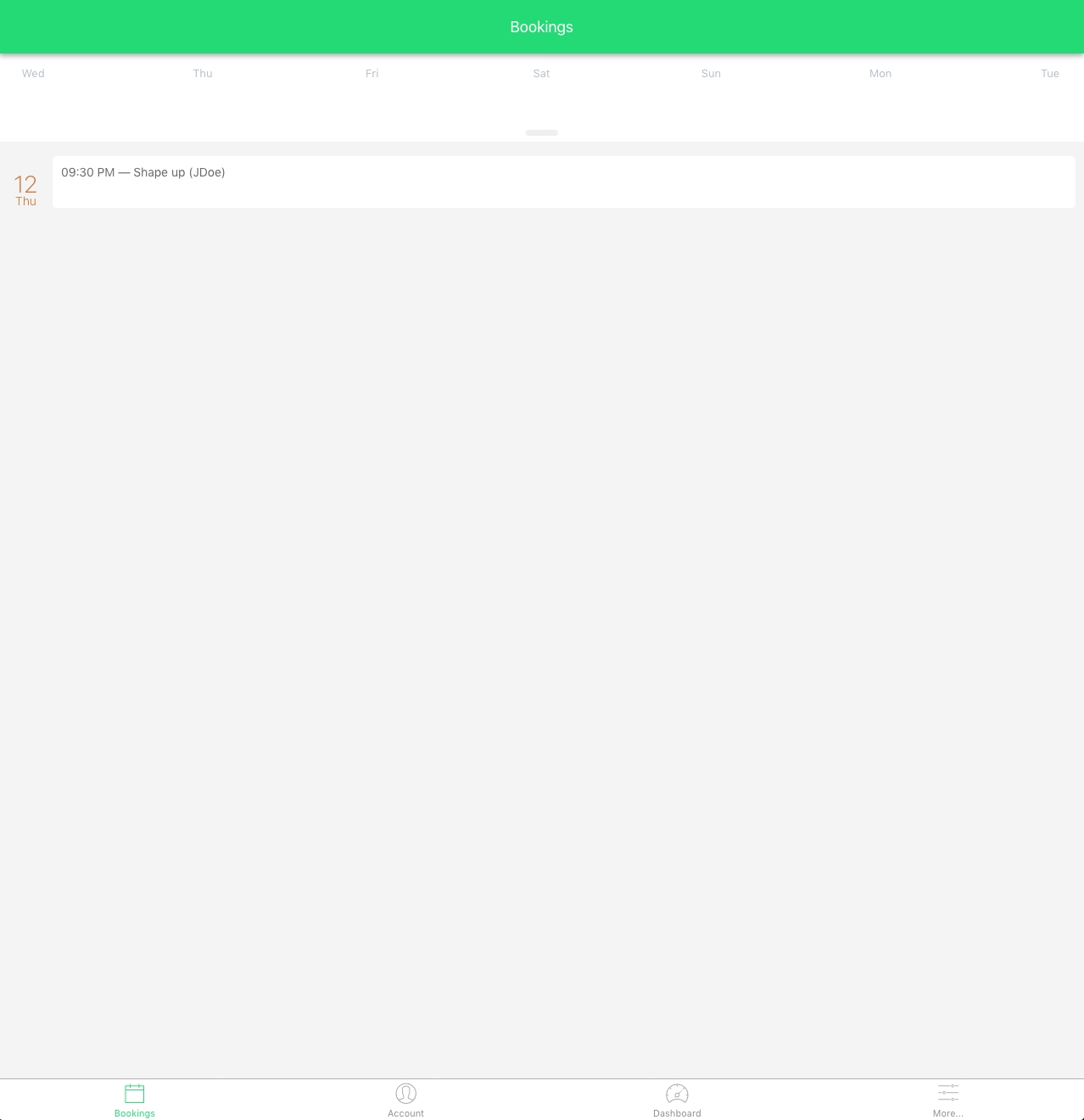
The dates section is not working and the expand bar does not do anything
Reproducible Demo
 BillyFigueroa
All 10 comments
@bkniffler adding you because you asked so you can help
Can you copy & paste this in a new issue to react-native-calendars and ping me? I'll check it out in the next days, since I relate on react-native-calendars a lot in a hybrid expo native/web app, I'm interested in this.
BillyFigueroa
on 14 Sep 2019
I have created this snack, let me know if you can view it
BillyFigueroa
on 14 Sep 2019
Awesome, thanks for reproducing in snack. So there is two seperate issues. With the touch issue, I would guess this has something to do with how the knob does not use onPress, but instead uses onTouchStart and onTouchEnd (https://github.com/wix/react-native-calendars/blob/master/src/agenda/index.js#L147) to track if a touch was performed or if a drag motion is perfomed. This doesn't seem to play nice in web.
The other issue of non visible dates is surely styling related. If you look at the DOM via chrome inspector you'll see some issues with height, translateY, absolute rendering etc. Probably the measuring (https://github.com/wix/react-native-calendars/blob/master/src/agenda/index.js#L93) and how it takes window sizes instead of the container size is an issue. I also noticed that the scrolling works differently, on ios/android, it only scrolls within the container and the header remains fixed. On web, the whole view is scrollable.
 bkniffler
on 14 Sep 2019
bkniffler
on 14 Sep 2019
@bkniffler thanks for helping. I am hoping someone takes a look at this with your insight and takes action. I m not sure anyone has taken a look at this besides you
BillyFigueroa
on 14 Sep 2019
Don't expect it, the project is looking for new maintainers since wix doesn't seem to use it any more. And the issues are starting to pile up. So I guess the best bet is to PR.
bkniffler
on 14 Sep 2019
@bkniffler smh! How would you recommend attacking this? Specially the onPress portion?
I ma start looking for a different library for the web version but damn, that will make the experience so much different. I may be able to use some of their code and build something "similar" for my self, but that would take time
BillyFigueroa
on 15 Sep 2019
I've created a fork that fixes the click issue (https://github.com/bkniffler/react-native-calendars/commit/7a0f986bbef1f84b0fd6901af6974c8bcd7436c2).
For the other issue, this seems kinda tricky. I've not yet figured out the cause and I'll not have the time right now to further look into it. It might have something to do with calendar-list rendering.
Btw I think it'll be faster to fix the issue instead of building your own.
bkniffler
on 15 Sep 2019
@bkniffler thanks. I ll check out the code when I get a chance.
BillyFigueroa
on 16 Sep 2019
@BillyFigueroa Did you get a chance to check out the calendar-list rendering?
 haveamission
on 21 May 2020
haveamission
on 21 May 2020
is there any update on this issue?
 latyaodessa
on 16 Aug 2020
latyaodessa
on 16 Aug 2020
Related issues
 henrikra
·
3Comments
henrikra
·
3Comments
 anishtr4
·
3Comments
anishtr4
·
3Comments
 kewin1807
·
4Comments
kewin1807
·
4Comments
 sommeshEwall
·
3Comments
sommeshEwall
·
3Comments
 filippoitaliano
·
3Comments
filippoitaliano
·
3Comments
Most helpful comment
is there any update on this issue?