React-native-calendars: Agenda with invisible month days
Description
When scrolling in Agenda component, there are months that only shows it name.
Expected Behavior
The behaviour expected is the months shows correctly when scrolling in the Agenda component.
Environment
Please run these commands in the project folder and fill in their results:
npm ls react-native-calendars:^1.21.0npm ls react-native:https://github.com/expo/react-native/archive/sdk-27.0.0.tar.gz
Also specify:
- Phone/emulator/simulator & version: iPhone X Simulator
Reproducible Demo

 mauriciord
All 13 comments
post your component usage here
 sibelius
on 10 Jan 2019
sibelius
on 10 Jan 2019
using the component
<Schedule
          onDayPress={this.loadDay}
          items={this.markedDates(this.props.query.events.edges)}
          rowHasChanged={this.rowHasChanged}
          markedDates={this.markedDates(this.props.query.events.edges)}
          renderEmptyDate={this.renderEmptyDate}
          loadItemsForMonth={month => this.props.loadItemsForMonth}
          renderItem={this.renderItem}
          config={this.props.config}
          selectDate={this.selectDate}
          loadItemsForMonth={this.loadItemsForMonth}
        />
the component
const Schedule = ({
  onCalendarToggled,
  onDayChange,
  pastScrollRange,
  futureScrollRange,
  onRefresh,
  onDayPress,
  renderItem,
  items,
  rowHasChanged,
  markedDates,
  loadItemsForMonth,
  renderKnob,
  theme,
}) => (
  <Agenda
    onCalendarToggled={onCalendarToggled}
    onDayChange={onDayChange}
    pastScrollRange={pastScrollRange}
    futureScrollRange={futureScrollRange}
    onRefresh={onRefresh}
    onDayPress={onDayPress}
    renderDay={renderDay}
    renderItem={renderItem}
    items={items}
    rowHasChanged={rowHasChanged}
    markedDates={markedDates}
    renderEmptyDate={renderEmptyDate}
    loadItemsForMonth={loadItemsForMonth}
    renderKnob={renderKnob}
    theme={theme}
  />
);

Schedule.propTypes = {
  onCalendarToggled: PropTypes.func,
  onDayChange: PropTypes.func,
  pastScrollRange: PropTypes.number,
  futureScrollRange: PropTypes.number,
  onRefresh: PropTypes.func,
  onDayPress: PropTypes.func,
  renderItem: PropTypes.func,
  items: PropTypes.object,
  rowHasChanged: PropTypes.func,
  markedDates: PropTypes.object,
  loadItemsForMonth: PropTypes.func,
  renderKnob: PropTypes.func,
  theme: PropTypes.object,
};

Schedule.defaultProps = {
  items: [],
  pastScrollRange: 50,
  futureScrollRange: 50,
  renderDay,
  renderKnob: () => (
    <Icon name="chevron-double-down" size={24} style={{ color: Color.dsInkLightest }} />
  ),
  theme: {
    'stylesheet.agenda.main': {
      scrollPadStyle: {
        left: 0,
        width: '100%',
      },
    },
  },
};

export { Schedule };
does it work with example?, can u remove custom theme and custom renderDay
sibelius
on 10 Jan 2019
No, running only with <Agenda items={items} />, the behaviour still is the same.
Maybe the translation to PT-BR ?
mauriciord
on 10 Jan 2019
run this https://github.com/wix/react-native-calendars/tree/master/example, the behavior is the same there?
sibelius
on 10 Jan 2019
run this https://github.com/wix/react-native-calendars/tree/master/example, the behavior is the same there?
Running 100% working

mauriciord
on 10 Jan 2019
what is the difference from this to yours?
sibelius
on 10 Jan 2019
I discovered that the component that is rendering it is causing this behaviour.
Inside components/EventsView.js i'm calling <Schedule ..., when i tried to put the component that i mentioned above that worked, it has the same behaviour even with the example
mauriciord
on 10 Jan 2019
I think it is not related to this package, but your styles could cause this issue
sibelius
on 10 Jan 2019
I'll close this issue, maybe it's my styles.
Thank you
mauriciord
on 10 Jan 2019
It's on the createRefetchContainer at react-relay (https://github.com/facebook/relay/tree/master/packages/react-relay)
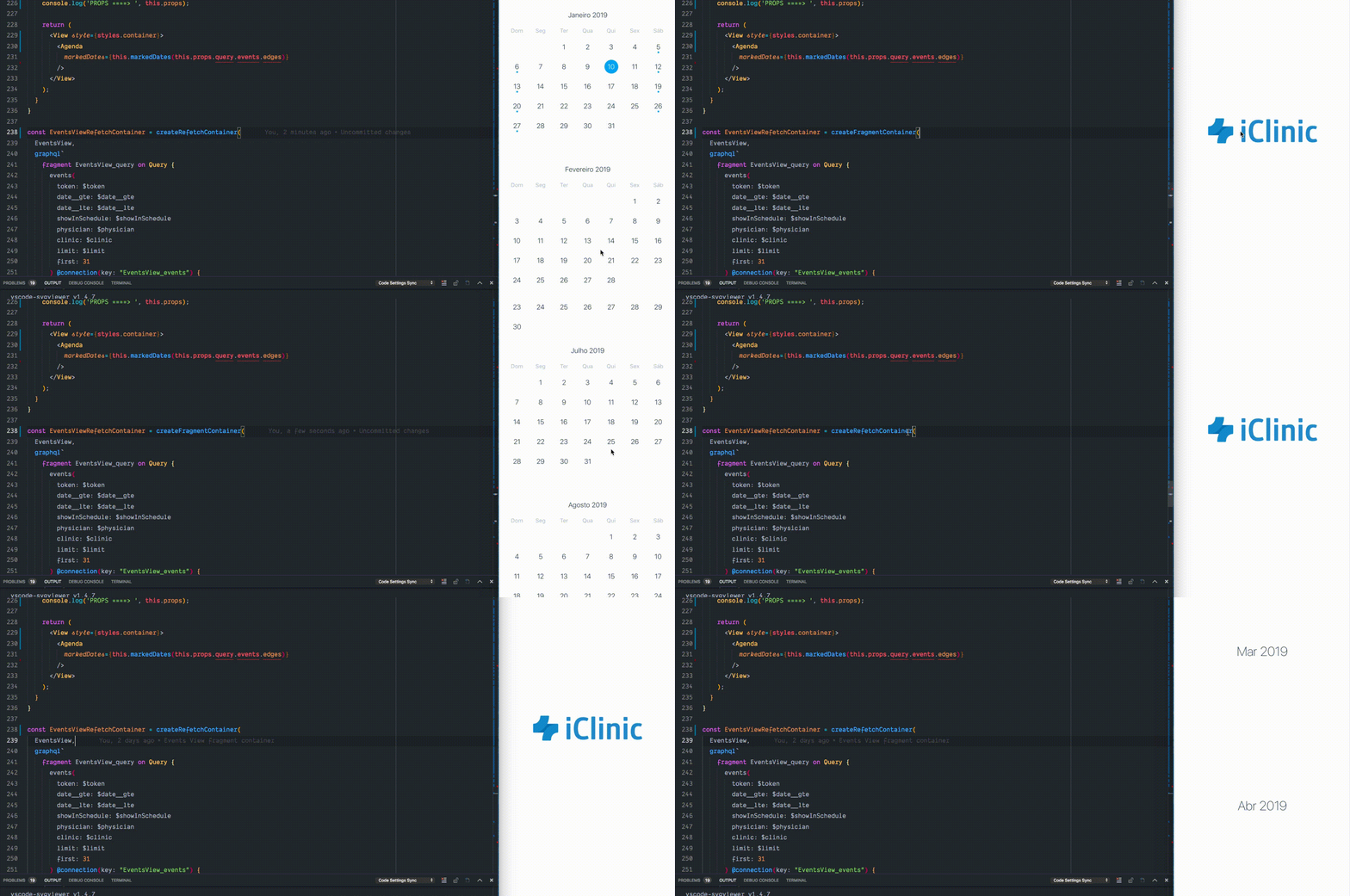
mauriciord
on 10 Jan 2019
class EventsView extends PureComponent {

markedDates = list =>
    keyBy(lodashMap(list, element => extend({}, element, { marked: true })), 'node.date');

render() {
    return (
      <View style={styles.container}>
        <Agenda
          markedDates={this.markedDates(this.props.query.events.edges)}
        />
      </View>
    );
  }

}
const EventsViewRefetchContainer = createRefetchContainer(
  EventsView,
  {
    query: graphql`
      fragment EventsView_query on Query {
        events(
          token: $token
          date__gte: $date__gte
          date__lte: $date__lte
          showInSchedule: $showInSchedule
          physician: $physician
          clinic: $clinic
          limit: $limit
          first: 31
        ) @connection(key: "EventsView_events") {
          edges {
            node {
              date
            }
          }
        }
      }
    `,
  },
  graphql`
    query EventsViewQuery(
      $token: String
      $date__gte: String
      $date__lte: String
      $showInSchedule: Boolean
      $physician: Int
      $clinic: Int
      $limit: Int
    ) {
      ...EventsView_query
    }
  `,
);

export default withNavigation(createQueryRendererModern(EventsViewRefetchContainer, EventsView, {
  query: graphql`
      query EventsViewQuery(
        $token: String
        $date__gte: String
        $date__lte: String
        $showInSchedule: Boolean
        $physician: Int
        $clinic: Int
        $limit: Int
      ) {
        ...EventsView_query
      }
    `,
  queriesParams: props => {
    const monthAndYear = moment().format('YYYY-MM');
    return {
      token: props.auth.token,
      date__gte: `${monthAndYear}-01`,
      date__lte: `${monthAndYear}-31`,
      showInSchedule: true,
      physician: props.auth.physician,
      clinic: parseInt(props.auth.clinic),
      limit: 0,
    };
  },
}));
This issue has been automatically marked as stale because it has not had recent activity. It will be closed if no further activity occurs. Thank you for your contributions.
![stale[bot] picture](https://avatars.githubusercontent.com/in/1724?v=4&s=40) stale[bot]
on 23 Aug 2020
stale[bot]
on 23 Aug 2020
Related issues
 AleksandrZhukov
·
3Comments
AleksandrZhukov
·
3Comments
 kewin1807
·
4Comments
kewin1807
·
4Comments
 anishtr4
·
3Comments
anishtr4
·
3Comments
 microwin168
·
4Comments
microwin168
·
4Comments
 sommeshEwall
·
3Comments
sommeshEwall
·
3Comments
Most helpful comment
Running 100% working