React-native-calendars: Agenda does not show well
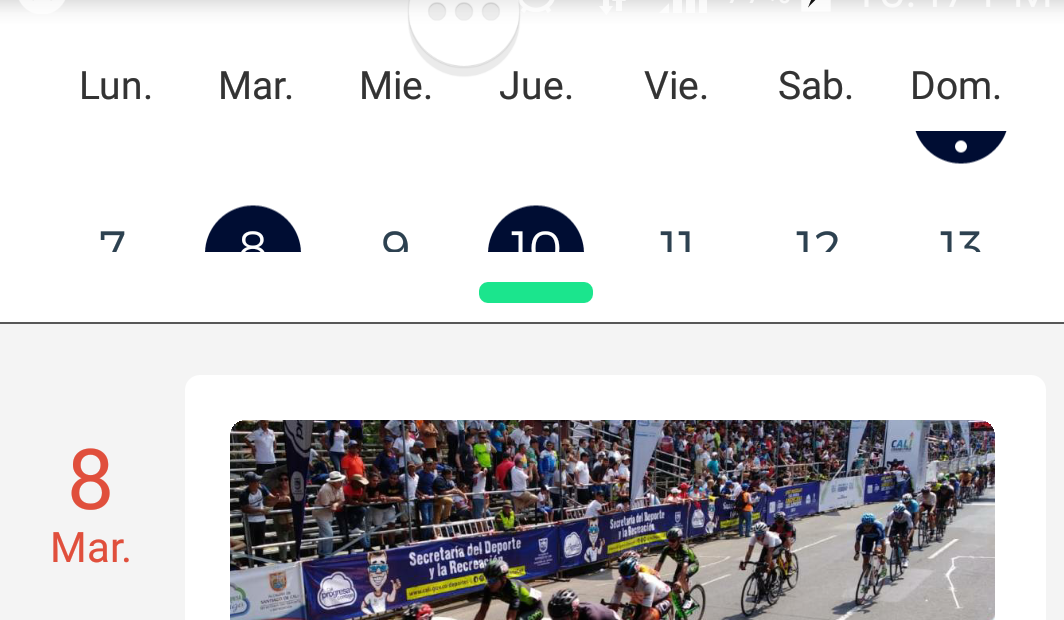
when entering the agenda it is normal, enter the details of an item and then go back and the days in the calendar are no longer displayed well
 Jeison12
All 6 comments
Hi @Jeison12 ,
Try this one:
theme={{
   'stylesheet.calendar.header': {
      monthText: {
      marginTop: 5,
      fontWeight: '200',
    }
  }
}}
You need to less some margin on the header (in case you've modified it).
 bonlemuel
on 4 Mar 2019
bonlemuel
on 4 Mar 2019
Also, this happens on Android and not on iOS for me. Not able to understand the cause of the issue. It appears the calendar list is by default open and it later closed to just show current week in doing so its miscalculating. Also when you initially land the selected date circle is little cut on the bottom as it leaves space on top.
 kailashvele
on 29 May 2019
kailashvele
on 29 May 2019
@kailashvele same for me
 jordan-tpz
on 15 Jun 2019
jordan-tpz
on 15 Jun 2019
Happening on iOS for me.
 onosol
on 27 Jun 2019
onosol
on 27 Jun 2019
Same for me, It happens after reload screen because need to update render item
 ariefwidiatmoko
on 4 Jan 2020
ariefwidiatmoko
on 4 Jan 2020
This issue has been automatically marked as stale because it has not had recent activity. It will be closed if no further activity occurs. Thank you for your contributions.
![stale[bot] picture](https://avatars.githubusercontent.com/in/1724?v=4&s=40) stale[bot]
on 22 Aug 2020
stale[bot]
on 22 Aug 2020
Related issues
 sonnguyenit
·
3Comments
sonnguyenit
·
3Comments
 henrikra
·
3Comments
henrikra
·
3Comments
 dobiedad
·
4Comments
dobiedad
·
4Comments
 srichallamalla935
·
4Comments
srichallamalla935
·
4Comments
 moiiiiit
·
4Comments
moiiiiit
·
4Comments
Most helpful comment
Also, this happens on Android and not on iOS for me. Not able to understand the cause of the issue. It appears the calendar list is by default open and it later closed to just show current week in doing so its miscalculating. Also when you initially land the selected date circle is little cut on the bottom as it leaves space on top.