React-native-calendars: BorderRadius is not applying to current date
Description
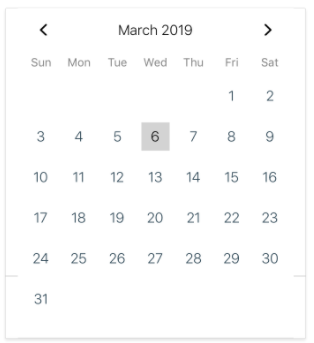
->BorderRadius is not applying to the current date
Expected Behavior
current date background radius need to be in roundshape
Actual Behavior
current date background radius is in squareshape
  <Calendar
                  onDayPress={value => this.onDayPress(value)}
                  style={styles.calendar}
                  minDate={this.state.min_date}
                  maxDate={this.state.max_date}
                  current={Date()}
                  hideExtraDays
                  theme={{
                    todayTextColor: "black",
                    todayBackgroundColor: "lightgrey",
                    selectedDayTextColor: "black",
                    arrowColor: "black",
                    selectedDayBackgroundColor: "#ffdb39",
                    monthTextColor: "black",
                    textSectionTitleColor: "grey"
                  }}
                  markedDates={{
                    [this.state.selected]: { selected: true }
                  }}
                  //minDate="2019-03-01"
                />
Environment
react-native-calendars:1.22.0react-native:0.57.5
Reproducible Demo
stale
 srichallamalla935
All 4 comments
hi @srichallamalla935, can you try this below code.
import React, { Component } from "react";
import { View, Text, StyleSheet } from "react-native";
import moment from "moment";
import { Calendar } from "react-native-calendars";
type Props = {};

const _today = moment().format("YYYY-MM-DD");

export default class CalendarFile extends React.Component {
  initialState = {};
  constructor() {
    super();
    this.state = {
      _markedDates: this.initialState
    };
  }
// for multiple selection
  onDayPress = day => {
    const _selectedDay = moment(day.dateString).format("YYYY-MM-DD");
    let selected = true;
    if (this.state._markedDates[_selectedDay]) {
      selected = !this.state._markedDates[_selectedDay].selected;
    }
    this.setState({
      _markedDates: this.initialState
    });
    var updatedMarkedDates = this.state._markedDates;
    updatedMarkedDates = {
      ...this.state._markedDates,
      ...{
        [_selectedDay]: {
          selected,
          selectedColor: "gold"
        }
      }
    };
    this.setState({ _markedDates: updatedMarkedDates });
  };
// for single selection
  onDaySelect(day) {
    this.setState({
      _markedDates: day.dateString
    });

  render() {
    return (
      <View style={{ flex: 1 }}>
        <Calendar
          onDayPress={this.onDaySelect.bind(this)}
          markingType={"custom"}
          markedDates={{
            [_today]: {
              customStyles: {
                container: {
                  backgroundColor: "lightgrey"
                },
                text: {
                  color: "black",
                  fontWeight: "bold"
                }
              }
            },
            [this.state._markedDates]: {
              customStyles: {
                container: {
                  backgroundColor: "gold"
                },
                text: {
                  color: "black",
                  fontWeight: "bold"
                }
              }
            }
          }}
        />
      </View>
    );
  }
}
 harikanammi
on 7 Mar 2019
harikanammi
on 7 Mar 2019
👍4
I feel like the missing borderRadius here is an oversight:
https://github.com/wix/react-native-calendars/blob/master/src/calendar/day/multi-dot/style.js#L29-L31
Or at least it should be configurable via theme
 bneigher
on 13 Jul 2019
bneigher
on 13 Jul 2019
This issue has been automatically marked as stale because it has not had recent activity. It will be closed if no further activity occurs. Thank you for your contributions.
![stale[bot] picture](https://avatars.githubusercontent.com/in/1724?v=4&s=40) stale[bot]
on 23 Aug 2020
stale[bot]
on 23 Aug 2020
Anyone have any more information on this issue? Also getting this with similar code to above
 MichaelKim39
on 4 Oct 2020
MichaelKim39
on 4 Oct 2020
Was this page helpful?
0 / 5 - 0 ratings
Related issues
 kewin1807
·
4Comments
kewin1807
·
4Comments
 moiiiiit
·
4Comments
moiiiiit
·
4Comments
 matieux
·
4Comments
matieux
·
4Comments
 AleksandrZhukov
·
3Comments
AleksandrZhukov
·
3Comments
 ramdhanymf
·
4Comments
ramdhanymf
·
4Comments
Most helpful comment
hi @srichallamalla935, can you try this below code.