React-native-calendars: endingDay & startingDay are not displayed correct on Android.
Description
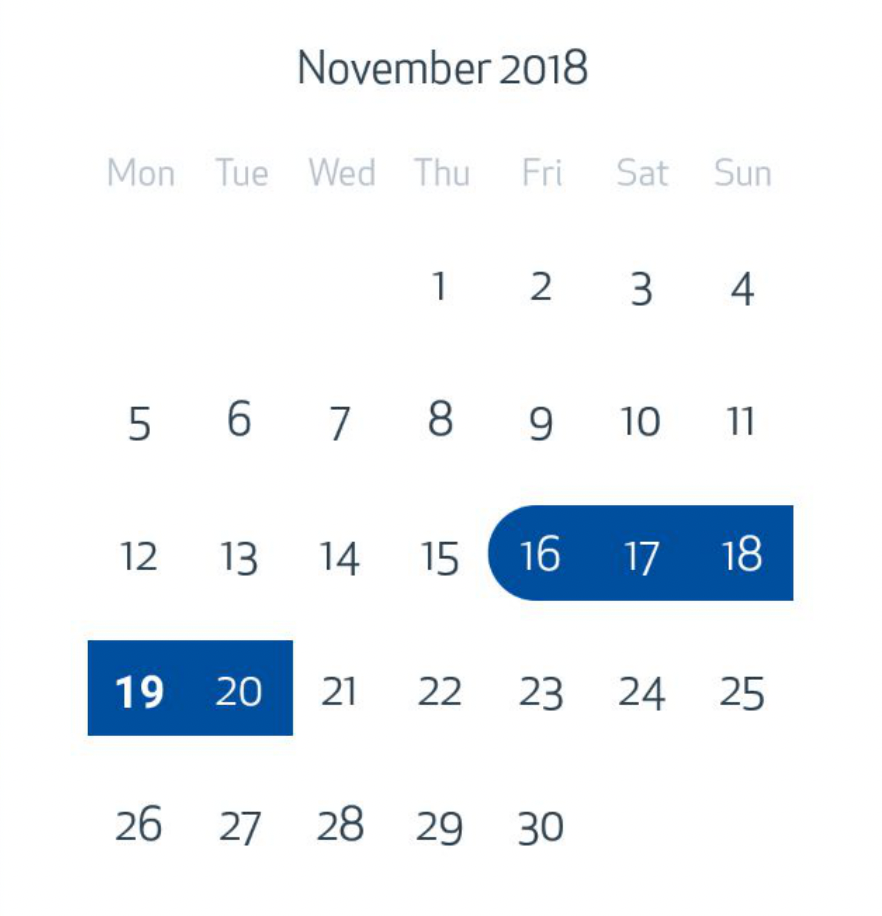
endingDay and startingDay =true doesn't works properly on Android working without Expo. It works when using expo.
Expected Behavior
Marking with rounded edges.
Observed Behavior
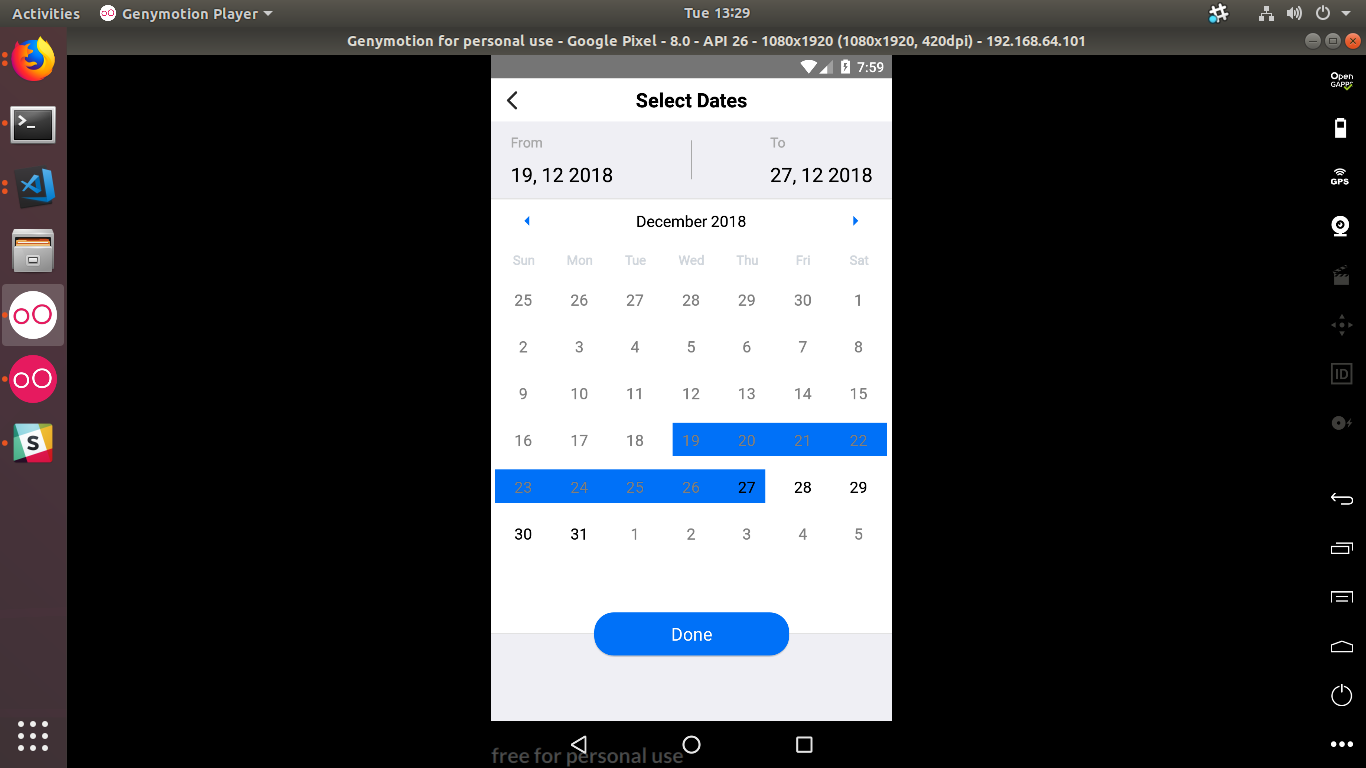
Marking as a rectangle ( as if it had startingDay & endingDay = false).

Environment
Please run these commands in the project folder and fill in their results:
npm ls react-native-calendars: 1.20.0npm ls react-native: 0.57.1
Emulator Nexus 5 : API 28 (Android 9)
Huawei Mediapad M5: API 26 (Android 8)
Reproducible Demo
mDates["2018-10-05"] = { startingDay: true, color: lockColor, textColor:'black', endingDay: true, selection:false}
 seco35
All 16 comments
+1
 adimshev
on 15 Nov 2018
adimshev
on 15 Nov 2018
Please, help us! Square period endings is awful.
npm ls react-native-calendars: 1.21.0
npm ls react-native: 0.57.5
adimshev
on 16 Nov 2018
adimshev
on 19 Nov 2018
+1
npm ls react-native-calendars: 1.21.0
npm ls react-native: 0.57.5
Having the same issue on android (works fine on iOS).
It's only present after a selection is made on the calendar. If a period is sent to the calendar on open, it rounds the corners properly.
on load:

after new selection:

 wojciechver
on 23 Nov 2018
wojciechver
on 23 Nov 2018
You can use prop dayComponent to pass your own day component. It works for me.
import React from 'react';
import { View, Text, TouchableWithoutFeedback, StyleSheet } from 'react-native';
export default class CalendarDay extends React.PureComponent {
constructor(props) {
super(props);
this.onDayPress = this.onDayPress.bind(this);
}
onDayPress() {
const { onPress, date } = this.props;
onPress(date);
}
render() {
const {
marking: {
color: backgroundColor,
startingDay,
endingDay,
selected
},
state
} = this.props;
return (
<TouchableWithoutFeedback onPress={this.onDayPress}>
<View
style={[
styles.container,
{ backgroundColor },
startingDay ? styles.startingDay : null,
endingDay ? styles.endingDay : null
]}
>
<Text
allowFontScaling={false}
style={[
styles.text,
selected ? styles.selected : null,
state === 'today' ? styles.today : null
]}
>
{String(this.props.children)}
</Text>
</View>
</TouchableWithoutFeedback>
);
}
}
const styles = StyleSheet.create({
container: {
alignItems: 'center',
alignSelf: 'stretch',
marginLeft: -1,
height: 34,
justifyContent: 'center'
},
text: {
fontFamily: 'ApexNew-Book',
color: '#000',
fontSize: 14
},
selected: {
color: '#FFF'
},
startingDay: {
borderBottomLeftRadius: 17,
borderTopLeftRadius: 17
},
endingDay: {
borderBottomRightRadius: 17,
borderTopRightRadius: 17
},
today: {
fontWeight: 'bold'
}
});
plz help me, calnder doesnt give rounded period corner.
getDateString(timestamp) {
const date = new Date(timestamp)
const year = date.getFullYear()
const month = date.getMonth() + 1
const day = date.getDate()
let dateString = `${year}-`
if (month < 10) {
dateString += `0${month}-`
} else {
dateString += `${month}-`
}
if (day < 10) {
dateString += `0${day}`
} else {
dateString += day
}
return dateString;
}
getPeriod(startTimestamp, endTimestamp) {
const period = {}
let currentTimestamp = startTimestamp;
while (currentTimestamp < endTimestamp) {
const dateString = this.getDateString(currentTimestamp);
period[dateString] = {
color: '#0071f8',
borderRadius: 100,
startingDay: currentTimestamp === startTimestamp
}
currentTimestamp += 24 * 60 * 60 * 1000;
}
const dateString = this.getDateString(endTimestamp);
period[dateString] = {
color: '#0071f8',
endingDay: true,
}
return period;
}
setDay(dayObj) {
const _selectedDay = moment(dayObj.dateString).format(_format);
console.log(dayObj.dateString)
count++
if (count === 1) {
this.setState({
firstDay: dayObj.day,
firstMonth: dayObj.month,
firstYear: dayObj.year
})
}
else if (count === 2) {
this.setState({
secondday: dayObj.day,
secondMonth: dayObj.month,
secondYear: dayObj.year
})
count = 0
}
this.setState({
todayDate: dayObj.dateString
})
const { start, end } = this.state;
const {
dateString, day, month, year,
} = dayObj;
let selected = true;
const timestamp = new Date(year, month - 1, day).getTime()
const newDayObj = { ...dayObj, timestamp }
// console.log('timestamp=', newDayObj);
const startIsEmpty = _isEmpty(start);
const _selectedDay1 = moment(day.dateString).format(_format);
if (startIsEmpty || !startIsEmpty && !_isEmpty(end)) {
const period = {
[dateString]: {
color: '#0071f8',
endingDay: true,
startingDay: true,
selected: true,
},
...{ [_selectedDay1]: { selected } }
}
this.setState({ start: newDayObj, period, end: {} })
} else {
// if end date is older than start date switch
const { timestamp: savedTimestamp } = start
if (savedTimestamp > timestamp) {
const period = this.getPeriod(timestamp, savedTimestamp);
this.setState({ start: newDayObj, end: start, period });
} else {
const period = this.getPeriod(savedTimestamp, timestamp);
this.setState({ end: newDayObj, start, period });
}
}
}
markingType='period'
markedDates={period}
minDate={this.state.todayDate}
theme={{
calendarBackground: eachViewBackgroundColor,
textSectionTitleColor: '#D0D7DF',
dayTextColor: clickableDateTextColor,
selectedDayRadius: 100,
textDisabledColor: 'grey',
todayTextColor: '#543BEA',
monthTextColor: clickableDateTextColor,
arrowColor: '#0071f8',
selectedDayBackgroundColor: 'red',
selectedDayTextColor: 'white',
}}
/>
 kalraneeraj24550
on 18 Dec 2018
kalraneeraj24550
on 18 Dec 2018
@kalraneeraj24550 https://github.com/afresh/react-native-calendars/commit/37b713c3922ae3282701cd1436ab9a478d9c2bed
 afresh
on 19 Dec 2018
afresh
on 19 Dec 2018
Looks like a missing overflow: 'hidden' style on the containerStyle here https://github.com/wix/react-native-calendars/blob/master/src/calendar/day/period/index.js#L131
 ahanriat
on 1 Feb 2019
ahanriat
on 1 Feb 2019
I'll conduct a bit more investigation and if it happens to be a correct fix I'll propose a PR 🤗
ahanriat
on 1 Feb 2019
Does anyone know when this fix will go in?
 linnett
on 4 Feb 2019
linnett
on 4 Feb 2019
as mentioned from @ahanriat , to fix this we need add overflow: hidden into base stylesheet from day period. And since the PR still not merged https://github.com/wix/react-native-calendars/pull/728 , you can try to solve the issue like this :
theme={{
  'stylesheet.day.period': {
      base: {
        overflow: 'hidden',
        height: 34,
        alignItems: 'center',
        width: 38,
      }
  }
}}
 elgalesmana
on 14 Feb 2019
elgalesmana
on 14 Feb 2019
@elgalesmana I tried your solution it works perfectly when the calendar is loaded with the marked dates.
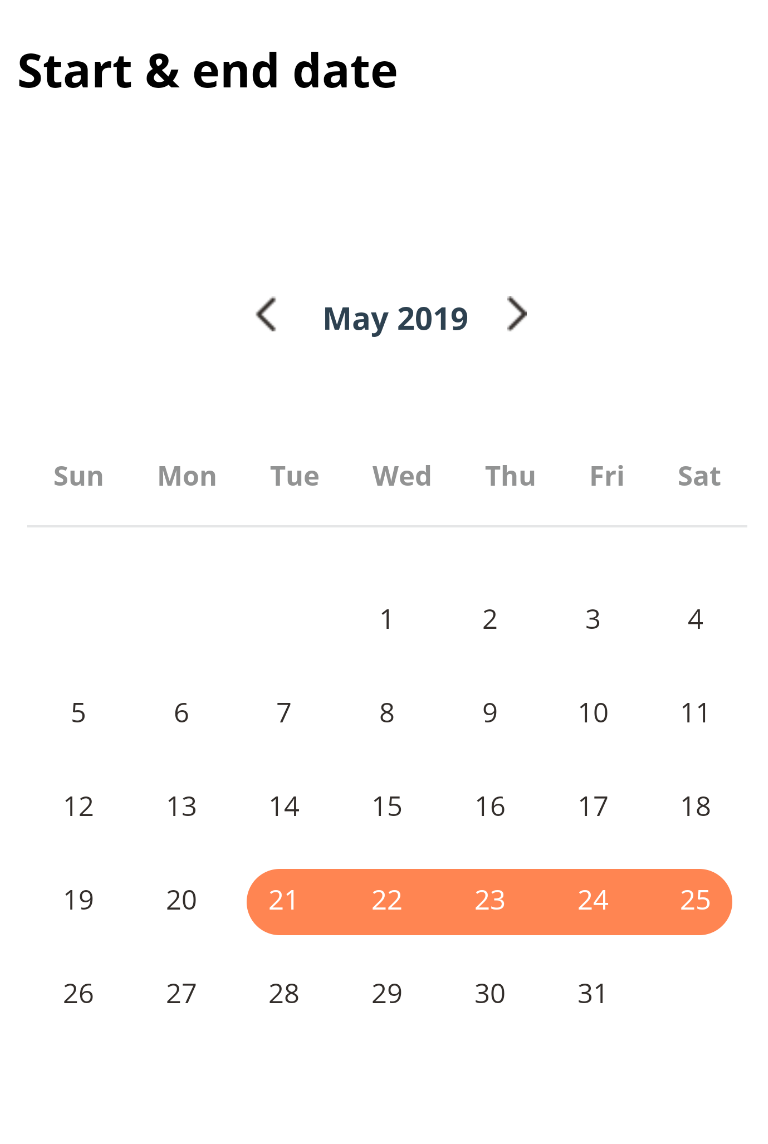
However, when I change the marked dates selection, it ends up with this result.
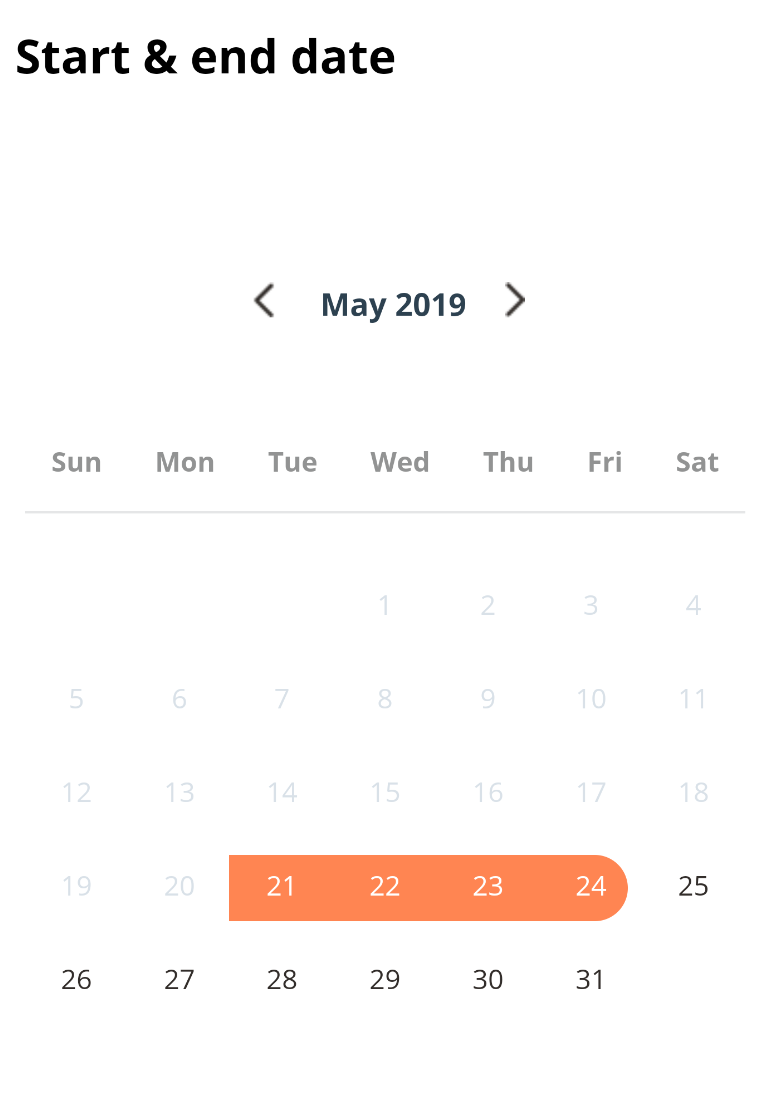
anything I'm doing wrong?
 tamer-mohamed
on 29 Apr 2019
tamer-mohamed
on 29 Apr 2019
@tamer-mohamed you need to update the markedDates state values. you can do this with onDayPress like in this plugin https://github.com/lazaronixon/react-native-date-range-picker/blob/master/DateRangePicker.js
elgalesmana
on 29 Apr 2019
@elgalesmana
In the first load, marked dates are shown correctly.
I'm passing the markedDates from the state, but the broderRadius disspear from the starting date once the component is updated (once markedDates are changed)
<Calendar
  markedDates={this.props.markedDates}
  onDayPress={this._handleDayPress}
  theme={{'stylesheet.day.period': {
            base: {
              overflow: 'hidden',
              height: 34,
              alignItems: 'center',
              width: 38,
            }
   }}
/>
@elgalesmana
In the first load, marked dates are shown correctly.
I'm passing themarkedDatesfrom the state, but the broderRadius disspear from the starting date once the component is updated (oncemarkedDatesare changed)<Calendar markedDates={this.props.markedDates} onDayPress={this._handleDayPress} theme={{'stylesheet.day.period': { base: { overflow: 'hidden', height: 34, alignItems: 'center', width: 38, } }} />
Correct answer until the PR is merged, I experienced the same issue in 1.135.0. Thanks a lot
 buddhiv
on 7 Jun 2019
buddhiv
on 7 Jun 2019
This issue has been automatically marked as stale because it has not had recent activity. It will be closed if no further activity occurs. Thank you for your contributions.
![stale[bot] picture](https://avatars.githubusercontent.com/in/1724?v=4&s=40) stale[bot]
on 23 Aug 2020
stale[bot]
on 23 Aug 2020
Related issues
 chapeljuice
·
3Comments
chapeljuice
·
3Comments
 matieux
·
4Comments
matieux
·
4Comments
 akhilsanker
·
4Comments
akhilsanker
·
4Comments
 AleksandrZhukov
·
3Comments
AleksandrZhukov
·
3Comments
 Yandamuri
·
4Comments
Yandamuri
·
4Comments
Most helpful comment
as mentioned from @ahanriat , to fix this we need add
overflow: hiddeninto base stylesheet from day period. And since the PR still not merged https://github.com/wix/react-native-calendars/pull/728 , you can try to solve the issue like this :