React-native-calendars: Fill Gap from Period StartingDay and EndingDay
Hey there,
So, I am trying to create periods dynamically based on users preferences, I managed to create and insert into the calendar the starting and ending date. I was hoping that react-native-calendars would do the heavy lifting and fill all the dates between starting and ending date.
Is it an known bug? Or maybe a feature that isn't implemented yet? Did anyone managed a workarround?
Expected Behavior
Based on the starting and ending date, react native calendars should fill the dates in between.
Observed Behavior
What actually happened when you performed the above actions?
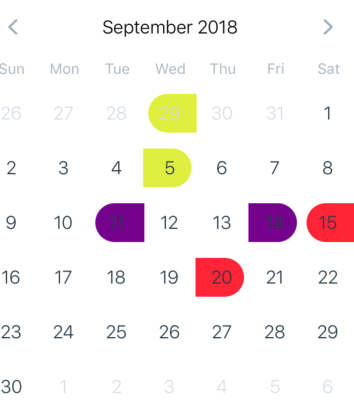
Running on Iphone 6 simulator
react-native: 0.56.0
react-native-calendars: 1.20.0
 amorettimarcelo
All 9 comments
Duplicate of #509
 akuma06
on 7 Sep 2018
akuma06
on 7 Sep 2018
You can just iterate between those dates. e.g. the red marking from 15-20
startDate = new Date("2018-09-16"); // next day, since first one is marked already
lastDate = new Date("2018-09-20"); // limit
while(startDate.getTime() < lastDate.getTime()) {
// TODO: Mark the day with color by getting Date using createDateString(y,m,d)
// months are 0-11 warning getDay will return day of week, getDate returns day of month 1-31
// this.createDateString(startDate.getFullYear(), startDate.getMonth()+1, startDate.getDate())
startDate.setTime( startDate.getTime() + 24 * 60 * 60 * 1000 ) // basically day + 1
}
createDateString(y,m,d){
var dateString = y+"-";
if(m <10){
dateString += "0"+m+"-";
}else{
dateString += m+"-";
}
if(d<10){
dateString += "0"+d;
}else{
dateString += d;
}
return dateString;
}
 seco35
on 24 Sep 2018
seco35
on 24 Sep 2018
Maybe this will help someone a little more than the code example above. This only supports one period, but with some tweaking one could easily make it support multiple
import React from 'react'
import _isEmpty from 'lodash/isEmpty'
import { Calendar } from 'react-native-calendars'

export default class CalendarWithPeriodFill extends React.Component {
  state = {
    start: {},
    end: {},
    period: {},
  }

  getDateString(timestamp) {
    const date = new Date(timestamp)
    const year = date.getFullYear()
    const month = date.getMonth() + 1
    const day = date.getDate()

    let dateString = `${year}-`
    if (month < 10) {
      dateString += `0${month}-`
    } else {
      dateString += `${month}-`
    }
    if (day < 10) {
      dateString += `0${day}`
    } else {
      dateString += day
    }

    return dateString
  }

  getPeriod(startTimestamp, endTimestamp) {
    const period = {}
    let currentTimestamp = startTimestamp
    while (currentTimestamp < endTimestamp) {
      const dateString = this.getDateString(currentTimestamp)
      period[dateString] = {
        color: 'green',
        startingDay: currentTimestamp === startTimestamp,
      }
      currentTimestamp += 24 * 60 * 60 * 1000
    }
    const dateString = this.getDateString(endTimestamp)
    period[dateString] = {
      color: 'green',
      endingDay: true,
    }
    return period
  }

  setDay(dayObj) {
    const { start, end } = this.state
    const {
      dateString, day, month, year,
    } = dayObj
    // timestamp returned by dayObj is in 12:00AM UTC 0, want local 12:00AM
    const timestamp = new Date(year, month - 1, day).getTime()
    const newDayObj = { ...dayObj, timestamp }
    // if there is no start day, add start. or if there is already a end and start date, restart
    const startIsEmpty = _isEmpty(start)
    if (startIsEmpty || !startIsEmpty && !_isEmpty(end)) {
      const period = {
        [dateString]: {
          color: 'green',
          endingDay: true,
          startingDay: true,
        },
      }
      this.setState({ start: newDayObj, period, end: {} })
    } else {
      // if end date is older than start date switch
      const { timestamp: savedTimestamp } = start
      if (savedTimestamp > timestamp) {
        const period = this.getPeriod(timestamp, savedTimestamp)
        this.setState({ start: newDayObj, end: start, period })
      } else {
        const period = this.getPeriod(savedTimestamp, timestamp)
        this.setState({ end: newDayObj, start, period })
      }
    }
  }

  render() {
    const { period } = this.state
    return (
      <Calendar
        onDayPress={this.setDay.bind(this)}
        markingType='period'
        markedDates={period}
      />
    )
  }
}
 brentkirkland
on 10 Oct 2018
brentkirkland
on 10 Oct 2018
just building on top of seco35's solution, granted you already have the onDayPress to return a start date and end date, here is my solution.
import moment from 'moment';

createDateRange(startDate, endDate) {
    const dateRange = {
      [startDate]: { selected: true, startingDay: true, color: 'green' },
      [endDate]: { selected: true, endingDay: true, color: 'green' },
    };
    if (startDate && endDate) {
      let start = moment(startDate).startOf('day').add(1, 'days');
      const end = moment(endDate).startOf('day');
      while (end.isAfter(start)) {
        Object.assign(dateRange, { [start.format('YYYY-MM-DD')]: { selected: true, color: 'green' } });
        start = start.add(1, 'days');
      }
    }
    return dateRange;
  }
Slightly cleaner method using moment.
 darylk31
on 26 Oct 2018
darylk31
on 26 Oct 2018
@brentkirkland sir, your code works for me fine, but the selected date comes in square background not circle .can you plz help me. how to make it circle
 kalraneeraj24550
on 11 Dec 2018
kalraneeraj24550
on 11 Dec 2018
@kalraneeraj24550 had the same issue, to fix this, make sure you change the format of the startDate and endDate::
createDateRange(startDate, endDate) {
  startDate = moment(startDate).format('YYYY-MM-DD');
  endDate = moment(endDate).format('YYYY-MM-DD');
    const dateRange = {
      [startDate]: { selected: true, startingDay: true, color: 'green' },
      [endDate]: { selected: true, endingDay: true, color: 'green' },
    };
    if (startDate && endDate) {
      let start = moment(startDate).startOf('day').add(1, 'days');
      const end = moment(endDate).startOf('day');
      while (end.isAfter(start)) {
        Object.assign(dateRange, { [start.format('YYYY-MM-DD')]: { selected: true, color: 'green' } });
        start = start.add(1, 'days');
      }
    }
    return dateRange;
  }
 nervouscat
on 24 Feb 2019
nervouscat
on 24 Feb 2019
@nervouscat I have a strong feeling that this solution will not work in different timezones.
 auseika
on 14 Dec 2019
auseika
on 14 Dec 2019
Hey @darylk31 , do you perhaps have the implementation for onDayPress to return a start date and an end date? I'm trying to get it in a functional component using moment and without lodash and I would love to see how you've done it.
 YosefLehrer
on 5 Feb 2020
YosefLehrer
on 5 Feb 2020
This issue has been automatically marked as stale because it has not had recent activity. It will be closed if no further activity occurs. Thank you for your contributions.
![stale[bot] picture](https://avatars.githubusercontent.com/in/1724?v=4&s=40) stale[bot]
on 22 Aug 2020
stale[bot]
on 22 Aug 2020
Related issues
 henrikra
·
3Comments
henrikra
·
3Comments
 chapeljuice
·
3Comments
chapeljuice
·
3Comments
 sonnguyenit
·
3Comments
sonnguyenit
·
3Comments
 idlework
·
4Comments
idlework
·
4Comments
 filippoitaliano
·
3Comments
filippoitaliano
·
3Comments
Most helpful comment
Maybe this will help someone a little more than the code example above. This only supports one period, but with some tweaking one could easily make it support multiple