React-native-background-geolocation: ActionButton in foreground notification
Your Environment
- Plugin version: All
- Platform: iOS or Android
- OS version: All
- Device manufacturer / model: All
- React Native version (
react-native -v): 0.57 - Plugin config
Expected Behavior
N/A
Actual Behavior
N/A
Steps to Reproduce
N/A
Context
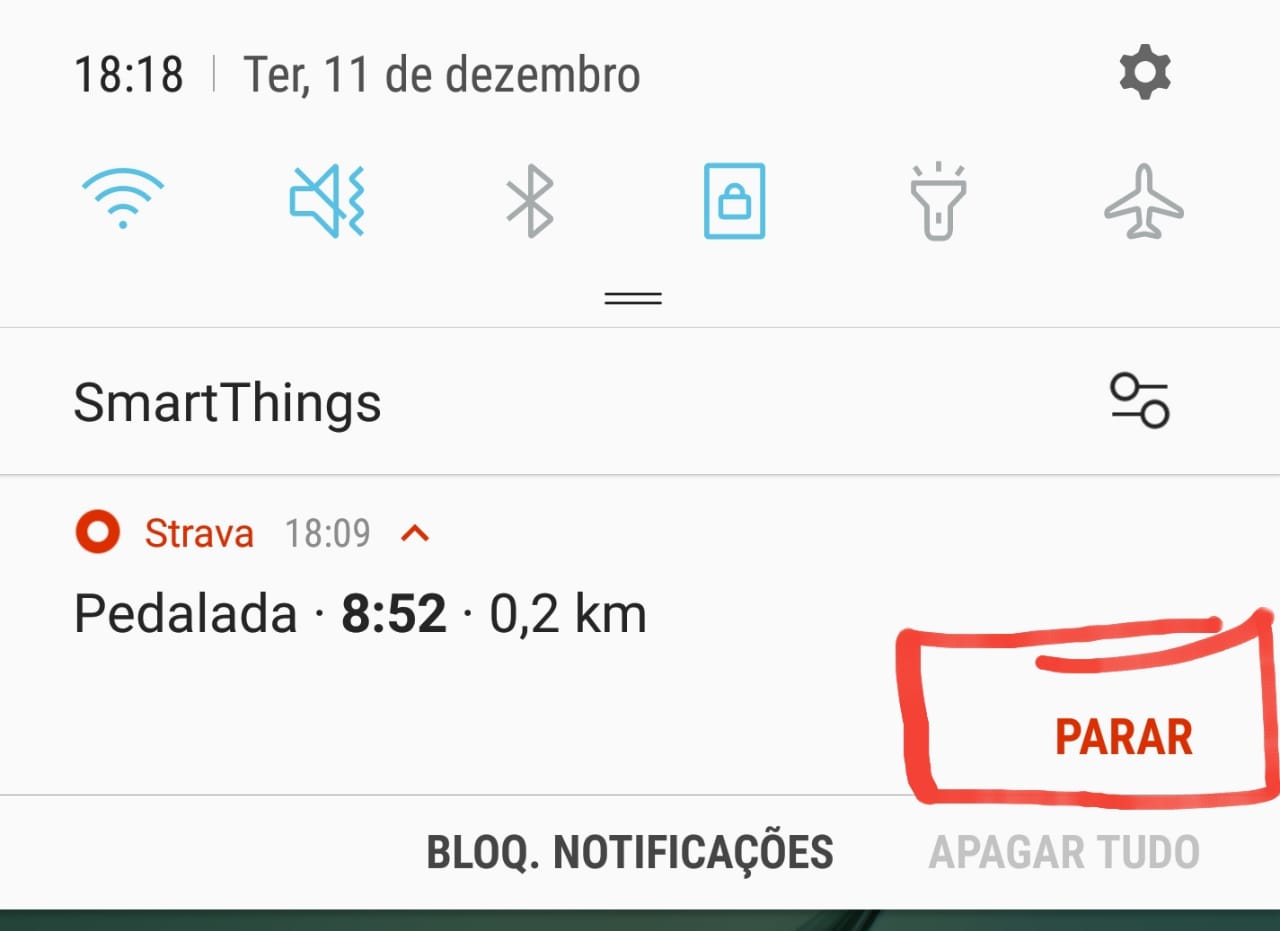
I would like to know how I can put actions button in notification when my application is running in background
Debug logs
N/A
 GuilhermeGuiuler
All 11 comments
You can’t. What actions would you like?
 christocracy
on 11 Dec 2018
christocracy
on 11 Dec 2018
You can’t. What actions would you like?
Something like that
GuilhermeGuiuler
on 11 Dec 2018
You can’t. What actions would you like?
Something like that
@christocracy is possible to do that ? Custom ActionButtons with callback functions that do something (like stop to tracking). Also would be aweasome if we can do some styles in the notification text (like bold and italic). Is any of this things possible with this package ?
 thawankeane
on 12 Dec 2018
thawankeane
on 12 Dec 2018
It is not possible. What you're asking for (styling) would be very complex.
There's also the issue how to handle these button-clicks when your app is terminated, since your Javascript callbacks would no longer execute (since the MainActivity is terminated).
This isn't going to happen anytime soon.
christocracy
on 12 Dec 2018
I was experimenting with this today. I have an idea how this could work.
christocracy
on 26 Apr 2019
Heck, that's cool, I even thought you had forgotten ... I hope it works well in your tests and that you implement this in the project, it would be cool for Android and IOS.
I hope everything works soon
Good Job 😄
GuilhermeGuiuler
on 26 Apr 2019
Ok, I have found a way involving creating a custom android View.


- Clicking the buttons, the plugin can receive these actions:
[c.t.l.service.TrackingService onStartCommand] >>> notification_action: notification_action_foo
[c.t.l.service.TrackingService onStartCommand] >>> notification_action: notification_action_bar
A theoretical configuration and usage would look like this:
BackgroundGeolocation.onNotificationAction((buttonId) => {
  console.log('- Notification button clicked: ', buttonId);
  switch(buttonId) {
    case 'notification_action_foo':
      break;
    case 'notification_action_bar':
      break;
  }
});

BackgroundGeolocation.ready({
  notificationTitle: "The notification title",
  notificationText: "The notification text",
  notificationActions: [  // <-- plugin will add click-listeners to these button ids
    "notification_action_foo",
    "notification_action_bar"
  ]
});
That looks really cool. I'd use this to open a screen explaining the purpose + how we handle the data and imploring users to leave it enabled if possible (we have an opt-in tracking app where they can turn it off but it helps us if they leave it on). So, potentially useful.
 mikehardy
on 26 Apr 2019
mikehardy
on 26 Apr 2019
@mikehardy I found an interesting side-effect when you cause an exception writing to this notification layout, eg an invalid resource id, it causes Android to let the fg service run anyway, but with no notification rendered!
christocracy
on 27 Apr 2019
Huh 🤔 2 immediate thoughts, 1 - file a bugalyzer bug with google and be prepared to see nothing happen on the issue itself but the bug gets fixed eventually and 2 - this seems like a barn-sized hole in the whole privacy area. I'm consent-based so not interested in playing but I imagine this is used for profit
mikehardy
on 27 Apr 2019
Notification system refactored in 3.0.4. Fully custom layouts are now possible.
christocracy
on 9 May 2019
Related issues
 akash-wadhwa
·
3Comments
akash-wadhwa
·
3Comments
 farshid1
·
5Comments
farshid1
·
5Comments
 vaniakerer
·
7Comments
vaniakerer
·
7Comments
 Moveonit
·
5Comments
Moveonit
·
5Comments
 jagrajSidhu
·
3Comments
jagrajSidhu
·
3Comments
Most helpful comment
I was experimenting with this today. I have an idea how this could work.