React-native-background-geolocation: Could not determine the dependencies of task ':app:preDebugBuild'. Conflict with Fabric, Firebase and push notifications
Your Environment
- Plugin version: 2.12.2
- Platform: Android
- OS version: all
- Device manufacturer / model: all
- React Native version (
react-native -v): 0.55.1 - Plugin config
Expected Behavior
I just have finished installation of the plugin, expected behavior - app should continue work
Actual Behavior
App shows such errors:

Version of the dependencies in my project is higher than in example:
ext {
    compileSdkVersion = 27
    targetSdkVersion = 27
    buildToolsVersion = "27.0.3"
    supportLibVersion = "27.1.0"
    googlePlayServicesVersion = "15.0.1"
    gradle3EXPERIMENTAL = "yes"
}
 Luckygirlllll
All 28 comments
None of those errors have anything to do with the plugin. I suggest you open your app in Android Studio and perform a Build->Clean Project.
Btw, your gradle property gradle3EXPERIMENTAL = "yes" is a Mauron85-only option.
 christocracy
on 27 Jul 2018
christocracy
on 27 Jul 2018
@christocracy I have already tried Build->Clean Project, it didn't help, I got these errors after the adding react-native-background-geolocation library, all stuff related to Firebase started show errors, I guess, it's somehow conflicting with the library, I'm using latest version of googlePlayServicesVersion in my project.
Luckygirlllll
on 27 Jul 2018
You're not even getting far enough to have firebase version conflicts. Your app is failing to locate added projects in your settings.gradle
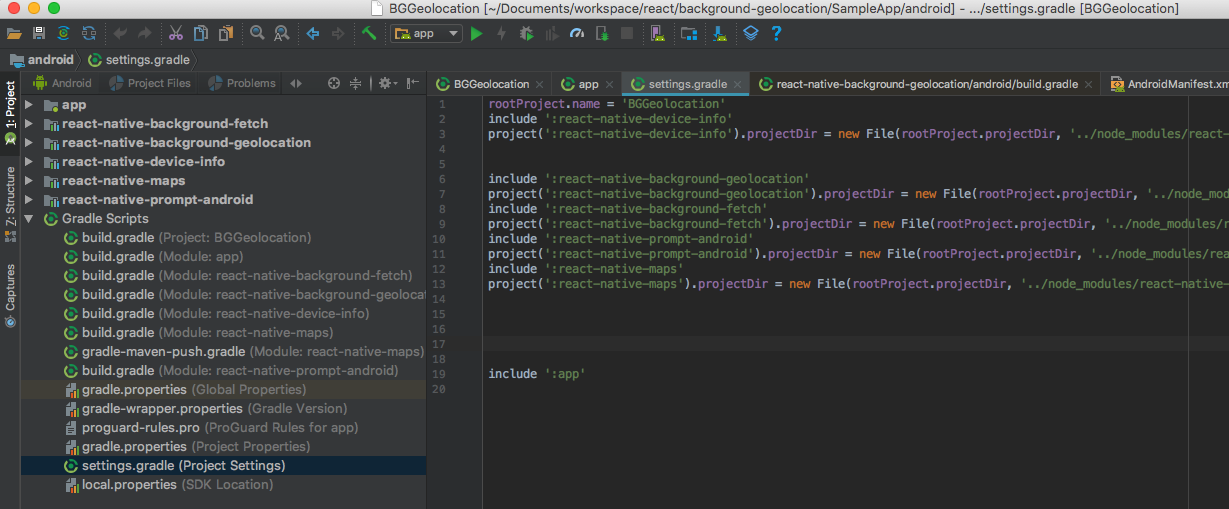
- Do you not see warnings / errors in Android Studio?
- In the file-manager on left, you should see a folder for each added module in your project.
Close / re-open Android Studio.
christocracy
on 27 Jul 2018
@christocracy
I have all of that libs in settings.gradle

Luckygirlllll
on 27 Jul 2018
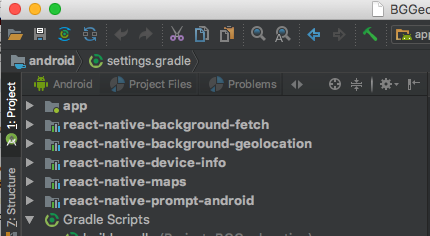
And do all those modules appear in the file-explorer on left?
christocracy
on 27 Jul 2018
@christocracy yes

Luckygirlllll
on 27 Jul 2018
There's your problem. Your app is not finding those 3 plugins. As you can see, those folders are empty.
You'll want to remove the Mauron85 version.
christocracy
on 27 Jul 2018
in Android Studio: File -> Sync Project With Gradle Files
christocracy
on 27 Jul 2018
@christocracy that didn't help either
Luckygirlllll
on 27 Jul 2018
- In
settings.gradle, comment-out all lines referencingmauron85. Re-sync. - confirm in your
node_modulesthat those missing plugins actually exist on your file-system.
christocracy
on 27 Jul 2018
@christocracy I unlinked and uninstalled react-native-background-fetch, and somehow firebase appeared again

Luckygirlllll
on 27 Jul 2018
Also I unlinked and installed react-native-background-geolocation and got all other modules back

Luckygirlllll
on 27 Jul 2018
P.S: before doing all of that, I was uninstalling mauron85 library as well, sync the project after that, but it did give any result
Luckygirlllll
on 27 Jul 2018
Somehow your library is conflicting with fabric, firebase and push notifications in my project
Luckygirlllll
on 27 Jul 2018
I can confirm that I have these libraries in node_modules

Luckygirlllll
on 27 Jul 2018
Now that those folders are shown, you should be good to proceed.
christocracy
on 27 Jul 2018
@christocracy em, when I'm adding your library they disappear
Luckygirlllll
on 27 Jul 2018
Show me the following files:
android/build.gradleandroid/app/build.gradle
christocracy
on 27 Jul 2018
android/app/build.gradle
apply plugin: "com.android.application"
apply plugin: 'io.fabric'

import com.android.build.OutputFile

project.ext.react = [
    entryFile: "index.js"
]

apply from: "../../node_modules/react-native/react.gradle"
apply from: "../../node_modules/react-native-vector-icons/fonts.gradle"

def enableSeparateBuildPerCPUArchitecture = false
def enableProguardInReleaseBuilds = false

android {
    compileSdkVersion 27
    buildToolsVersion "27.0.3"

    defaultConfig {
        applicationId "com.xxx"
        minSdkVersion 16
        targetSdkVersion 26
        versionCode 4
        versionName "1.2"
        multiDexEnabled true
        ndk {
            abiFilters "armeabi-v7a", "x86"
        }
    }
    splits {
        abi {
            reset()
            enable enableSeparateBuildPerCPUArchitecture
            universalApk false  // If true, also generate a universal APK
            include "armeabi-v7a", "x86"
        }
    }
    signingConfigs {
        release {
            storeFile file(RELEASE_STORE_FILE)
            storePassword RELEASE_STORE_PASSWORD
            keyAlias RELEASE_KEY_ALIAS
            keyPassword RELEASE_KEY_PASSWORD
        }
    }
    buildTypes {
        release {
            signingConfig signingConfigs.release
            minifyEnabled enableProguardInReleaseBuilds
        }

    }

    dexOptions {
        jumboMode true
    }
    applicationVariants.all { variant ->
        variant.outputs.each { output ->
            // For each separate APK per architecture, set a unique version code as described here:
            // http://tools.android.com/tech-docs/new-build-system/user-guide/apk-splits
            def versionCodes = ["armeabi-v7a":1, "x86":2]
            def abi = output.getFilter(OutputFile.ABI)
            if (abi != null) {  // null for the universal-debug, universal-release variants
                output.versionCodeOverride =
                        versionCodes.get(abi) * 1048576 + defaultConfig.versionCode
            }
        }
    }
}

dependencies {
    compile project(':react-native-background-fetch')
    compile project(':react-native-background-geolocation')
    compile project(':react-native-video')
    compile project(':react-native-camera')
    compile project(':react-native-fabric')
    compile project(':react-native-firebase')
    compile project(':react-native-mixpanel')
    compile project(':react-native-push-notification')
    compile project(':react-native-branch')
    compile (project(':react-native-video')) {
       exclude group: "com.android.support", module: 'support-v4'
    }
    compile (project(':react-native-camera')) {
       exclude group: "com.android.support", module: 'support-v4'
    }
    compile project(':react-native-cookies')
    compile project(':react-native-fbsdk')
    compile project(':react-native-device-info')
    compile project(':react-native-config')
    compile project(':react-native-i18n')
    compile project(':react-native-vector-icons')
    compile 'com.android.support:multidex:1.0.0'
    compile fileTree(dir: "libs", include: ["*.jar"])
    compile "com.android.support:appcompat-v7:27.0.1"
    compile "com.facebook.react:react-native:+"  // From node_modules
    implementation "com.google.android.gms:play-services-base:15.0.1"
    implementation "com.google.firebase:firebase-core:16.0.1"
    implementation('com.crashlytics.sdk.android:crashlytics:2.9.4@aar') {
        transitive = true
    }
}

// Run this once to be able to run the application with BUCK
// puts all compile dependencies into folder libs for BUCK to use
task copyDownloadableDepsToLibs(type: Copy) {
    from configurations.compile
    into 'libs'
}

    apply plugin: 'com.google.gms.google-services'
android/build.gradle
buildscript {
    repositories {
        google()
        jcenter()
        maven {
            url 'https://maven.fabric.io/public'
        }

    }
    dependencies {
        classpath 'com.android.tools.build:gradle:3.1.3'
        classpath 'com.google.gms:google-services:4.0.1'
        classpath 'io.fabric.tools:gradle:1.25.4'

        // NOTE: Do not place your application dependencies here; they belong
        // in the individual module build.gradle files
    }
}

allprojects {
    repositories {
        mavenLocal()
        google()
        jcenter()
        maven {
            // All of React Native (JS, Obj-C sources, Android binaries) is installed from npm
            url "$rootDir/../node_modules/react-native/android"
        }
        maven { url 'https://maven.google.com' }
              maven {
                      url "$rootDir/../node_modules/react-native-background-geolocation/android/libs"
                   }
               maven {
                       url "$rootDir/../node_modules/react-native-background-fetch/android/libs"
               }
    }
}

ext {
    compileSdkVersion = 27
    targetSdkVersion = 27
    buildToolsVersion = "27.0.3"
    supportLibVersion = "27.1.0"
    googlePlayServicesVersion = "15.0.1"
}
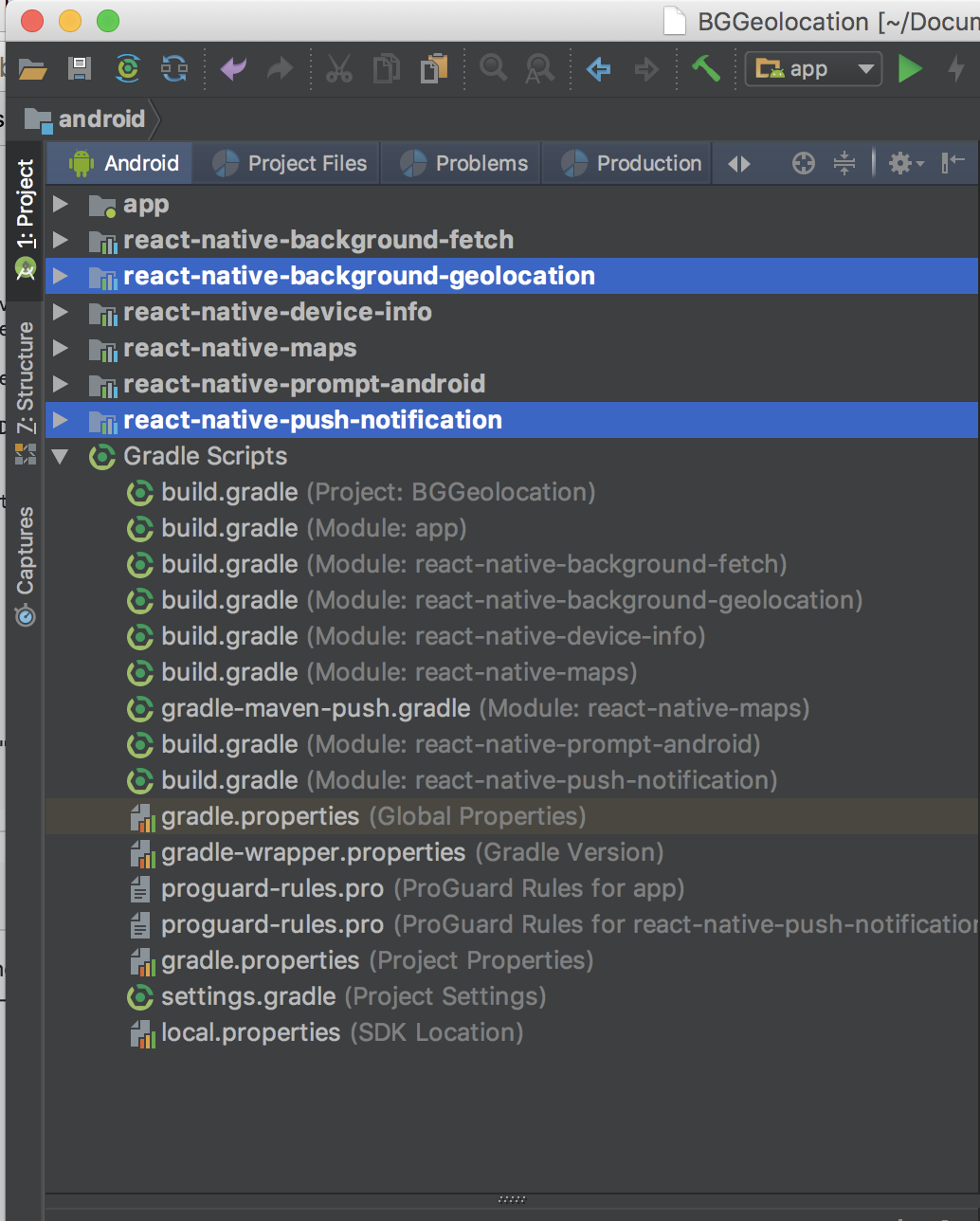
I just have tried to add your library once again, so react-native-push-nofication library disappeared immediately after I run `npm install --save react-native-background-geolocation, all other libraries survived this time.

Now it shows only this error:

`
Luckygirlllll
on 27 Jul 2018
Could not reproduce.
christocracy
on 15 Aug 2018
@christocracy I think I found the problem, I used yarn for the installing all packages, but I used npm for the installing react-native-background-geolocation, so I think that is causing the problem.
Luckygirlllll
on 16 Aug 2018
You should choose one or the other.
christocracy
on 16 Aug 2018
Btw, if you’re posting your locations to Firebase, I’ve released a new adapter plugin for background-geolocation which will override the plugin’s SQLite/http services and post to Firebase for you.
christocracy
on 16 Aug 2018
I confirm what @Luckygirlllll said. I got build issues after added a package using npm instead of yarn. The solution is to add the package with yarn.
 Jobel91
on 1 Feb 2019
Jobel91
on 1 Feb 2019
Could not determine the dependencies of task ':app:preDebugBuild'.
Getting this error
 FathomSamadhan
on 25 Oct 2019
FathomSamadhan
on 25 Oct 2019
Could not determine the dependencies of task ':app:preDebugBuild'.
Care to elaborate on that? That’s like a doctor saying “patient died from blood loss”.
christocracy
on 25 Oct 2019
Related issues
 randymuhroji
·
3Comments
randymuhroji
·
3Comments
 greyvugrin
·
3Comments
greyvugrin
·
3Comments
 lyseiha
·
6Comments
lyseiha
·
6Comments
 ca057
·
7Comments
ca057
·
7Comments
 tofoli
·
5Comments
tofoli
·
5Comments
Most helpful comment
@christocracy I think I found the problem, I used yarn for the installing all packages, but I used npm for the installing react-native-background-geolocation, so I think that is causing the problem.