React-native-background-geolocation: Background Tracking Location Upload to Firestore
I will buy the lib for sure, but i have some question:
- Can i Enabled Location Tracking for both android and iOS even app got killed by user?
- if can, can i use that tracking and send location to Firestore to save it up?
 lyseiha
All 6 comments
Yes and yes.
 christocracy
on 8 Sep 2020
christocracy
on 8 Sep 2020
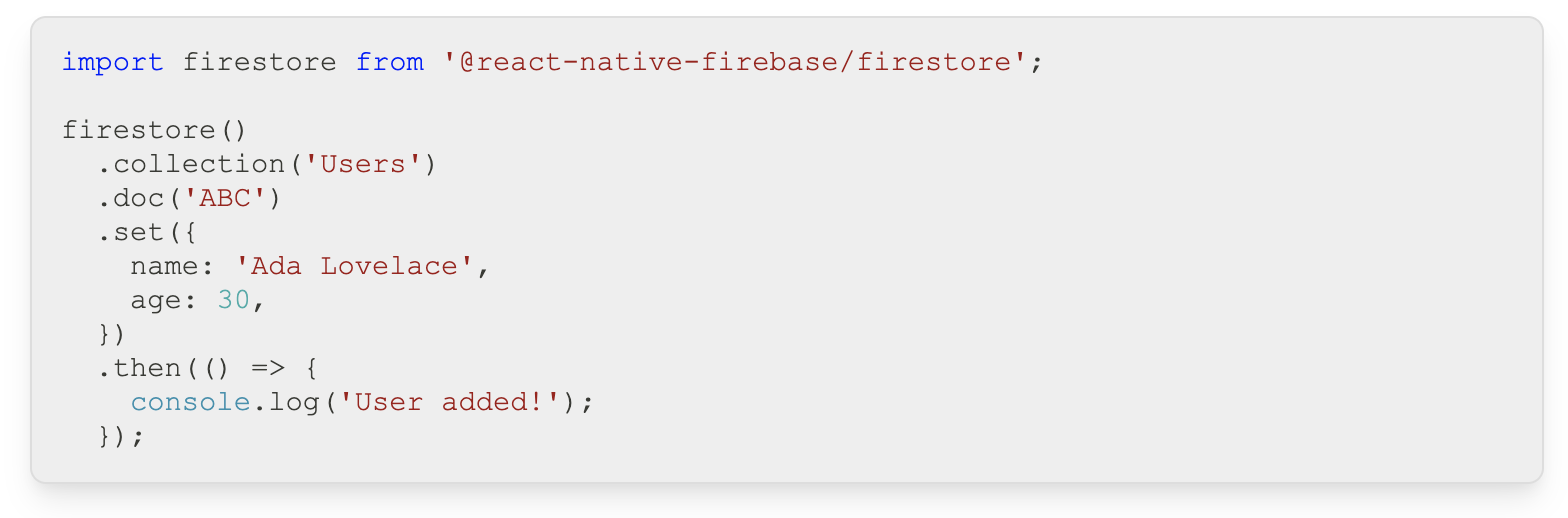
So can i use this method below to upload location on both ios and android?
lyseiha
on 8 Sep 2020
There is an actual plugin which you may like: https://github.com/transistorsoft/react-native-background-geolocation-firebase
But in general, if you assume that EventStreamService exists in separate code, but is effectively doing what the code you quote above does - getting a doc ref and setting it with the data of a geolocation, then you just make some methods that can send the BackgroundGeolocation events off to your firestore service for storage, and set those methods in to BackgroundGeolocation as event handlers
import BackgroundGeolocation, {
  Location,
  MotionActivityEvent,
  MotionChangeEvent,
  ProviderChangeEvent,
  LocationError,
} from 'react-native-background-geolocation-android';
import firebase from '@react-native-firebase/app';

// ...
    // This handler fires whenever bgGeo receives a location update.
    BackgroundGeolocation.onLocation(this.onLocation.bind(this), this.onError.bind(this));

    // This handler fires when movement states changes (stationary->moving; moving->stationary)
    BackgroundGeolocation.onMotionChange(this.onMotionChange.bind(this));


  onLocation(location: Location) {
    // We don't want to persist samples
    console.log(`GeolocationService::onLocation - is location a sample? ${location.sample}`);
    console.log('GeolocationService::onLocation - registered '); // , location);
    if (location.sample) {
      return;
    }
    EventStreamService.logEvent('LOCATION', UserStore.getUser()?.kullkiId, null, location);
  }


  onMotionChange(event: MotionChangeEvent) {
    console.log('GeolocationService::onMotionChange -', event.isMoving, event.location);
    EventStreamService.logEvent('MOTION', UserStore.getUser()?.kullkiId, null, event.location);
  }
Obviously there's lots of code missing here, but that should get you there - it has all of the general idea of "the plugin fires events, you make a method that you register for the events, and in that method you pass the event off to whatever service you have that stores things in firestore"
Hopefully that helps
 mikehardy
on 8 Sep 2020
mikehardy
on 8 Sep 2020
There is an actual plugin which you may like: https://github.com/transistorsoft/react-native-background-geolocation-firebase
But in general, if you assume that
EventStreamServiceexists in separate code, but is effectively doing what the code you quote above does - getting a doc ref and setting it with the data of a geolocation, then you just make some methods that can send the BackgroundGeolocation events off to your firestore service for storage, and set those methods in to BackgroundGeolocation as event handlersimport BackgroundGeolocation, { Location, MotionActivityEvent, MotionChangeEvent, ProviderChangeEvent, LocationError, } from 'react-native-background-geolocation-android'; import firebase from '@react-native-firebase/app'; // ... // This handler fires whenever bgGeo receives a location update. BackgroundGeolocation.onLocation(this.onLocation.bind(this), this.onError.bind(this)); // This handler fires when movement states changes (stationary->moving; moving->stationary) BackgroundGeolocation.onMotionChange(this.onMotionChange.bind(this)); onLocation(location: Location) { // We don't want to persist samples console.log(`GeolocationService::onLocation - is location a sample? ${location.sample}`); console.log('GeolocationService::onLocation - registered '); // , location); if (location.sample) { return; } EventStreamService.logEvent('LOCATION', UserStore.getUser()?.kullkiId, null, location); } onMotionChange(event: MotionChangeEvent) { console.log('GeolocationService::onMotionChange -', event.isMoving, event.location); EventStreamService.logEvent('MOTION', UserStore.getUser()?.kullkiId, null, event.location); }Obviously there's lots of code missing here, but that should get you there - it has all of the general idea of "the plugin fires events, you make a method that you register for the events, and in that method you pass the event off to whatever service you have that stores things in firestore"
Hopefully that helps
Will firestore function working in onLocation and onMotionChange even will the app got killed on both platform (android & iOS), sir?
lyseiha
on 8 Sep 2020
on ios if the plugin is running your javascript is running. on android you'll need to implement headless mode and make sure your firestore stuff is initialized there, or you can implement it directly in java if you like - you can even combine the headless-js mode events into a direct firebase-android-sdk API call to firestore as the react-native-firebase serializer is useful in native java after I integrated this PR https://github.com/invertase/react-native-firebase/pull/3888
Which is a way of saying sure? You can do it any way you like? You are at the point where you need to experiment to see what fits you.
mikehardy
on 8 Sep 2020
@mikehardy Thank you so much, i will try to test it out. ✌️ 😉
lyseiha
on 8 Sep 2020
Related issues
 compojoom
·
3Comments
compojoom
·
3Comments
 MorcosS
·
3Comments
MorcosS
·
3Comments
 woodpav
·
5Comments
woodpav
·
5Comments
 randymuhroji
·
3Comments
randymuhroji
·
3Comments
 vishgoel007
·
3Comments
vishgoel007
·
3Comments
Most helpful comment
There is an actual plugin which you may like: https://github.com/transistorsoft/react-native-background-geolocation-firebase
But in general, if you assume that
EventStreamServiceexists in separate code, but is effectively doing what the code you quote above does - getting a doc ref and setting it with the data of a geolocation, then you just make some methods that can send the BackgroundGeolocation events off to your firestore service for storage, and set those methods in to BackgroundGeolocation as event handlersObviously there's lots of code missing here, but that should get you there - it has all of the general idea of "the plugin fires events, you make a method that you register for the events, and in that method you pass the event off to whatever service you have that stores things in firestore"
Hopefully that helps