React-native-background-geolocation: Event-listener geofence doesn't work as expected
Your Environment
- Plugin version: 2.11.0
- Platform: iOS
- OS version: 11.2.5
- Device manufacturer / model: iPhone 6s / NKQN2LL/A
- React Native version (
react-native -v): 0.50.3 - Plugin config: DEMO APP => Advanced mode, 200m geofence, notify exit ON, notify exit ON, notify Dwell ON and loitering delay 120.000 ms.
Expected Behavior
The event-listener geofence should be always being called when user enters or leaves the geofence.
e.g BackgroundGeolocation.on('geofence', this.geofenceChanges))
Actual Behavior
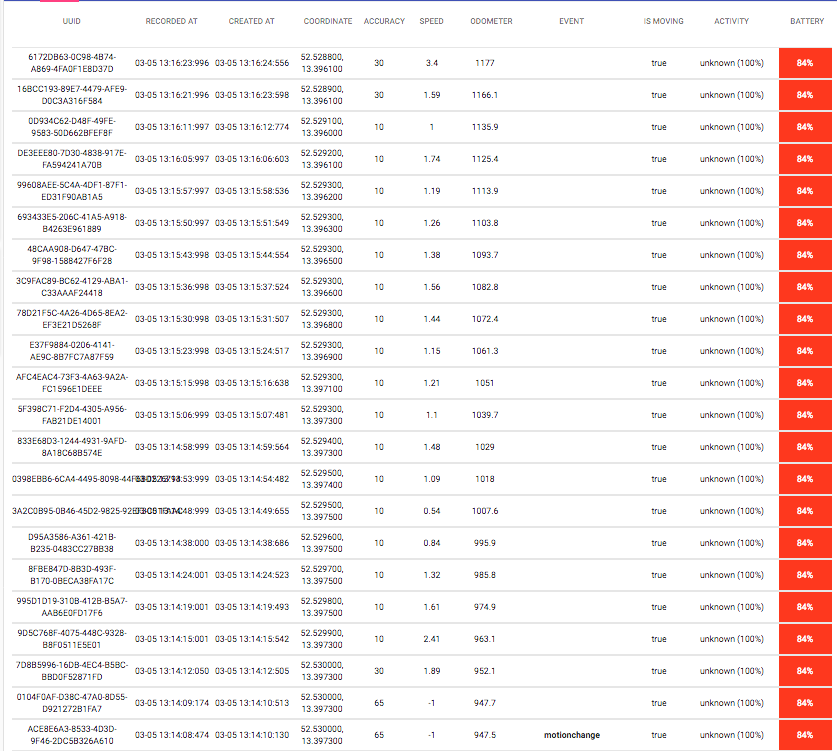
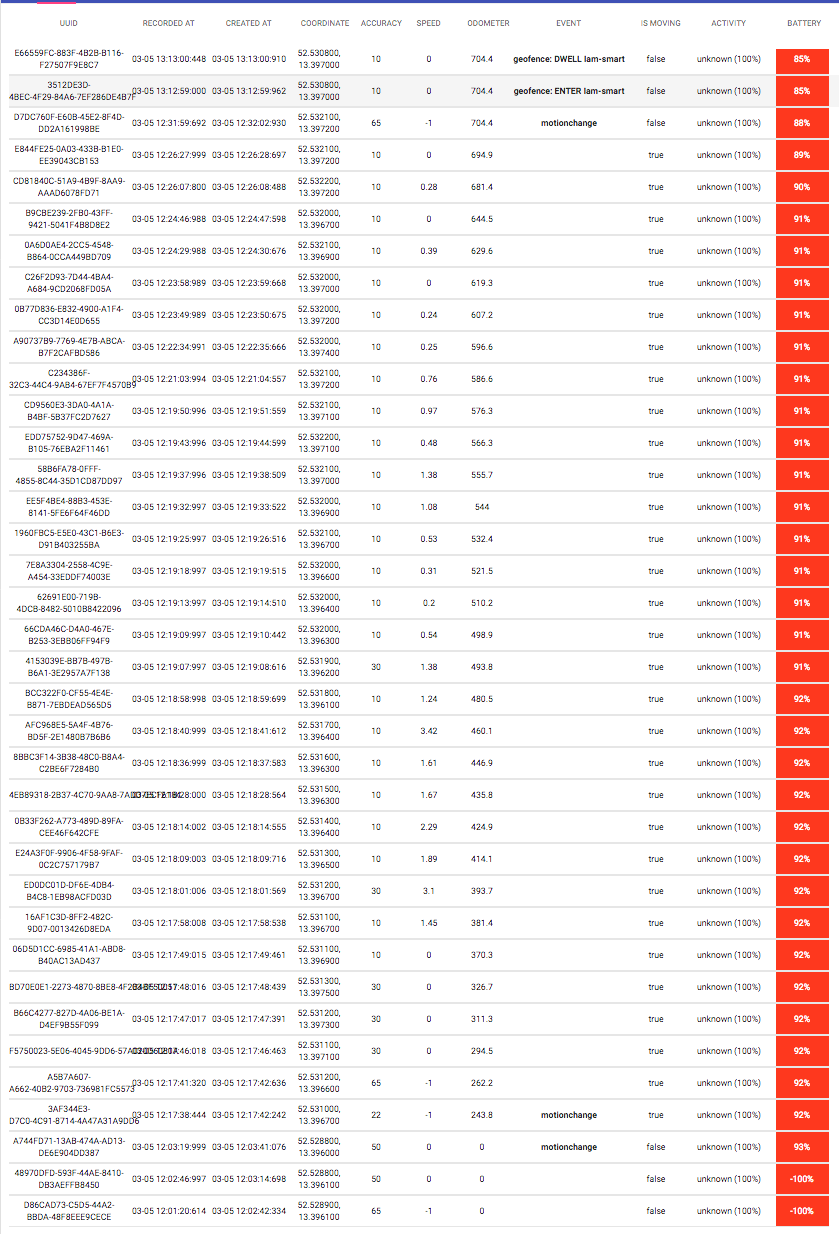
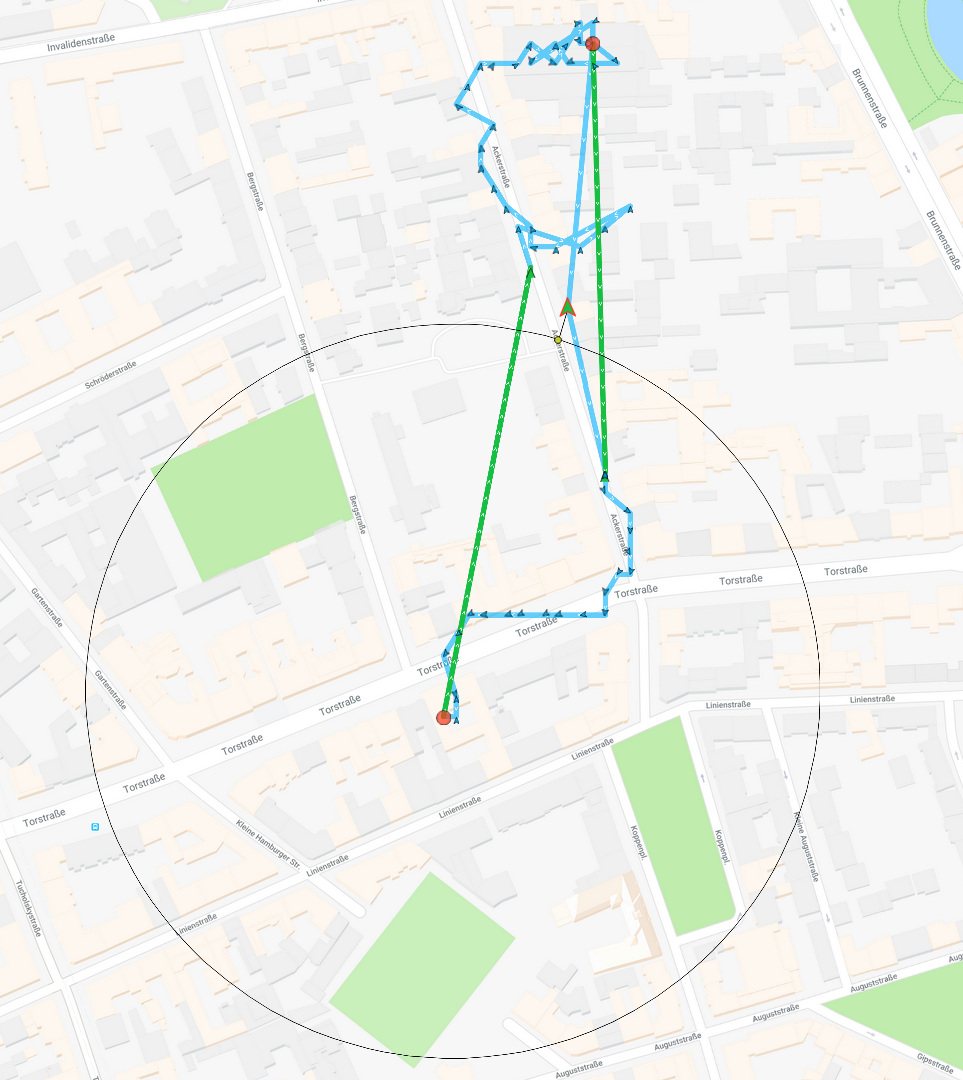
I'm having issues with the event-listener goefence that is not always being called. Here you can see some data. I used the demo app for testing it. The problem is that there was only one event being triggered (user enters home), no exit event triggered.
LOGS
MAP
Steps to Reproduce
- Clone the demo app, install it in an iPhone, configure it, run it.
- Use advance mode.
- Create a new geofence near your actual position with 200m radius, notify on entry ON, notify on Exit ON, notify on Dwell ON, and loitering delay 120.000 ms.
- Try to leave the geofence, after 30 min go back (IDK if this is important), then go back and enter to your geofence.
Context
I want to catch whenever user enters or leaves the geofence.
Debug logs
 buskerone
All 32 comments
I have the same problem. it's not really reliable. even though user Enters / Exits the Geofence, sometimes the event is triggered.
 atasmohammadi
on 5 Mar 2018
atasmohammadi
on 5 Mar 2018
I have months of data showing 4 geofences in my local neighborhood (radius 200 meter) consistently firing both exit and entry 100% of the time on a variety of Android devices.
 christocracy
on 5 Mar 2018
christocracy
on 5 Mar 2018
@christocracy thanks for your quick answer. But this is for iOS and it's not really helpful. Do you have similar data for iOS? BTW, I'm using the paid version of the library so maybe I should move this issue to the other repo.
buskerone
on 5 Mar 2018
@christocracy I'd really appreciate it if you could share you JS code with us. I know you have a demo app for this library but it's very complex.
atasmohammadi
on 5 Mar 2018
I have this issue in premium version, so I have opened a similar issue here
https://github.com/transistorsoft/react-native-background-geolocation-android/issues/410
atasmohammadi
on 5 Mar 2018
Both iOS and Android trigger equally consistently. I do not miss and exit or entry event ever.
All the is code I use is in the demo app.
There are 3 flavors in the demo app from simple Hello World to advanced.
Geofeofence aren’t affected by JavaScript. They are affected only by the documented attributes you provide eg radius.
The only example code you need is in the docs for #addGeofence. That is it.
christocracy
on 5 Mar 2018
Ok this is not helpful at all, can you explain why this is happening using the demo app in advanced mode? If never saw this issue maybe it's a bug. I already put all the logs, map, and info in this issue so maybe you or other guys can reproduce it?
buskerone
on 5 Mar 2018
- Have you tested in the iOS Simulator?
- Do you have Wifi enabled? Geofences will not work with Wifi disabled.
christocracy
on 5 Mar 2018
I tested in a real device and also in the iOS Simulator. What do you mean that geofences will not work with Wifi disabled, it will not work at all? if yes, why?
I mean, GPS + 4G should do the work right? is this because with Wifi you get more accuracy?
Do you have this documented?
buskerone
on 5 Mar 2018
https://developer.android.com/training/location/geofencing.html
Having Wi-Fi on can significantly improve the location accuracy, so if Wi-Fi is turned off, your application might never get geofence alerts depending on several settings including the radius of the geofence, the device model, or the Android version.
On most devices, the geofence service uses only network location for geofence triggering. The service uses this approach because network location consumes much less power, it takes less time to get discrete locations, and most importantly it’s available indoors.
If there is no reliable data connection, alerts might not be generated. This is because the geofence service depends on the network location provider which in turn requires a data connection.
atasmohammadi
on 5 Mar 2018
@ataomega That could be added to the docs.
christocracy
on 5 Mar 2018
@christocracy BTW Wifi was enabled when testing with a real device.
buskerone
on 5 Mar 2018
This is a couple of weeks of testing in my neighbourhood (these are 200 meter geofences):
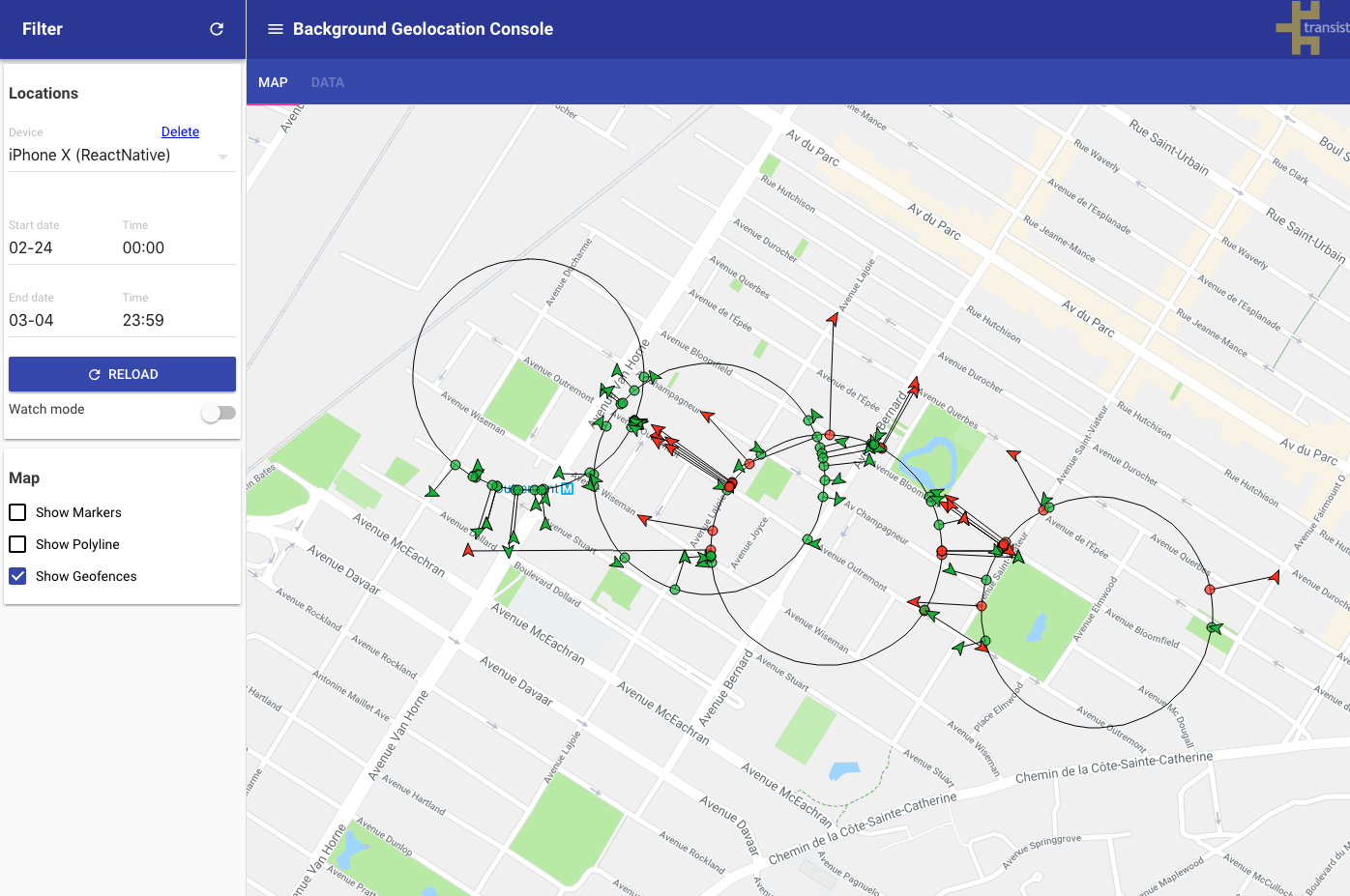
Browse my data here
christocracy
on 5 Mar 2018
thanks for sharing! It's weird that the demo app didn't work as expected with Wifi being turned on.. I'll keep testing it.
buskerone
on 5 Mar 2018
Do you have an activated Sim card in your iOS device? I've found some devices can have problems without a sim card. My iPhone 5 & 6s both trigger fine without sim card.
christocracy
on 5 Mar 2018
You'll also want to fetch logs from the plugin after a failed test. See Debugging wiki
christocracy
on 5 Mar 2018
and be sure to test with debug: true so you can hear the geofences trigger and see the associated local-notifications.
christocracy
on 5 Mar 2018
Yes, I used a device with a sim card. Ok, nice. I'll turn on the debug mode and check the logs after that.
buskerone
on 5 Mar 2018
Update?
christocracy
on 19 Mar 2018
@buskerone @christocracy facing the same issue, on both iOS and Android. Enter events works great, Exit sometimes not sent. Using a 200 radius.
 oferRounds
on 8 Apr 2018
oferRounds
on 8 Apr 2018
@oferRounds can you provide some logs of this?
christocracy
on 9 Apr 2018
I'm having similar issues... I won't get an ENTER going into a geofence, but will get an EXIT leaving the same fence (sporadically - same behavior from multiple fences). In the attached log, if you start around 12:55, you'll can see me in the car and arriving in the fence (no ENTER is triggered, no GeofenceService - onHandleIntent). But if you keep walking down the log, at 13:07:58 you'll see the EXIT from the same fence.
This being my first post, and since it was a follow-up in an existing thread, I wasn't sure how much of the issue format I should follow - if I did something incorrectly, I apologize.
My test device is a Samsung Galaxy S7 (Android 7.0).
 JimLuschkowski
on 7 Jun 2018
JimLuschkowski
on 7 Jun 2018
Please duplicate entire issue template
christocracy
on 7 Jun 2018
I'm having similar issues... I won't get an ENTER going into a geofence, but will get an EXIT leaving the same fence (sporadically - same behavior from multiple fences).
Your Environment
- Plugin version: 2.12.2
- Platform: Android
- OS version: 7.0
- Device manufacturer / model: Samsung Galaxy S7
- React Native version (
react-native -v): 0.55.4 - Plugin config:
{
"activityRecognitionInterval": 10000,
"allowIdenticalLocations": false,
"autoSync": true,
"autoSyncThreshold": 0,
"batchSync": false,
"debug": false,
"deferTime": 0,
"desiredAccuracy": -1,
"desiredOdometerAccuracy": 100,
"disableElasticity": false,
"disableStopDetection": false,
"distanceFilter": 10,
"elasticityMultiplier": 1,
"enableHeadless": false,
"extras": {},
"fastestLocationUpdateInterval": 10000,
"forceReloadOnBoot": false,
"forceReloadOnGeofence": false,
"forceReloadOnHeartbeat": false,
"forceReloadOnLocationChange": false,
"forceReloadOnMotionChange": false,
"forceReloadOnSchedule": false,
"foregroundService": true,
"geofenceInitialTriggerEntry": false,
"geofenceProximityRadius": 1000,
"geofenceTemplate": "{\"data\":{\"type\":\"update\",\"attributes\":{\"UpdateUniqueID\":\"<%= uuid %>\",\"ConnectionUniqueID\":\"<%= geofence.identifier %>\",\"Type\":\"<%= geofence.action %>\",\"Date\":\"<%= timestamp %>\"}}}",
"headers": {
"Content-Type": "application\/json"
},
"headlessJobService": "com.transistorsoft.rnbackgroundgeolocation.HeadlessJobService",
"heartbeatInterval": -1,
"httpRootProperty": ".",
"httpTimeout": 60000,
"isMoving": false,
"locationTemplate": "",
"locationTimeout": 60,
"locationUpdateInterval": 1000,
"locationsOrderDirection": "ASC",
"logLevel": 4,
"logMaxDays": 3,
"maxBatchSize": -1,
"maxDaysToPersist": 1,
"maxRecordsToPersist": -1,
"method": "POST",
"minimumActivityRecognitionConfidence": 75,
"notificationColor": "",
"notificationLargeIcon": "mipmap\/icon",
"notificationPriority": -2,
"notificationSmallIcon": "mipmap\/icon_notification",
"notificationText": "",
"notificationTitle": "",
"params": {},
"persist": true,
"schedule": [],
"startOnBoot": true,
"stationaryRadius": 25,
"stopAfterElapsedMinutes": 0,
"stopOnStationary": false,
"stopOnTerminate": false,
"stopTimeout": 5,
"triggerActivities": "in_vehicle, on_bicycle, on_foot, running, walking",
"url": "**",
"enabled": true,
"schedulerEnabled": false,
"trackingMode": 0,
"odometer": 1354.2767333984375,
"isFirstBoot": false
}
Expected Behavior
ENTER and EXIT events should fire when entering/exiting the same fence
Actual Behavior
ENTER events aren't firing when entering going into some fences. Leaving the same fence will result in a EXIT however.
It's interesting to note that it seems to be more prevalent when entering the fence I have set up around my home. In some of the responses above, there's mention of how Wifi affects the location services. Could the issue be it transitioning/connecting to my home network and that somehow impacts the geofence firing? It's very consistent on EXIT, or places where I don't have the Wifi network saved in my phone (ENTERs at work and home are spotty).
Steps to Reproduce
- Drive into fence; verify no ENTER
- Drive out of same fence; verify EXIT
Context
In the attached log, if you start around 12:55, you'll can see me in the car and arriving in the fence (no ENTER is triggered, no GeofenceService - onHandleIntent). But if you keep walking down the log, at 13:07:58 you'll see the EXIT from the same fence.
Debug logs
JimLuschkowski
on 7 Jun 2018
@JimLuschkowski Are you using a minimum geofence radius: 150? Anything less will not work
christocracy
on 24 Jun 2018
@christocracy, I have 3 different fences defined at 100m each. I'll increase the radius and monitor. Thanks for the info.
JimLuschkowski
on 1 Jul 2018
I updated the fences to 150m - got an EXIT today, but no ENTER upon return. The "Your Environment" section above is still the same with the exception this instance was observed on an iPhone...
- Platform: iOS
- OS version: 11.4
- Device manufacturer / model: Apple / 6s
The EXIT geofence event occurred at 2018-07-07 15:28:30.011 (in log). On my android device (same fence) the ENTER logged at 2018-07-07 17:01:35, so I would have assumed an ENTER on the iOS device around the same time.
I suspect there's something I've configured incorrectly, but I've been unable to figure out what.
JimLuschkowski
on 8 Jul 2018
I’m away on vacation until late July. Try 200 meter.
christocracy
on 8 Jul 2018
i also have problems reporting event correctly.
I'm doing some debugging tests with some gpx files. (simulating routes)
Why is it not possible to create the an area less than 150/200 m of radius?
 Richi2293
on 19 Jul 2018
Richi2293
on 19 Jul 2018
Why is it not possible to create the an area less than 150/200 m of radius?
- Geofences are handled by the operating system. They do not use GPS, they use Wifi / Cellular location-providers to evaluate geofences.
For more details, google "ios minimum geofence radius" and "android minimum geofence radius"
christocracy
on 23 Jul 2018
Can you please set the minimum less than 150?
 Taxi4you
on 23 Feb 2021
Taxi4you
on 23 Feb 2021
Can you please set the minimum less than 150?
If you're asking this question of me, I have no control over the iOS / Android operating systems.
You need to forward your request to Apple and Google.
christocracy
on 23 Feb 2021
Related issues
 JAStanton
·
3Comments
JAStanton
·
3Comments
 vaniakerer
·
7Comments
vaniakerer
·
7Comments
 compojoom
·
3Comments
compojoom
·
3Comments
 stroncod
·
7Comments
stroncod
·
7Comments
 lyseiha
·
6Comments
lyseiha
·
6Comments
Most helpful comment
https://developer.android.com/training/location/geofencing.html
Having Wi-Fi on can significantly improve the location accuracy, so if Wi-Fi is turned off, your application might never get geofence alerts depending on several settings including the radius of the geofence, the device model, or the Android version.
On most devices, the geofence service uses only network location for geofence triggering. The service uses this approach because network location consumes much less power, it takes less time to get discrete locations, and most importantly it’s available indoors.
If there is no reliable data connection, alerts might not be generated. This is because the geofence service depends on the network location provider which in turn requires a data connection.