React-native-apple-authentication: performRequest hangs ios14 Simulator -> App Store Rejection (use ios13 simulator)
[:point_down: SEE COMMENTS BELOW TO UNDERSTAND STATUS / GET YOUR APP APPROVED :point_down:]
Hi,
i've been experiencing this error from iOS 14.
I'm using @invertase/react-native-apple-authentication@1.1.2 as i don't need Apple Signin for Android.
Although, in past AppleStore reviewers rejects my app randomly, probably depending on who tests the app, this time there's no way to make it accepts.
 const appleAuthRequestResponse = await appleAuth.performRequest({
            requestedOperation: AppleAuthRequestOperation.LOGIN,
            requestedScopes: [AppleAuthRequestScope.EMAIL, AppleAuthRequestScope.FULL_NAME],
        });
It's a pity, this package works perfectly for real devices!
Could you suggest me, what to do? It's a problem experienced only in my case or not only?
My React Native info
System:
OS: macOS 10.15.6
CPU: (12) x64 Intel(R) Core(TM) i7-9750H CPU @ 2.60GHz
Memory: 671.25 MB / 16.00 GB
Shell: 5.7.1 - /bin/zsh
Binaries:
Node: 12.13.1 - /usr/local/bin/node
Yarn: 1.22.4 - /usr/local/bin/yarn
npm: 6.14.3 - /usr/local/bin/npm
Watchman: 4.9.0 - /usr/local/bin/watchman
SDKs:
iOS SDK:
Platforms: iOS 14.0, DriverKit 19.0, macOS 10.15, tvOS 14.0, watchOS 7.0
Android SDK:
API Levels: 23, 25, 26, 27, 28, 29
Build Tools: 28.0.3, 29.0.0, 29.0.2, 29.0.3
System Images: android-19 | Google APIs Intel x86 Atom, android-28 | Google APIs Intel x86 Atom, android-28 | Google Play Intel x86 Atom
IDEs:
Android Studio: 4.0 AI-193.6911.18.40.6626763
Xcode: 12.0/12A7209 - /usr/bin/xcodebuild
npmPackages:
react: 16.9.0 => 16.9.0
react-native: 0.61.5 => 0.61.5
npmGlobalPackages:
create-react-native-module: 0.16.0
react-native-cli: 2.0.1
 se09deluca
All 38 comments
Same Issue. How do we circumvent this?
 ferran9908
on 22 Sep 2020
ferran9908
on 22 Sep 2020
That's odd, I have gotten it to work, and while I am currently working through a different apple store rejection it is related to a subsequent network load failing.
Honestly - and this is just supposition and I'm a bit frustrated by it and other issues I and others have with the apple testers - I think their network is crap. I think it's slow, and lossy, and drops connections. It's the only underlying reason I can think of for the variety of failures I see related to App Store approval.
 mikehardy
on 22 Sep 2020
mikehardy
on 22 Sep 2020
Two things, to move on from my frustration comment, and start fixing this:
- Do not remain on old versions. It does not matter what you need or don't need. Bugfixes always come in new versions.
- Can you reproduce this on the simulator on your local machine? Stated differently: Can you build and run the example from master on your machine, and it authenticates correctly on your local machine in an ios14 simulator? Because this works for me
mikehardy
on 22 Sep 2020
Currently facing the same issue.
It was working on simulator before I upgrade from 1.1.2 to 2.0.1. Also I upgraded Xcode from 11 to 12 (as well as iOS to 14).
No console output with any errors.
Update:
I rolled back to 1.1.2 to, hopefully, get it back working on simulators, but it still hangs after authentication and performRequest never gets resolved. I guess by that that the issue might have to do with iOS 14 or Xcode 12.
 rafaismyname
on 22 Sep 2020
rafaismyname
on 22 Sep 2020
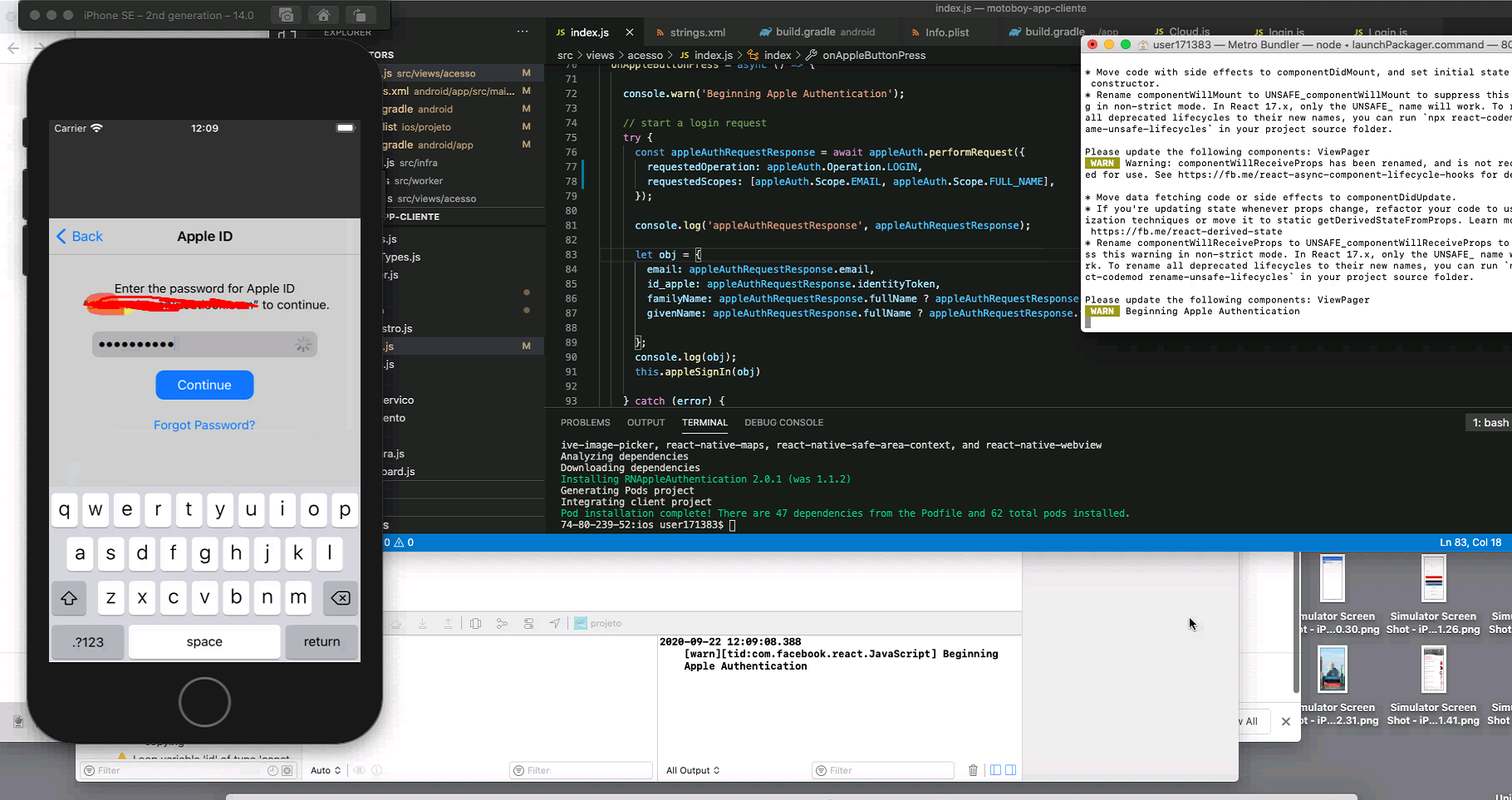
Same problem, perform request does not resolve. It gets stuck on the password. I tried to enable and disable "sing in with apple" at sugested here => https://github.com/invertase/react-native-apple-authentication/issues/117, but made no difference.
IOS 14 e xcode 12.
tried with 1.1.2 and 2.01.
I cant get to the log "appleAuthRequestResponse"
 gkothe
on 22 Sep 2020
gkothe
on 22 Sep 2020
I also ran into this with iOS 14 but I think the issue is upstream. If I'm logged into iCloud in my iOS 14 simulator and go to icloud.com in Safari, the "Continue with Password" dialog that appears will also fail.
Curious if the icloud.com process fails for you all as well.
 dburdan
on 23 Sep 2020
dburdan
on 23 Sep 2020
Same problem, perform request does not resolve. It gets stuck on the password. I tried to enable and disable "sing in with apple" at sugested here => #117, but made no difference.
IOS 14 e xcode 12.
tried with 1.1.2 and 2.01.
I cant get to the log "appleAuthRequestResponse"
From what I've seen, I get the same issue in the iOS 14 Simulator but not in the iOS 13 Simulator with the same code.
But then, I'm able to go past this screen on a physical iOS 14 device.
This makes testing the app harder. Is there any fix for this?
ferran9908
on 23 Sep 2020
There is no fix. I reproduce the problem.
For now assume the iOS14 simulator is broken.
The code works on iOS13 simulators. It works on iOS 13 and 14 real devices.
There is nothing we can do, I don't think.
If someone attempted it with Xcode 12.2beta or iOS simulators >=14.1 that would be instructive.
If anyone has anything new to add that will help, otherwise further "me too" posts won't advance the conversation - you can just use reactions if it's affecting you, but it's a known problem at this point
mikehardy
on 23 Sep 2020
Hey @se09deluca
Just found what's going wrong. I had the same bug too since a recent upgrade of the lib and RN.
I think some call changed.
Previously I did:
import appleAuth, {
  AppleAuthRequestOperation,
  AppleAuthRequestScope,
  AppleAuthCredentialState,
} from '@invertase/react-native-apple-authentication';
...
const { user, email, fullName } = await appleAuth.performRequest({
  requestedOperation: AppleAuthRequestOperation.LOGIN,
  requestedScopes: [AppleAuthRequestScope.EMAIL, AppleAuthRequestScope.FULL_NAME],
});
...
if (credentialState === AppleAuthCredentialState.AUTHORIZED) {
    // @XXX Waiting Apple Review
}
...
But theses elements are not exported from the lib: [AppleAuthRequestOperation, AppleAuthRequestScope, AppleAuthCredentialState]. I just checked and you have now to pass by appleAuth directly like showed in README.
Implement the Login Process
Like this:
import appleAuth from '@invertase/react-native-apple-authentication';
...
const { user, email, fullName } = await appleAuth.performRequest({
    requestedOperation: appleAuth.Operation.LOGIN,
    requestedScopes: [appleAuth.Scope.EMAIL, appleAuth.Scope.FULL_NAME],
});
...
if (credentialState === appleAuth.State.AUTHORIZED) {
    // @XXX Waiting Apple Review
}
...
 anthlasserre
on 24 Sep 2020
anthlasserre
on 24 Sep 2020
@anthlasserre I believe you are conflating things. Certainly there were changes from v1.x of this lib to recently released v2.x but I for instance am using TypeScript. I'm not having any export or symbol declaration issues. I am using the symbols correctly because Typescript makes it so there is no other way. Yet I still reproduce the problem on simulator.
mikehardy
on 24 Sep 2020
There is no fix. I reproduce the problem.
For now assume the iOS14 simulator is broken.
The code works on iOS13 simulators. It works on iOS 13 and 14 real devices.There is nothing we can do, I don't think.
If someone attempted it with Xcode 12.2beta or iOS simulators >=14.1 that would be instructive.
If anyone has anything new to add that will help, otherwise further "me too" posts won't advance the conversation - you can just use reactions if it's affecting you, but it's a known problem at this point
@mikehardy I tested it on Xcode 12.2 beta and iOS 14.2 simulator, same issue.
 artmerlop
on 26 Sep 2020
artmerlop
on 26 Sep 2020
@mikehardy if you download iOS 13.6 simulator on Xcode > 12 you can test everything.
artmerlop
on 26 Sep 2020
Hi guys, thanks everyone for the replies.
Yes, the problem still exists on iOS 14 simulators, but apparently it doesn't come from the react-native-apple-authentication package.
I just found this Apple forum thread. It is an issue reported by many native iOS developers and attributed to Xcode 12, this bug already existed in the beta, but has not been fixed yet.
Hope it gets fixed by Apple soon.
@mikehardy in my case, it doesn't works even in the example application, running on iOS 14. However in the meantime that the problem is solved, i'll upgrade the library version to benefit of the newest bug fixes.
Thank you @anthlasserre for the suggestion, but when i wrote this issue, i was on the 1.1.2 version of the package and the code was right for that version. Thank you anyway for the check!
se09deluca
on 26 Sep 2020
I am having the same problem. The error i get is;
Error: The operation couldn’t be completed. (com.apple.AuthenticationServices.AuthorizationError error 1001.)
sign with apple on ios14 device works, ios14 simulator does not work. And app store keeps rejecting my app
Still no solution ?
 ihsanktmr
on 5 Oct 2020
ihsanktmr
on 5 Oct 2020
@ihsanktmr let us know what you find when you look for a solution, as you can see here, we have no new information.
mikehardy
on 5 Oct 2020
I am having the same problem. The error i get is;
Error: The operation couldn’t be completed. (com.apple.AuthenticationServices.AuthorizationError error 1001.)sign with apple on ios14 device works, ios14 simulator does not work. And app store keeps rejecting my app
Still no solution ?
@ihsanktmr you should download iOS 13.X simulator and test on that version, also when you send it to review specify that apple signin function will not work on iOS 14 simulator, because it's a bug from Apple, reported by many developers, I specified that and my app got aproved.
artmerlop
on 5 Oct 2020
@artmerlop I'm getting the same The operation couldn't be completed error on an iOS 13.5 simulator
 Vluf
on 14 Oct 2020
Vluf
on 14 Oct 2020
@Vluf I tested an iOS13.5 emulator just last night, worked fine for me --> 🤷 - not that helpful but is a success report. 13.5 seems to work fine in my testing. 14 simulator definitely still not working for me, but on device everything is fine
mikehardy
on 14 Oct 2020
@mikehardy You're right, my error was due to a misconfiguration.
Vluf
on 15 Oct 2020
I'm going to close this as there is no action to take I don't think - it is an upstream bug out of our control
In app store review comments you should note for reviewers that if they test apple sign in, it is broken on ios14 simulators and they must use either a real device or ios13
mikehardy
on 15 Oct 2020
in my case, it is not working on ios 14 real devices too
 jaysoni9294-1
on 12 Nov 2020
jaysoni9294-1
on 12 Nov 2020
iOS 14 is not working
 KantaP
on 3 Dec 2020
KantaP
on 3 Dec 2020
@KantaP not my experience on real devices. On real devices it works for me. Prove it with a reproduction based on the example app, and if you can, open a new issue with full details please
mikehardy
on 3 Dec 2020
@mikehardy , I'm using xcode 12.2 and simulator 14.2 and still the same.
 ithustle
on 14 Dec 2020
ithustle
on 14 Dec 2020
Yep, still working on real devices and ios13 simulator just fine, still busted on ios14 simulator
mikehardy
on 14 Dec 2020
I've tried right now on iOS 14.3 and still
ithustle
on 17 Dec 2020
Thanks @ithustle - shameful really isn't it? :laughing: - ios13 simulators to test this continues to be the rule :shrug:
[edited to add I will collapse some of these comments in order to keep it just "current" but I appreciate all the reporting]
mikehardy
on 17 Dec 2020
It is not only for the simulator. It happens on physical devices, too. My code is working well with ios 13 but for ios 14 it hangs on simulator and physical device (I am using test flight.)
Also, my application is rejected because of that.
 htuzel
on 22 Jan 2021
htuzel
on 22 Jan 2021
You may have a different problem. No other person has reported a problem on real devices.
mikehardy
on 22 Jan 2021
This is apparently still possible to hang on ios14 real devices so I will re-open this.
ios14 simulators are still expected to fail. Do not post about this, it is a known issue, completely out of our control
Please note we have zero reproduction scenarios for failure on io14 real devices, and it works in testing on real ios14 devices as recently as a few hours ago for me when attempted to reproduce, so there will be no forward progress.
In order to move this forward we will need concrete information on exactly how to reproduce it.
mikehardy
on 24 Feb 2021
I was having the issues, but downgrading the package to v1.0.0 seems working.
 cylim
on 26 Mar 2021
cylim
on 26 Mar 2021
@cylim great you can reproduce it!
In order to move this forward we will need concrete information on exactly how to reproduce it.
Please post a reproduction and we can move forward, otherwise there's no progress just notifications from github....
mikehardy
on 26 Mar 2021
@mikehardy I just tried to run it again with latest and v1.0.0.
When I am using v1.0.0, the Apple Login proceed to next step.
When I am using the latest, it just stopped. Never proceed to next step.
Code,
// Failed latest
const appleAuthRequestResponse = await appleAuth.performRequest(
          {
            requestedOperation: appleAuth.Operation.LOGIN,
            requestedScopes: [
              appleAuth.Scope.EMAIL,
              appleAuth.Scope.FULL_NAME,
            ],
          },
          )

 // Success v1.0.0
 const appleAuthRequestResponse = await appleAuth.performRequest(
          {
            requestedOperation: AppleAuthRequestOperation.LOGIN,
            requestedScopes: [
              AppleAuthRequestScope.EMAIL,
              AppleAuthRequestScope.FULL_NAME,
            ],
          },
        )
Video
v1.0.0 : https://www.youtube.com/watch?v=ajSujhM_Loo
latest : https://www.youtube.com/watch?v=8O5P1c9oEh4
cylim
on 27 Mar 2021
@cylim great findings! So when you bisect between the version that works and does not work, which commit is the culprit?
mikehardy
on 29 Mar 2021
@mikehardy Unsure. I didn't look into the source code yet, might try to check it today, busying with work. 😢
The reason why I downgrade the version it due to my previous app using v1.0.0 is working, but new app using the latest is not working on iOS 14 real devices.
If someone is in rush to get a fix, downgrade the version. We will look into what is causing it. 😄
cylim
on 30 Mar 2021
I think you have something else going on, not working on ios14 real devices is not something I reproduce. Current version works ios14 real devices for me. Not sure if your experience will be representative. I'd check it with the example app.
mikehardy
on 30 Mar 2021
Hi guys,
I'm not sure to report my problem here, I'm sorry about anything.
I'm having a problem on the real device SO 14.4.2, I'm also using TestFlight, after setting the password, this stuck on loading. Version lib 2.1.2
@htuzel did you get solve this ?
 MariaFF
on 20 May 2021
MariaFF
on 20 May 2021
You need to enable apple signin for your build (not only for debugging).
It was the issue for my case.
@MariaFF
htuzel
on 20 May 2021
Related issues
dburdan
·
6Comments
 dsmailpuneet
·
3Comments
dsmailpuneet
·
3Comments
 dbarner1
·
4Comments
dbarner1
·
4Comments
 pantelispanayiotou
·
8Comments
pantelispanayiotou
·
8Comments
 fareszoghbi1
·
5Comments
fareszoghbi1
·
5Comments
Most helpful comment
There is no fix. I reproduce the problem.
For now assume the iOS14 simulator is broken.
The code works on iOS13 simulators. It works on iOS 13 and 14 real devices.
There is nothing we can do, I don't think.
If someone attempted it with Xcode 12.2beta or iOS simulators >=14.1 that would be instructive.
If anyone has anything new to add that will help, otherwise further "me too" posts won't advance the conversation - you can just use reactions if it's affecting you, but it's a known problem at this point