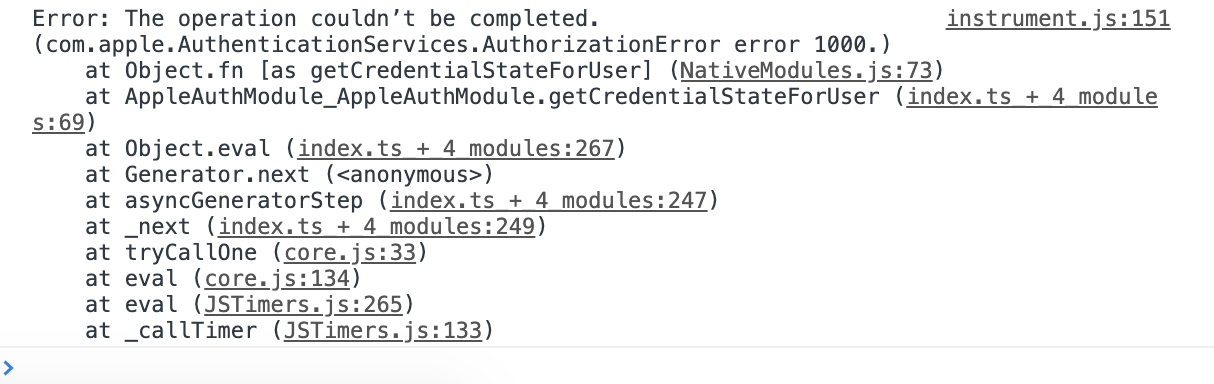
React-native-apple-authentication: appleAuth.getCredentialStateForUser giving error code =1000
please help when ever am calling this function this error pop up
  const credentialState = await appleAuth.getCredentialStateForUser(
    user
  );
 fareszoghbi1
All 5 comments
Open Xcode and add Sign In With Apple in ( Signing & Capabilities )
 lucasferreiraestevam
on 24 Jan 2020
lucasferreiraestevam
on 24 Jan 2020
getting same error
[Error: The operation couldn’t be completed. (com.apple.AuthenticationServices.AuthorizationError error 1000.)]
"Sign In With Apple" enabled in Xcode
 Desintegrator
on 21 Feb 2020
Desintegrator
on 21 Feb 2020
I had the same issue, and I have solved it by adding the capability to Xcode
press on your project name in xcode,
then press on the tab 'Signup & capabilities',
then press '+ Capability' and add 'sign up with apple'
 QaysTrad
on 24 Feb 2020
QaysTrad
on 24 Feb 2020
👍5
🎉2
This appears to be project setup error. Discussion can continue but it is not actionable for the module
 mikehardy
on 2 May 2020
mikehardy
on 2 May 2020
Tried everything, cleaned project, reinstalled all dependencies and still same...


    const appleAuthRequestResponse = await appleAuth.performRequest({
        requestedOperation: AppleAuthRequestOperation.LOGIN,
        requestedScopes: [AppleAuthRequestScope.EMAIL, AppleAuthRequestScope.FULL_NAME],
    });

    console.dir(appleAuthRequestResponse);

    const credentialState = await appleAuth.getCredentialStateForUser(appleAuthRequestResponse.user);

    console.dir(credentialState);
 Natteke
on 25 May 2020
Natteke
on 25 May 2020
Was this page helpful?
0 / 5 - 0 ratings
Related issues
 thinnakrit
·
3Comments
thinnakrit
·
3Comments
 doublelam
·
9Comments
doublelam
·
9Comments
 aqib1604
·
6Comments
aqib1604
·
6Comments
 vanminhnguyenbmt
·
7Comments
vanminhnguyenbmt
·
7Comments
 dburdan
·
6Comments
dburdan
·
6Comments
Most helpful comment
I had the same issue, and I have solved it by adding the capability to Xcode
press on your project name in xcode,
then press on the tab 'Signup & capabilities',
then press '+ Capability' and add 'sign up with apple'