React-native-apple-authentication: Apple login with 'Hide My Email' does not return the mirror email generated by Apple
I have a problem. I don't know if it is an issue or not. Recently Apple made an update that allows user to hide their email by generating a new email that forwards all emails to the hidden one. My problem is when I try to performRequest:
const appleAuthRequestResponse = await appleAuth.performRequest({
requestedOperation: AppleAuthRequestOperation.LOGIN,
requestedScopes: [AppleAuthRequestScope.EMAIL, AppleAuthRequestScope.FULL_NAME],
});
The response should contain user's email and it is null. The same request works perfectly for 'Share my email' option. I think that in appleAuthRequestResponse.email should be the hidden email, as it is the shared one. Am I wrong?
 CristianHatz
All 18 comments
I found the mirror email by decoding identityToken with JWT, if someone has the same issue.
CristianHatz
on 7 Apr 2020
Interesting! I suppose firebase does this automagically as they just show up for me (after firebase digestion/regurgitation). This seems like something maybe worth documenting - if you want to give that a shot the github web UI makes doing pull requests for text files really simple by taking care of all the fork/branch stuff for you in the background
 mikehardy
on 7 Apr 2020
mikehardy
on 7 Apr 2020
With no reproduction or logs there is not much we can do, but I will happily reopen this with actionable information, and of course conversation can always continue
Just want to set the tone in this repo for an issues list that is in control and doesn't have non-actionable stuff
mikehardy
on 2 May 2020
Hey @mikehardy . I have the same error in my application. When I use hide email, the email return null and that happen on simulator and physical device.
`
const appleAuthRequestResponse = await appleAuth.performRequest({
requestedOperation: AppleAuthRequestOperation.LOGIN,
requestedScopes: [AppleAuthRequestScope.EMAIL, AppleAuthRequestScope.FULL_NAME],
});
console.log("appleAuthRequestResponse " , appleAuthRequestResponse)
`
The result.
authorizationCode: "c2ff4e630479d4a68943d080338d42b4e.0.nrv..."
authorizedScopes: []
email: null
fullName:
familyName: "Morgado"
givenName: "Guilherme"
middleName: null
namePrefix: null
nameSuffix: null
nickname: null
identityToken: "eyJraWQiOiJlWGF1bm1MIiwiYWxnIjoiUl..."
realUserStatus: 1
state: null
user: "001576.1a6d722fe8cf40748af4fbee..."
I have am another application that have the same problem, but this work using the Firebase (The email is returned on userCredential ) .
      const appleCredential = firebase.auth.AppleAuthProvider.credential(identityToken, nonce);
      const userCredential = await firebase.auth().signInWithCredential(appleCredential);
"@invertase/react-native-apple-authentication": "^0.2.0",
"react-native": "0.61.5",
I tested in iPhone X and simulator iPhone 11 PRO (13.4.1)
 MorgadoKnivet
on 19 May 2020
MorgadoKnivet
on 19 May 2020
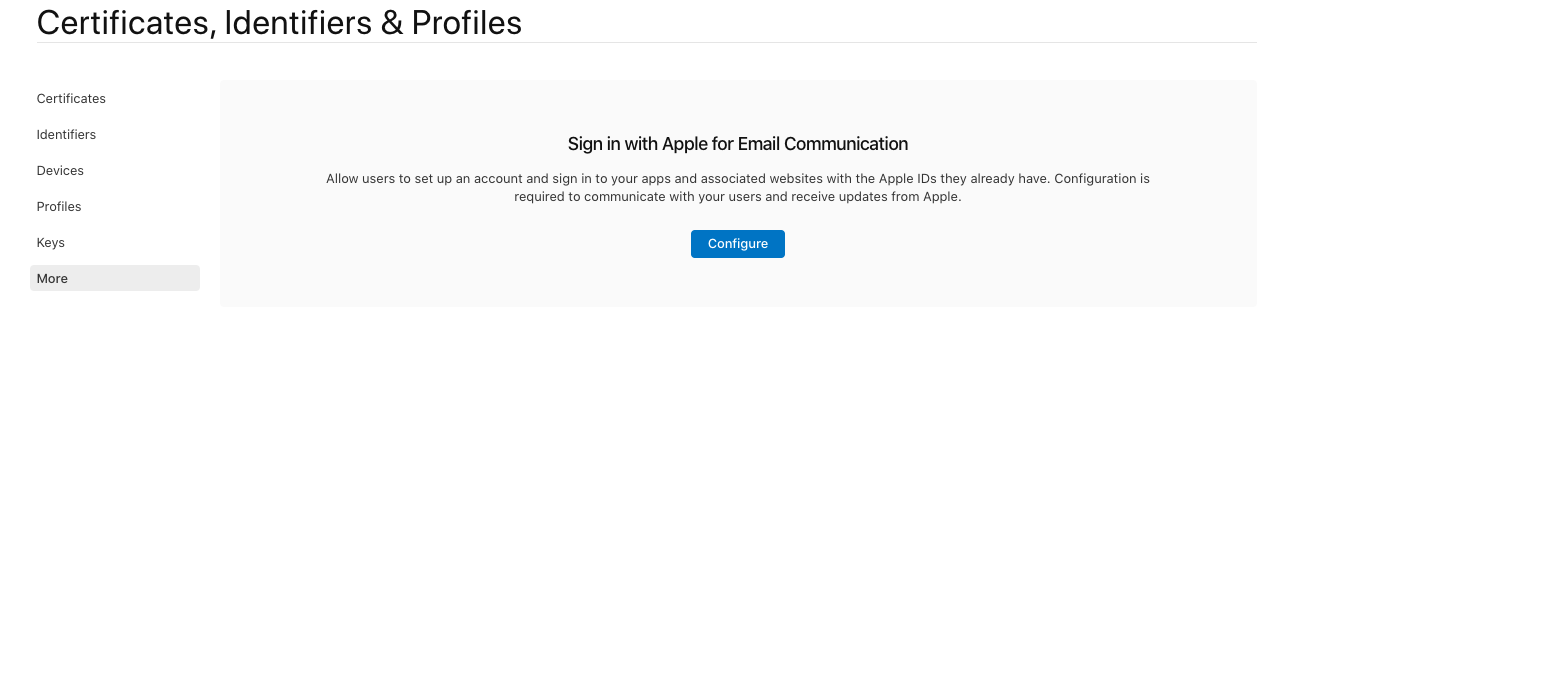
I didn't configure "Sign in with Apple for Email Communication " In the projects I said before
MorgadoKnivet
on 19 May 2020
Interesting - @MorgadoKnivet - are you saying that in the project using firebase where you get the apple relay emails populated, you have sign in with apple for email communication configured, and the one you don't get the email for, you do not have sign in with apple for email communication configured?
If that's correct, then we have a strong suspect for the root cause - it's probably sign in with apple for email communication
If that is incorrect, then firebase is getting the email somehow and that's the thing to figure out
mikehardy
on 19 May 2020
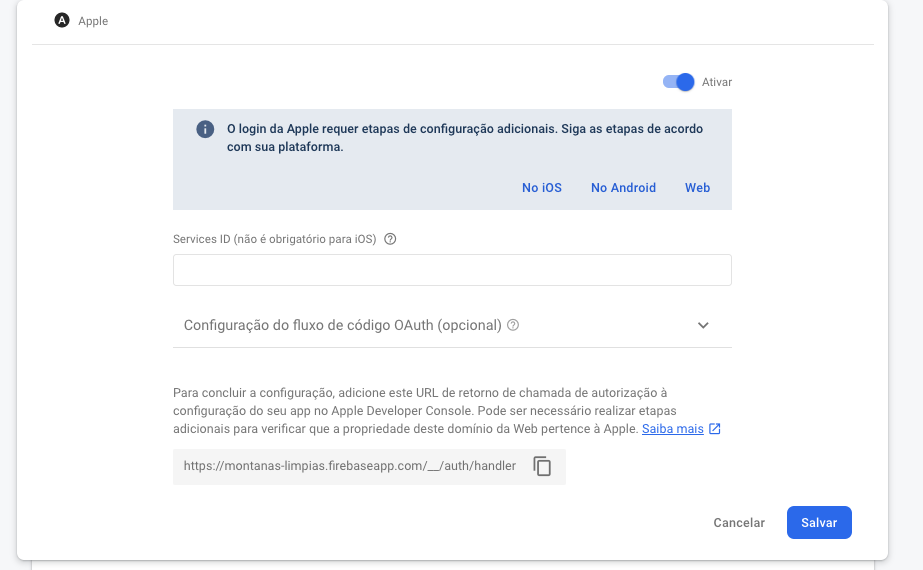
I didn't configure sign in with apple for email communication on any projects.
A exemple where the hide email working using react-native-apple-authentication and react-native-firebase

MorgadoKnivet
on 19 May 2020
That is what I see on my firebase project, but I have email configured. So it seems the variable is firebase or not. What is firebase doing on their side to pull the apple relay email for the "hide email" users?
mikehardy
on 19 May 2020
I didn't configure nothing. It's firebase default configuration
MorgadoKnivet
on 19 May 2020
Likewise, I didn't either. So how are they doing it? That's the answer to the "how can I do it" question. I don't have that answer but their auth code is open source in the SDK at least
mikehardy
on 19 May 2020
I will try to configure the "sign in with apple for email communication"
MorgadoKnivet
on 19 May 2020
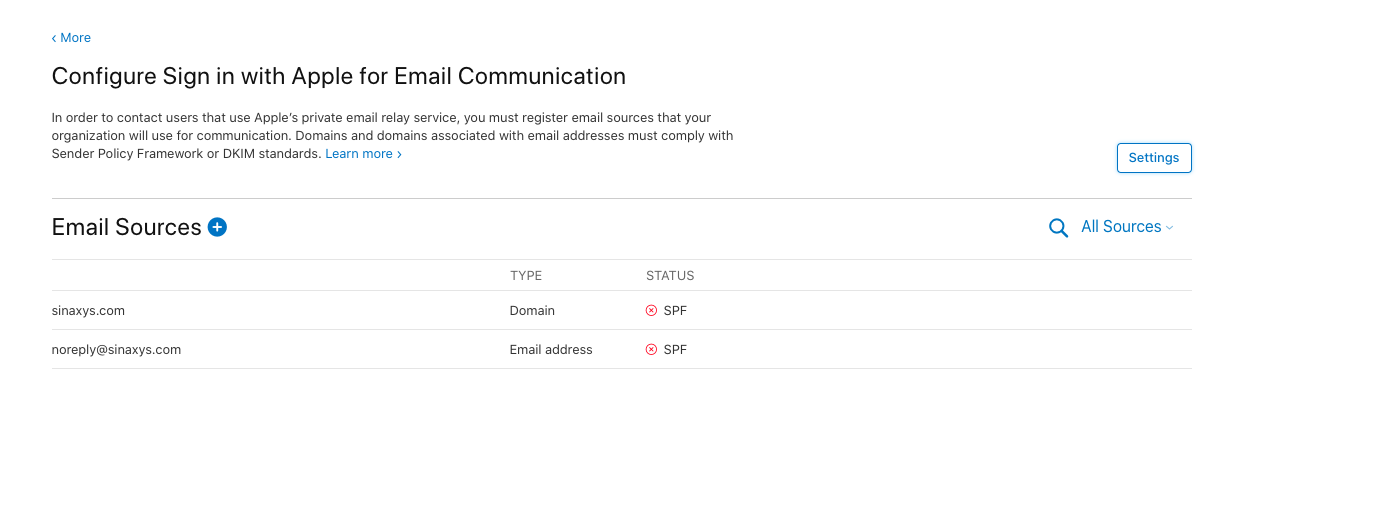
Hey @mikehardy. We configured The Sign in with Apple for Email Communication. Unfortunately We could not configure the SPF. Even with this configuration done, the email keeps returning null.
MorgadoKnivet
on 26 May 2020
I noticed something similar, slightly related. Maybe this will help.
I use firebase but this might be a general thing
- if a user without a firebase auth entry in firebase that has never used apple sign in uses apple sign in the first time? I get their email
- if I delete the firebase auth account, on a user that has used apple sign in before, and they sign in again? I do not get their email. But firebase auth knows it!? (they remember it? no idea)
- if I delete the firebase auth account, on a user that has used apple sign in before, and they go into iOS account settings and remove the app from apple sign-in, then they use apple sign-in again? I get the email
Test: remove the app from the apple account in account preferences, then try sign-in to your app again, see if you get the email. I bet you do
What to do then? I'm not sure, I use firebase auth and they just remembered the email and gave it to me, how, I don't know, perhaps by persisting the uid from first response forever and it matches again afterwards?, I don't know.
mikehardy
on 26 May 2020
Hello anyone still facing this issue? When I sign in with Apple and use "Hide My Email" its gives email as null. I read the whole thread but couldn't get the concrete answer.
 maulikdhameliya
on 8 Sep 2020
maulikdhameliya
on 8 Sep 2020
When users sign in on my app the first time with hide my email I get the privacy relay email.
Every single time a user signs after the first time, you should expect null, according to the API documentation from Apple.
mikehardy
on 8 Sep 2020
hi, i upgrade my project from 0.60 to 0.63.4 and also upgrade the version of the apple signin package and implemented the new steps of the doc and now it doesn't bring me email when I sign with firebase, why ?
as a result, in firebase it adds me the authentication but without email, therefore it gives me error
 marquina-abreu
on 19 Jan 2021
marquina-abreu
on 19 Jan 2021

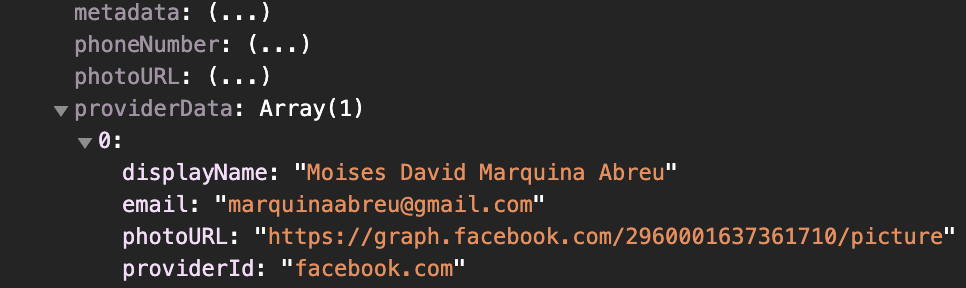
On facebook if you bring me EMAIL but with apple signin EMAIL is null
marquina-abreu
on 19 Jan 2021
and this object does not contain the property EMAIL.
const dataDecode = jwtDecode(appleAuthRequestResponse.identityToken);
 console.log('DATA DECODE ', dataDecode)
Related issues
 kp654321
·
9Comments
kp654321
·
9Comments
 VictorKolb
·
7Comments
VictorKolb
·
7Comments
 DIGITALSQUAD
·
5Comments
DIGITALSQUAD
·
5Comments
 fareszoghbi1
·
5Comments
fareszoghbi1
·
5Comments
 kaankarakas
·
9Comments
kaankarakas
·
9Comments
Most helpful comment
I found the mirror email by decoding identityToken with JWT, if someone has the same issue.