React-native-app-auth: linker command failed - ld: library not found for -lAppAuth
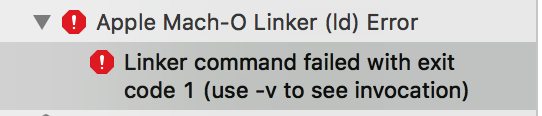

ld: warning: directory not found for option '-L/Users/brkrtp/Library/Developer/Xcode/DerivedData/burak
-ceqbfdnxrzunipektpsftfekkcjw/Build/Products/Debug-iphoneos/AppAuth'
ld: library not found for -lAppAuth
clang: error: linker command failed with exit code 1 (use -v to see invocation)
 brkrtp
All 21 comments
Have you run react-native link? If you have and you're still getting the error, try running the example app and compare its config to yours on Xcode.
 kadikraman
on 19 Jun 2018
kadikraman
on 19 Jun 2018
same i just open Example from xcode and build it and this error
but if i do with react-native run-ios all good
 ButuzGOL
on 26 Jun 2018
ButuzGOL
on 26 Jun 2018
Also i have notice this line
Include libAppAuth as a linked library for your target (in the "General -> Linked Framework and Libraries" section of your target).
but i cant find libAppAuth
ButuzGOL
on 26 Jun 2018
Hmm, I can't reproduce it. Which version of Xcode are you on?
kadikraman
on 26 Jun 2018
Version 9.3
I did a lot of things but those might help
I did two things put
- Pods.xcodeproj in libraries
- did rm -rf ~/Library/Caches/CocoaPods
- pod install
ButuzGOL
on 26 Jun 2018
And it helps but any way my ci still fails appcenter
logs_390.zip
ButuzGOL
on 26 Jun 2018
you can try do git clone from scratch i think you should be able to reproduce
ButuzGOL
on 26 Jun 2018
currently faced with dev pass but on archive fails with this error
ButuzGOL
on 26 Jun 2018
i think the problem with xcode version and pod
in latest xcode and lates pod all should be good but i will recheck it
ButuzGOL
on 3 Jul 2018
Hi, I've just released v3.0.0 of this library, which should fix some weirdness with iOS integration. Could you please try again with the latest version? Note that the code you need to add to AppDelegate has changed.
kadikraman
on 11 Jul 2018
updates on this? same error!
 Jonny993
on 13 Sep 2018
Jonny993
on 13 Sep 2018
@Jonny993 have you run react-native link? What version of React Native and this library are you running?
kadikraman
on 13 Sep 2018

react-native link done, all is working fine when I run the app in the IOS simulator, but problems comes up when I try to build with xcode!
"react-native": "0.56.0"
"react-native-app-auth": "^3.1.0"
Tell me if you need anything else
Jonny993
on 13 Sep 2018
@Jonny993 are you sure you've opened the.xcworkspace file (instead of the .xcodeproj which doesn't see pods)?
kadikraman
on 13 Sep 2018
@Jonny993 are you sure you've opened the
.xcworkspacefile (instead of the.xcodeprojwhich doesn't see pods)?
If I try to open the workspace I don't have any command for build or anything like that.
However, digging more in the problem I found out that XCODE can't find lib named "AppAuth" in the project, so I went to the folder to see which libraries are builded

As I thought, no "AppAuth" lib is present, so I went in the build settings of the project, I searched for "Search Paths" and found out that for debugging and releasing the "Library Search Paths" was pointing to something "wrong" (AppAuth) so I changed the paths for pointing to the correct named lib but error is the same.
Here you can see

Any tip on this would be gold..
Jonny993
on 14 Sep 2018
Ok so, huge update!
I reverted all the updates done yesterday and tried to do the following:
react-native run-ios
Got sured that everything was building and working fine on IOS Simulator
- opened up
.xcworkspacefile instead of.xcodeprojone - this time, I could navigate the xcode project inside the workspace (I couldn't yesterday, don't know why, something was messing up the entire project)
- added team and provisioning profile from
target,generaltab - added
iOS Developerfromproject,Code Signing Identityto everything

- build with CMD+R command the app directly on device
- inserted password when prompted
- done!
So just to clarify.. I was having some kind of problems accessing the .xcworkspace and so I tried to do the build on the .xcodeproj, which gave the errors above.
Cleaned everything up, restarting from yesterday, following the react native guide on how to build the app on device and boom, everything was working fine
Jonny993
on 14 Sep 2018
@Jonny993 awesome! 🎉
.xcworkspace vs .xcodeproj can be super confusing especially if you're new to xcode 😬 - but the rule of thumb in this case is that if you're using pods, you have to open .xcworkspace.
Closing this issue as although you weren't the original author of the issue, I get the feeling the solution is the same.
kadikraman
on 14 Sep 2018
@Jonny993 are you sure you've opened the
.xcworkspacefile (instead of the.xcodeprojwhich doesn't see pods)?
thanks
 chairmin
on 14 May 2019
chairmin
on 14 May 2019
Hey,
I was facing same kind of issue with Microsoft Outlook login SDK integration.I was using Cocoapods to install the libraries.I am getting below error,
ld: library not found for -lMSGraphSDK
clang: error: linker command failed with exit code 1 (use -v to see invocation)
FYI : Podfile is : pod 'MSGraphSDK'
pod 'MSGraphSDK-NXOAuth2Adapter' and XCode version is 10.2.1
Any help would be appreciated !!
Thanks.
 vymallesh
on 20 May 2019
vymallesh
on 20 May 2019
Thank you @Jonny993! it worked for me too!
 lguardado
on 25 Jul 2019
lguardado
on 25 Jul 2019
I still get the same error. I tried everything. It has been a day I'm on this. Please can you help? The solution above did'nt help
 felix-lambert
on 28 Apr 2020
felix-lambert
on 28 Apr 2020
Related issues
 djleonskennedy
·
3Comments
djleonskennedy
·
3Comments
 sattaman
·
3Comments
sattaman
·
3Comments
 baltuonis
·
6Comments
baltuonis
·
6Comments
 Jarzka
·
4Comments
kadikraman
·
3Comments
Jarzka
·
4Comments
kadikraman
·
3Comments
Most helpful comment
@Jonny993 awesome! 🎉
.xcworkspacevs.xcodeprojcan be super confusing especially if you're new to xcode 😬 - but the rule of thumb in this case is that if you're using pods, you have to open.xcworkspace.Closing this issue as although you weren't the original author of the issue, I get the feeling the solution is the same.