React-mapbox-gl: Context is empty
 vitali-yablonski
All 10 comments
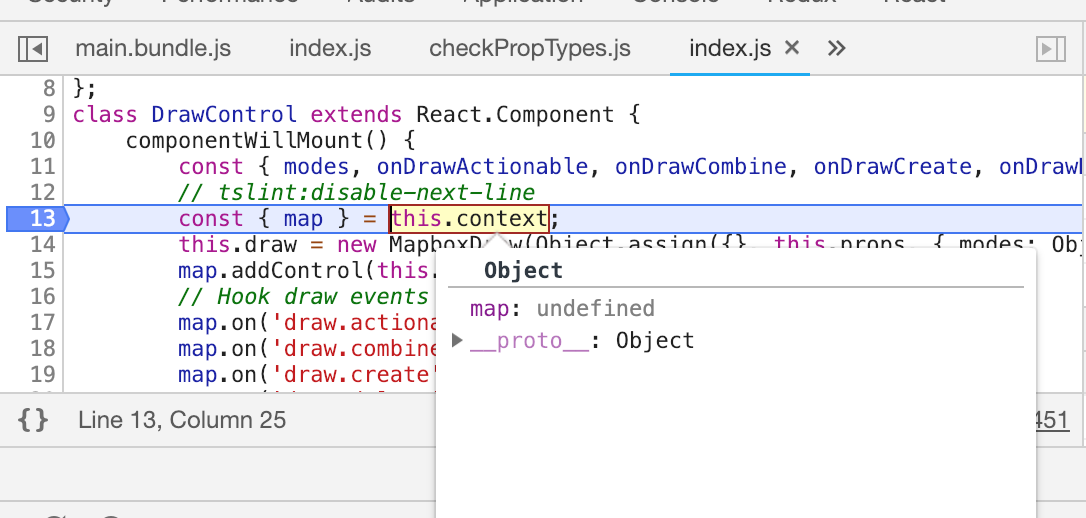
Context is empty fo v4.1.0, but for v3.9.2 does not have the problem.
vitali-yablonski
on 7 Feb 2019
same here… any news on that?
 mdugue
on 5 Mar 2019
mdugue
on 5 Mar 2019
no updates
vitali-yablonski
on 8 Mar 2019
Are you guys using Webpack? I've noticed that the new Context API hasn't been working in our app due to Webpack including React multiple times, which is a problem because React expects React.createContext to be a singleton. Here's the issue I opened on the webpack repo: webpack/webpack#8886
If you guys are experiencing the same problem, can you let the webpack guys know in that issue?
 tstirrat15
on 5 Apr 2019
tstirrat15
on 5 Apr 2019
Starting with #584 there is a separate build for systems using ES modules. If using the default Create-React-App config, then you may need to import withMap or MapContext from react-mapbox-gl/lib-esm/context instead of react-mapbox-gl/lib/context.
Once #654 is resolved, then the correct imports should be used automatically when importing from react-mapbox-gl.
I could be wrong though, and there may be another issue that is causing the context to be empty.
 JoshrlNZ
on 9 Apr 2019
JoshrlNZ
on 9 Apr 2019
After playing around a bit, here's what I found:
// We're in a create-react-app app

import DrawControl from 'react-mapboxl-gl-draw'; // This one is in node_modules
import ContextUsage from './ContextUsage'; // This one is in our project src/

class App extends React.Component {
  render () {
    return (
      <Map style="mapbox://styles/mapbox/streets-v9">
        <ContextUsage />
        <DrawControl position="top-left" />
      </Map>
    );
  }
}
<ContextUsage>works following @JoshrlNZ's idea
Josh you were right, importing from lib-esm instead of lib made it work, see my branch on react-mapbox-gl-draw@4 for a repro.
- However
<DrawControl>still doesn't work
Again, if interested, I just modified DrawControl to use the new Context, compiled it with tsc, and included it in the snippet above. Context is empty.
So I do think there's another issue with context, maybe along the lines of what @tstirrat15 found.
 amaurym
on 10 Apr 2019
amaurym
on 10 Apr 2019
I may be wrong on this, but the issue in that repository might be because of how Node resolves packages.
The built react-mapbox-gl-draw in that example repo tries to import react-mapbox-gl/lib-esm/context.
Node will keep looking for a node_modules folder in parent directories until it finds one.
That file is symlinked to react-mapbox-gl-draw/lib/index.js, so Node will then resolve react-mapbox-gl to react-mapbox-gl-draw/node_modules/react-mapbox-gl.
ContextUsage and App will resolve react-mapbox-gl using the same logic, but Node will find react-mapbox-gl-draw/examples/node_modules/react-mapbox-gl instead.
Node will only use modules as a singleton if they resolve to the same file.
This means DrawControl will get a different instance of MapContext from the other two, and context objects have to be the same to be linked correctly.
Just for testing, you can change the example project to use the current version of react-mapbox-gl-draw instead of the symlinked file, and then replace the package in node-modules with the new version. This way everything will resolve to one node_modules folder.
Although, I'm worried that users could end up using the lib version of react-mapbox-gl instead of lib-esm, which could result in your DrawControl not using the same context again.
It may be safer for libraries to wait until react-mapbox-gl exports the context itself as part of #654, or could use some further investigation.
JoshrlNZ
on 13 Apr 2019
@JoshrlNZ you were right. I refactored https://github.com/amaurymartiny/react-mapbox-gl-draw 's example app to use the same node_modules as the lib, and everything works.
With #654 everyone should do import { MapContext } from 'react-mapbox-gl'. Imo it's safe to close this issue now.
amaurym
on 16 May 2019
MapContext was officially exported in v4.4.0 from the main entrypoint, is there still a problem with this?
 mklopets
on 14 Jul 2019
mklopets
on 14 Jul 2019
@mklopets as I mentioned in #663, I fixed that issue with the help of this thread, by replacing all bad imports statement throughout my codebase with imports pointing only to the main entrypoint, i.e. 'react-mapbox-gl'. I think we could add a warning in the doc to indicate that importing everything from 'react-mapbox-gl' is really important. Doing otherwise may cause runtime errors.
Both #663 and #691 could be closed as they share the same root cause.
 Stouffi
on 17 Jul 2019
Stouffi
on 17 Jul 2019
Related issues
 radeno
·
13Comments
radeno
·
13Comments
 z0d14c
·
15Comments
z0d14c
·
15Comments
 kaligrafy
·
19Comments
kaligrafy
·
19Comments
 jonheslop
·
24Comments
jonheslop
·
24Comments
 kylebebak
·
12Comments
kylebebak
·
12Comments
Most helpful comment
Starting with #584 there is a separate build for systems using ES modules. If using the default Create-React-App config, then you may need to import
withMaporMapContextfromreact-mapbox-gl/lib-esm/contextinstead ofreact-mapbox-gl/lib/context.Once #654 is resolved, then the correct imports should be used automatically when importing from
react-mapbox-gl.I could be wrong though, and there may be another issue that is causing the context to be empty.