React-mapbox-gl: Need More Explanation About GeoJSONLayer Line
Hi guys!
Can You Send Me A Full Example?
 loverdeveloper
All 2 comments
Hi, there's a GeoJSON example in our examples. You can run the examples locally or view the live demos at http://alex3165.github.io/react-mapbox-gl/demos (find geojson-data in the menu there).
Edit: that one doesn't actually have a LineString – I'll update this answer. Sorry for the premature closing of the issue.
 mklopets
on 5 Sep 2018
mklopets
on 5 Sep 2018
import * as React from 'react';
import ReactMapboxGl, { GeoJSONLayer } from 'react-mapbox-gl';
import * as MapboxGL from 'mapbox-gl';

// tslint:disable-next-line:no-var-requires
const { token, styles } = require('./config.json');

const Map = ReactMapboxGl({ accessToken: token });

const geojson = {
  'type': 'FeatureCollection',
  'features': [
    {
      'type': 'Feature',
      'geometry': {
        'type': 'LineString',
        'coordinates': [
          [
            -77.01239,
            38.91275
          ],
          [
            -77.00405,
            38.93800
          ]
        ]
      }
    }
  ]
};

const linePaint: MapboxGL.LinePaint = {
  'line-color': 'red',
  'line-width': 5
};

class GeoJsonLayer extends React.Component {
  private center = [-77.01239, 38.91275];

  public render() {
    return (
      <Map
        style={styles.dark}
        center={this.center}
        containerStyle={mapStyle}
      >
        <GeoJSONLayer
          data={geojson}
          linePaint={linePaint}
        />
      </Map>
    );
  }
}

export default GeoJsonLayer;
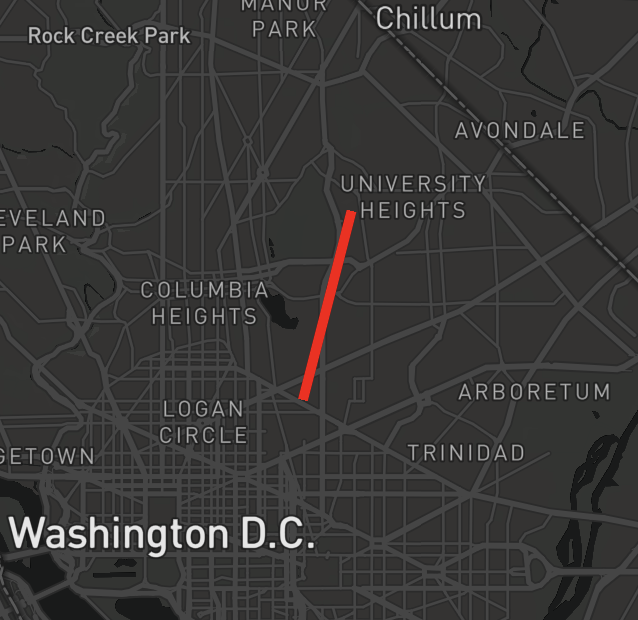
draws a line like this:
mklopets
on 5 Sep 2018
👍8
Was this page helpful?
0 / 5 - 0 ratings
Related issues
 iop280
·
21Comments
iop280
·
21Comments
 kaligrafy
·
19Comments
kaligrafy
·
19Comments
 evanfrawley
·
26Comments
evanfrawley
·
26Comments
 kylebebak
·
12Comments
kylebebak
·
12Comments
 piaaaac
·
13Comments
piaaaac
·
13Comments
Most helpful comment
draws a line like this:
