I noticed that when you use popups the text is blurry, this is even noticeable on
https://uber.github.io/react-map-gl/#/Examples/markers-popups
Is this fixable at all?
 lolcookie
All 6 comments

From my observation, it it not blurry, as shown above. Or are you considering this blurry?
 xintongxia
on 29 Sep 2019
xintongxia
on 29 Sep 2019
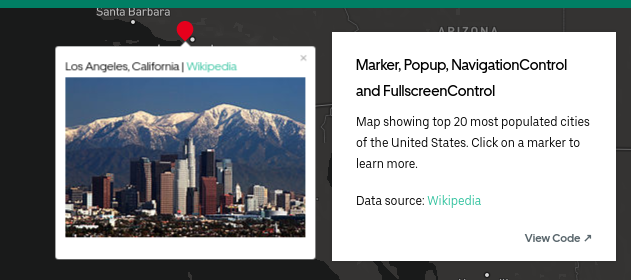
This may only be an issue with low dpi displays 🤔
lolcookie
on 1 Oct 2019
I have the same issue
 rilexus
on 1 Oct 2019
rilexus
on 1 Oct 2019
See related issue and potential solution on the Mapbox repo: https://github.com/mapbox/mapbox-gl-js/pull/3258
 pzi
on 3 Oct 2019
pzi
on 3 Oct 2019
The problem is here: https://github.com/uber/react-map-gl/blob/master/src/components/popup.js#L141-L142
// this would greatly improve the issue
const style = {
      position: 'absolute',
      transform: `
        translate(${-anchorPosition.x * 100}%, ${-anchorPosition.y * 100}%)
        translate(${Math.round(left)}px, ${Math.round(top)}px)
      `,
      display: undefined,
      zIndex: undefined
    };
The core issue is positioning on decimal pixels. If you are on an older laptop (like a 2012 MacBook Air) you will have a 1x display, so half-pixels cause a huge problem. But even on brand new laptops that have 2x and 3x displays the partial pixels will cause the overlays to look blurry.
To "really" fix the issue you'd need to know the offsetHeight and offsetWidth as well as the window.devicePixelRatio to determine if the transform would cause the element to be rendered "blurry".
const pixelRatio = window.devicePixelRatio || 1

const crispPixel = (size) => Math.round(size * pixelRatio) / pixelRatio

const crispPercentage = (el, percentage, dimension = 'width') => {
  const origSize = dimension === 'width' ? el.offsetWidth : el.offsetHeight
  return (crispPixel(percentage / 100 * origSize) / origSize) * 100
}

const el = this._containerRef.current

const style = {
      position: 'absolute',
      transform: `
        translate(${crispPercentage(el, -anchorPosition.x * 100)}%, ${crispPercentage(el, -anchorPosition.y * 100, 'height')}%)
        translate(${crispPixel(left)}px, ${crispPixel(top)}px)
      `,
      display: undefined,
      zIndex: undefined
    };
 heygrady
on 31 Jan 2020
heygrady
on 31 Jan 2020
@heygrady Thank you. Would you open a PR with this fix?
 Pessimistress
on 4 Feb 2020
Pessimistress
on 4 Feb 2020
Related issues
 AriLFrankel
·
3Comments
AriLFrankel
·
3Comments
 huaying
·
5Comments
huaying
·
5Comments
 jenyeeiam
·
4Comments
jenyeeiam
·
4Comments
 sicksid
·
3Comments
sicksid
·
3Comments
 bogdancaspar
·
3Comments
bogdancaspar
·
3Comments
Most helpful comment
The problem is here: https://github.com/uber/react-map-gl/blob/master/src/components/popup.js#L141-L142
The core issue is positioning on decimal pixels. If you are on an older laptop (like a 2012 MacBook Air) you will have a 1x display, so half-pixels cause a huge problem. But even on brand new laptops that have 2x and 3x displays the partial pixels will cause the overlays to look blurry.
To "really" fix the issue you'd need to know the
offsetHeightandoffsetWidthas well as thewindow.devicePixelRatioto determine if the transform would cause the element to be rendered "blurry".