React-map-gl: Built failed with babel-loader 8.x | babel 7.x?
Hi,
I am using webpack 4 | babel-loader 8.x | babel 7.x and I can't do import ReactMapGL from 'react-map-gl'. (webpack 4 | babel-loader 7.x | babel 7.x works just fine)
It gave the error below:
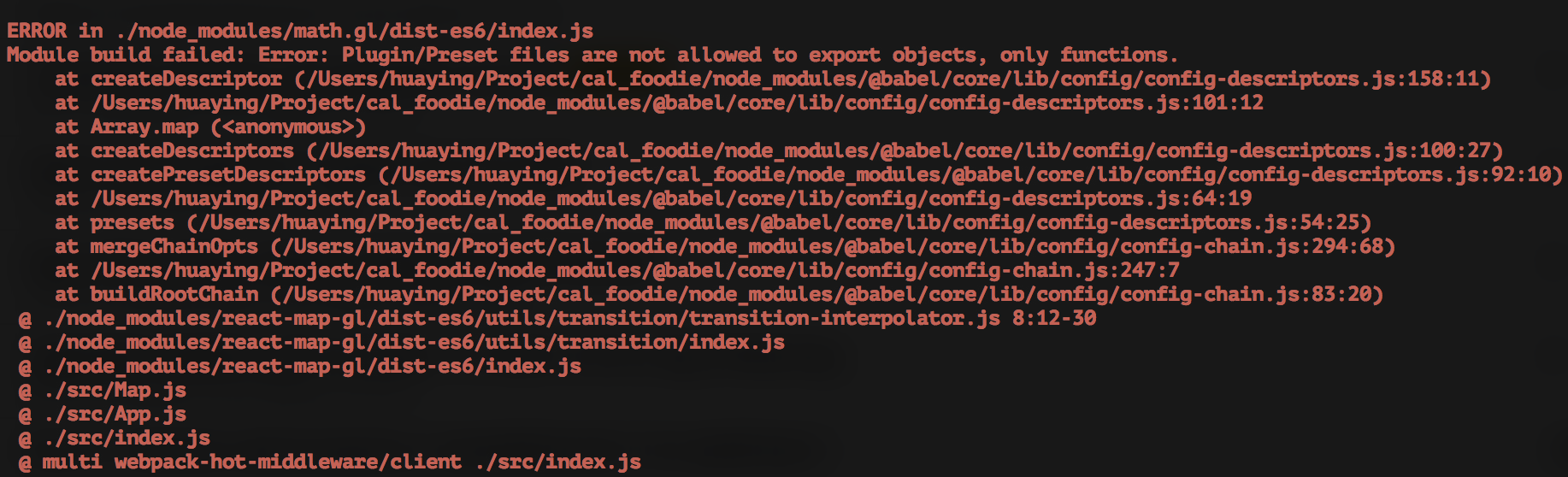
Has anyone met the same error?
// My webpack config
const path = require('path');
const HtmlWebpackPlugin = require('html-webpack-plugin');
const webpack = require('webpack');

module.exports = {
  mode: 'development',
  entry: {
    app: [
      'webpack-hot-middleware/client',
      './src/index.js',
    ]
  },
  output: {
    filename: '[name].bundle.js',
    path: path.resolve(__dirname, 'dist'),
    publicPath: '/'
  },
  devtool: 'inline-source-map',
  plugins: [
    new HtmlWebpackPlugin({
      template: 'template/index.html',
    }),
    new webpack.NamedModulesPlugin(),
    new webpack.HotModuleReplacementPlugin(),
    new webpack.NoEmitOnErrorsPlugin(),
  ],
  module: {
    rules: [
      {
        test: /\.js$/,
        exclude: /\/node_modules$/,
        use: {
          loader: 'babel-loader',
          options: {
            presets: [
              '@babel/preset-env',
              '@babel/preset-react',
              '@babel/preset-stage-2'
            ]
          }
        }
      },
      {
        test: /\.css$/,
        use: [
          'style-loader',
          'css-loader'
        ]
      },
      {
        test: /\.(png|svg|jpg|gif)$/,
        use: [
          'file-loader'
        ]
      }
    ]
  }
};
Thanks,
 huaying
All 5 comments
@ibgreen
 Pessimistress
on 17 Apr 2018
Pessimistress
on 17 Apr 2018
babel-loader 8 is still in beta. Not all existing webpack loaders are compatible with it. Suggest you comment out your loaders one by one to see which one is breaking.
Also, I opened a PR that upgrades react-map-gl main example to babel-loader 8, so hopefully that can be a working baseline.
 ibgreen
on 17 Apr 2018
ibgreen
on 17 Apr 2018
npm i babel-loader@7 -D
 luoquan1982
on 26 Sep 2018
luoquan1982
on 26 Sep 2018
👍14
❤6
🎉3
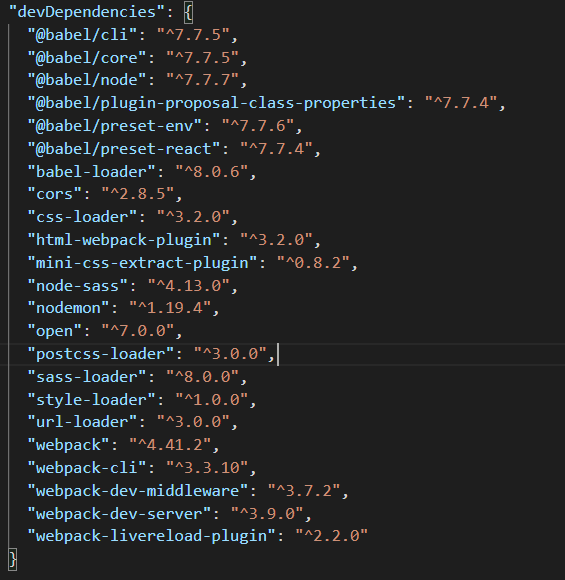
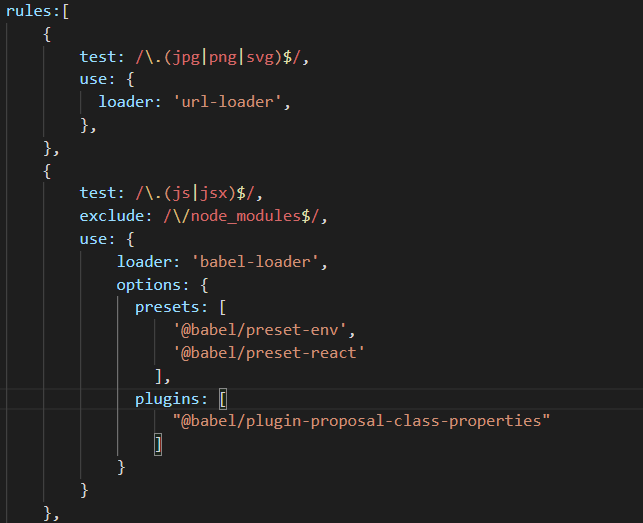
my solution was this
 ElkinCp5
on 22 Jan 2020
ElkinCp5
on 22 Jan 2020
my solution was this
Where do I put the rules? I am new to web dev.
 afif-malghani
on 25 Jan 2020
afif-malghani
on 25 Jan 2020
Was this page helpful?
0 / 5 - 0 ratings
Related issues
 jwarning
·
17Comments
jwarning
·
17Comments
 lopno
·
11Comments
lopno
·
11Comments
 schlesingermatthias
·
14Comments
ibgreen
·
27Comments
schlesingermatthias
·
14Comments
ibgreen
·
27Comments
 sachinshettigar
·
13Comments
sachinshettigar
·
13Comments
Most helpful comment
npm i babel-loader@7 -D