React-map-gl: Let map fill container (width: 100%, height: 100%)
Hi,
I'm trying to let my map fill the entire container width. But setting the width and height to '100%' yields a 'Not a number exception'.
<ReactMapGL
    {...viewport}
    onViewportChange={this.viewportChange}>
        <DeckGL
            {...viewport}
            layers={layers}
            initialViewState={initialViewState}>
              {children}
       </DeckGL>
</ReactMapGL>
with viewport being like the following it works:
viewport: {
    width: 400px,
    height: 400px,
    latitude: 47.65,
    longitude: 14,
    zoom: 8.5,
    maxZoom: 16,
    pitch: 50,
    bearing: 0,
},
But I'd need to set the viewport's width and height to 100% but that does not work. How can I get the map to fill the available space?
 schlesingermatthias
All 14 comments
I don't know if Mapbox natively supports it. When I went to look for a solution to this problem, I found #135, which recommended using a third-party library, and the solution we ended up going with was react-sizeme, since the packages referenced in that issue are unmaintained.
It seems to work okay. I agree that it would be nice to have a map that fills the given space without this workaround. I don't know how easy/difficult it would be to implement in the current architecture.
 tstirrat15
on 27 Sep 2018
tstirrat15
on 27 Sep 2018
Based on the css in this Mapbox example, the underlying Mapbox JS doesn't care about the size of the div you attach it to.
@ the maintainers, is there a reason that the viewport is written this way rather than filling its space?
tstirrat15
on 27 Sep 2018
mapbox-gl offers the option of auto-resize, but react-map-gl has not supported it for legacy reasons: (1) we always track map size with Redux in our own applications (2) detecting container resize was considered expensive when the library was initially created.
This is a planned feature for v4.0, see https://github.com/uber/react-map-gl/issues/561
 Pessimistress
on 27 Sep 2018
Pessimistress
on 27 Sep 2018
This is landed by https://github.com/uber/react-map-gl/pull/614 and published in v4.0.0-beta.1
Pessimistress
on 18 Oct 2018
Initially I implemented this by setting a ref on the container element and updating the height and width in componentDidMount().
<div className="widget-content" ref={ (mapWidgetElement) => this.mapWidgetElement = mapWidgetElement}>
<ReactMapGL
{...this.state.mapViewport}
onViewportChange={(viewport) => this.setState({mapViewport: viewport})}
/>
</div>
componentDidMount() {
this.setState({
mapViewport: {
height: this.mapWidgetElement.clientHeight,
width: this.mapWidgetElement.clientWidth,
latitude: 37.7577,
longitude: -122.4376,
zoom: 8
}
})
}
Now this should work... but it doesn't. It results in:
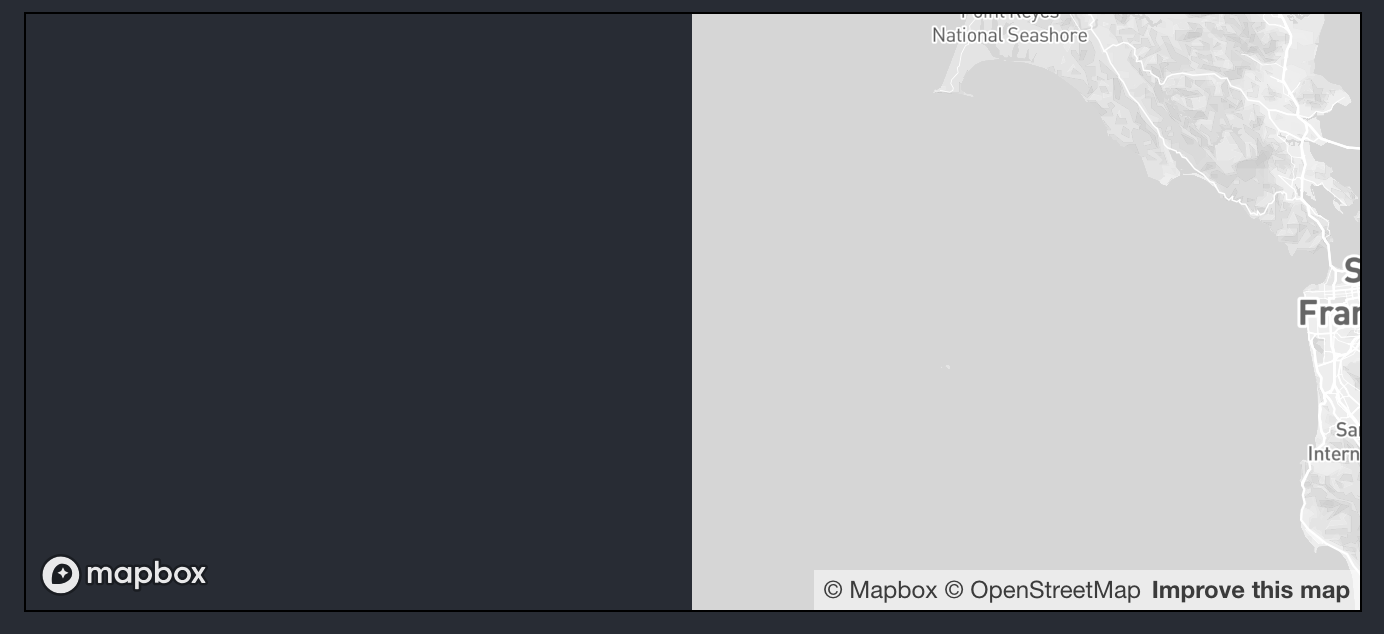
As indicated by the mapbox logo in the lower left corner the canvas does indeed fill the whole container element, but the map does not :(
I read this thread and thought #614 would fix it for me. Sadly I'm seeing the same issue sans me manually keeping track of the size of the parent element.
Any ideas that might fix this?
 andheiberg
on 2 Nov 2018
andheiberg
on 2 Nov 2018
Turns out it's simply some missing css:
mapboxgl-canvas {
left: 0;
}
I don't know if it's too late to say this or if you would want to use this attribute but try height: 100%, but adding to the css
'position: absolute'
 daktirr
on 3 Feb 2019
daktirr
on 3 Feb 2019
Here is how we solved it, thanks to https://github.com/uber/react-map-gl/pull/614#issuecomment-443796015
class Map extends Component {
  state = {
    viewport: {
    },
  }

  onViewportChange = viewport => {
    const {width, height, ...etc} = viewport
    this.setState({viewport: etc})
  }

  render () {
    const {
      viewport,
    } = this.state
    return (
      <ReactMapGL
        width='100%'
        height='100%'
        {...viewport}
        mapboxApiAccessToken={process.env.REACT_APP_MAPBOX_TOKEN}
        onViewportChange={viewport => this.onViewportChange(viewport)}
      />
    )
  }
}
 invisibleroads
on 11 Feb 2019
invisibleroads
on 11 Feb 2019
The 'Starting with a Map' from the Vis Academy tutorial made by the Uber team guided me through solving this issue.
 iccir919
on 22 Apr 2019
iccir919
on 22 Apr 2019
The 'Starting with a Map' from the Vis Academy tutorial made by the Uber team guided me through solving this issue.
Isn't this using the width of the window? What if you need to fit to the size of a container for layout purposes?
 nrgapple
on 29 Aug 2019
nrgapple
on 29 Aug 2019
You could do that:
function App() {
  const [view, setViewport] = useState({
    latitude: 37.7577,
    longitude: -122.4376,
    zoom: 8
  });
  return (
    <ReactMapGL
      {...view}
      width="100vw" // It always override the view(viewport) width state.
      height="100vh" // It always override the view(viewport) height state.
      mapboxApiAccessToken={process.env.REACT_APP_MAPBOX_TOKEN}
      onViewportChange={viewport => setViewport(viewport)}
    />
  );
}
The problem occurs when width and height are defined from onViewportChange callback, you only need to remove them and then implement your own way to handle width and height props.
 dapx
on 18 Sep 2019
dapx
on 18 Sep 2019
@dapx You can use useRef for parent and do as you do:
1) In parent component (and pass targetRef to parent, i.e. ref={targetRef}):
  const targetRef = useRef();
  const [dimensions, setDimensions] = useState({
    width: 0,
    height: 0,
  });
  useLayoutEffect(() => {
    if (targetRef.current) {
      setDimensions({
        width: targetRef.current.offsetWidth,
        height: targetRef.current.offsetHeight,
      });
    }
  }, []);
2) In map component (when passed parentDimensions prop from parent):
export default function CarMap({ parentDimensions }) {
  const [viewport, setViewport] = useState({
    latitude: 45.4211,
    longitude: -75.6903,
    zoom: 10,
  });

  return (
    <div>
      <ReactMapGL
        {...viewport}
        mapboxApiAccessToken={process.env.MAPBOX_TOKEN}
        width={`${parentDimensions.width}px`}
        height={`${parentDimensions.height}px`}
        onViewportChange={viewport => {
          setViewport(viewport);
        }}
         ...
      </ReactMapGL>
    </div>
  );
}
 Absvep
on 2 Nov 2019
Absvep
on 2 Nov 2019
Just set style={{position:relative}} on your container and do
 <ReactMapGL
        {...viewport}
        width="100%"
        height="100%"
        onViewportChange={viewport => setViewport(viewport)}
         />
For me it was a combination of getting the component size, using percentages on the map size, as well as the wrapper being relative.
E.g. this is how I have my map setup to handle a variable width sidebar
  const contentRef = React.useRef(null);
  const { width: contentWidth, height: contentHeight } = useSize(contentRef);
  const { width: windowWidth, height: windowHeight } = useWindowDimensions();

  // redraw if the map's parent container or window changes size
  React.useEffect(() => {
    redrawMap();
  }, [contentWidth, contentHeight, windowWidth, windowHeight]);

  function redrawMap() {
    setViewport({
      ...viewport,
    });
  }

<div className="flex h-full max-h-screen max-w-screen">

{/* sidebar */}
...

{/* map */}
<div className="flex-grow h-full">
  <div className="relative w-full h-full" ref={contentRef}>
    <ReactMapGL
      {...viewport}
      width="100%"
      height="100%"
      mapStyle="mapbox://styles/mapbox/satellite-streets-v11"
      mapboxApiAccessToken={SOLACE_SE_MAPBOX_API_KEY}
      onViewportChange={(nextViewport) => setViewport(nextViewport)}
      >
          ...
      </ReactMapGL
  </div>
</div>
useSize here: https://github.com/rehooks/component-size/blob/master/index.js
useWindowDimensions here: https://usehooks.com/useWindowSize/
 andrew-j-roberts
on 11 Jun 2020
andrew-j-roberts
on 11 Jun 2020
Related issues
 woss
·
20Comments
woss
·
20Comments
 rimig
·
11Comments
rimig
·
11Comments
 jwarning
·
17Comments
jwarning
·
17Comments
 macobo
·
14Comments
macobo
·
14Comments
 xintongxia
·
17Comments
xintongxia
·
17Comments
Most helpful comment
Here is how we solved it, thanks to https://github.com/uber/react-map-gl/pull/614#issuecomment-443796015