React-map-gl: Div with click event inside Popup
I'm trying to add a div (with an svg inside), which has an onClick event, to a Popup. This div has an onClick event that toggles the state of the element inside the Popup. It simply expands that element and adds some text.
To illustrate:
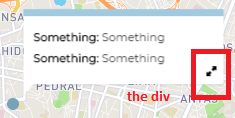
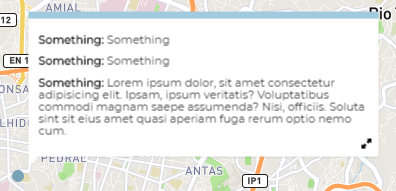
The issue I'm facing is that when clicking on that div, both the div's click event and the popup close event are triggered, which results in closing the popup and expanding the element simultaneously. I'd like to keep the close event behaviour of the Popup (close the Popup when clicking inside it) but stop that same event if the click is on the div.
The first approach I've tried was to use stopPropagationand nativeEvent.stopImmediatePropagation() on the div's click event but this didn't work. I believe this is caused by the way React handles events.
The second approach is to change the onClose function of the Popup element (which would require me to fork react-map-gl) to pass in the event as an argument and check what element triggered the click event (eg: checking evt.srcEvent.srcElement). This would allow me to either close the Popup or trigger the state change accordingly.
Is there any other way to accomplish this ?
I'm using react-map-gl version 5.0.7
 nip10
nip10
All 4 comments
Do you have a codesandbox.io that replicates this problem? I'd be happy to have a look if you can provide one.
 mayteio
on 1 Aug 2019
mayteio
on 1 Aug 2019
Do you have a codesandbox.io that replicates this problem? I'd be happy to have a look if you can provide one.
Sure.
I'm not sure how to share a working version but all I did was change this line:
to this
this.props.onClose(evt);
nip10
on 1 Aug 2019
@nip10 The event handling doesn't go through React's event stack, so stopPropagation would not work.
It might be easier for you to disable Popup's closeOnClick and attach a click event to your own div instead:
<Popup closeOnclick={false} captureClick={true} ...>
  <div onClick={this._onClosePopup}>
    <button onClick={this._expandPopup} />
  </div>
</Popup>
 Pessimistress
on 1 Aug 2019
Pessimistress
on 1 Aug 2019
It might be easier for you to disable Popup's
closeOnClickand attach a click event to your own div instead
Yep, that worked fine! I had a feeling I was overcomplicating this. Also added a stopPropagation in the button click to stop the event from bubbling up. Thanks
nip10
on 2 Aug 2019
Related issues
 miccferr
·
4Comments
miccferr
·
4Comments
 MattReimer
·
3Comments
MattReimer
·
3Comments
 huaying
·
5Comments
huaying
·
5Comments
 iamvdo
·
5Comments
iamvdo
·
5Comments
 xoddong
·
4Comments
xoddong
·
4Comments
Most helpful comment
@nip10 The event handling doesn't go through React's event stack, so
stopPropagationwould not work.It might be easier for you to disable Popup's
closeOnClickand attach a click event to your own div instead: