React-map-gl: Mapbox-GL component doesn't update after state change made in the store
I'm learning to use mapbox with react.js.For my little projet i've setup some actions that updated my coordinates.I can log the new state that i get as props through mapStateToProps.But when i try update the existing state,i doesn't work and gives errors.
Here is my code :
import ReactMapGL, { FlyToInterpolator } from "react-map-gl";
import React, { Component } from "react";
import "mapbox-gl/dist/mapbox-gl.css";

//redux side
import { connect } from 'react-redux';

const MAPBOX_TOKEN ="pk.mysecretapikey";

const mapStyle = "mapbox://styles/jlmbaka/cjvf1uy761fo41fp8ksoil15x";

const INITIAL_STATE = {
      height: "100vh",
      width: "100%",
      longitude: 23.071374,
      latitude: -3.6116245,
      zoom: 1.33
  };

const DRC_MAP = {
    longitude: 23.656,
    latitude: -2.88,
    zoom: 4.3,
    curve: 1,
    speed: 0.7,
    easing: t => t * (2 - t)
  }

let count=0;
class Map extends Component{
  state = {
        viewport:INITIAL_STATE,
        country:DRC_MAP
    };


    _goToViewport = args => {
      // console.log("goToViewport() : ", this.state.viewport);
      this._handleViewportChange({
        zoom: 0,
        transitionInterpolator: new FlyToInterpolator(),
        transitionDuration: 3000,
        ...args
      });
    };

    _flyToDRC = () => {
      console.log("flyToDRC - "+count);
      setTimeout(() => {
        this._goToViewport(
          this.state.country
        );
      }, 1000);
    };

    _flyToInfrastructure = ()=>{}

    _handleLoad = () => this._flyToDRC();

    _handleViewportChange = viewport => {
      console.log("_handleViewPortChange() - "+count);
      this.setState({viewport})
    };


     componentWillReceiveProps(nextProps){
       if (nextProps.energy !== null) {
         window.alert("update state");
         const latitude = nextProps.energy[0].geometry.coordinates[0];
         const longitude = nextProps.energy[0].geometry.coordinates[1];
         this.setState({
           viewport: this.state.country
         });
         this.setState({
           country: {
             ...this.state.country,
             latitude,
             longitude
           }
         }, () =>{
            console.log("Actual state : ", this.state);
         } );

       }
     }

    render(){
      return (
        <ReactMapGL
          mapboxApiAccessToken={MAPBOX_TOKEN}
          mapStyle={mapStyle}
          onViewportChange={this._handleViewportChange}
          onLoad={this._handleLoad}
          {...this.state.viewport}
        />
      );
    };
}


const mapStateToProps = (state) => {
  const { energy } = state;
  return {
    energy:energy
  }
}

export default connect(mapStateToProps,null)(Map);
in the above code : the INITIAL_STATE const has got the values that determine how my map will initially render and DRC_MAP const is how my map will rendered after the animated zoom.ANd i've used those 2 const to initialize my state that are viewport and country.With thhis every works fine and as expected wthout any problem.But in my componeneWillReceiveProps method,i'm cheking if there is some new value for my state like this : if(this.props.energy!==null){ so tru,i make the update so that the zoomed version or actual map becomes the the initial viewport and they new values the target area to show and zoom in the map and then the animation can occur again,and that where nothing is working i cannot size view with animation based on new values.How can i make this work?Thank you
 jochri3
All 9 comments
Your component may be receiving updates from the store before the map is initialised. Also, react-map-gl doesn't take curve, speed or easing parameters for transitions.
Can I suggest using hooks to listen for changes?
import React, {useEffect, useState} from 'react';
import {useSelector} from "react-redux";
import ReactMapGL, {FlyToInterpolator} from 'react-map-gl';

// this is what state gets initialised as
const INITIAL_STATE = {
  height: "100vh",
  width: "100%",
  longitude: 23.071374,
  latitude: -3.6116245,
  zoom: 1.33
};

// this is the state we want to merge when the map has loaded.
// note the transition* parameters.
const DRC_MAP = {
  longitude: 23.656,
  latitude: -2.88,
  zoom: 4.3,
  transitionDuration: 500,
  transitionInterpolator: new FlyToInterpolator(),
  transitionEasing: t => t * (2 - t)
}

const MAPBOX_TOKEN ="pk.mysecretapikey";
const mapStyle = "mapbox://styles/jlmbaka/cjvf1uy761fo41fp8ksoil15x";

// classes are so 2018 - use functional components instead!
export default function Map(){
  // get the value from your redux store
  const {energy} = useSelector(state => state);

  // to use when the map is loaded and to change the viewport
  const [loaded, setLoaded] = useState(false);
  const [country, setCountry] = useState({});
  const [viewport, setViewport] = useState(INITIAL_STATE);

  // this effect will fire whenever energy or loaded changes.
  useEffect(() => {
    // all these checks are to ensure this doesn't fire unnecessarily.
    // you may have to add more in the future.
    if(
      loaded &&
      energy !== null &&
      energy.length > 0 &&
      viewport.longitude !== DRC_MAP.longitude &&
      viewport.latitude !== DRC_MAP.latitude
    ){
      // when loaded = true, energy is available, and we're not already
      // at the DRC_MAP lon/lat, merge the old viewport (including height/width)
      // with the new DRC viewport.
      setViewport(oldViewport => ({
        ...oldViewport,
        ...DRC_MAP
      }))

      // optionally, you can get the lon/lat from energy to use in this transition.
      // it's not clear why you're storing it in the state under country.
      const [longitude, latitude] = energy[0].geometry.coordinates;
      setCountry({longitude, latitude});
    }
  }, [energy, loaded, DRC_MAP]);

  return (
        <ReactMapGL
          mapboxApiAccessToken={MAPBOX_TOKEN}
          mapStyle={mapStyle}
          onViewportChange={nextViewport => setViewport(nextViewport)}
          onLoad={() => setLoaded(true)}
          {...viewport}
        />
  )
}
Note in the above, useEffect will fire three plus times, but that's OK:
- on initial load (
energy,loadedandDRC_MAPare all initialised) - when
energybecomes available (store has been filled with, I am assuming, AJAX content) - when loaded is set to true from the
react-map-glonLoad function. - any time 'energy' updates in the store.
References:
- Intro to React Hooks (this will change your life/DX)
react-reduxhooks- Viewport transitions in
react-map-gl
edit: added const [viewport, setViewport] = useState(INITIAL_STATE);, removed this.state and corrected references to loaded.
 mayteio
on 9 Jul 2019
mayteio
on 9 Jul 2019
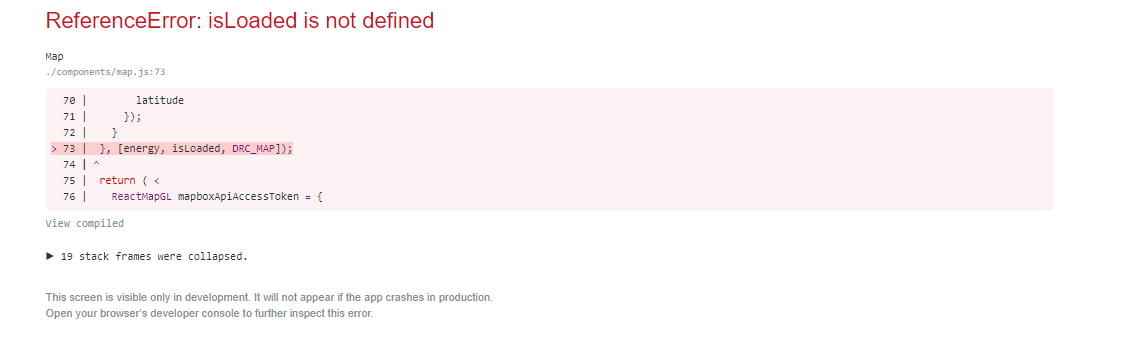
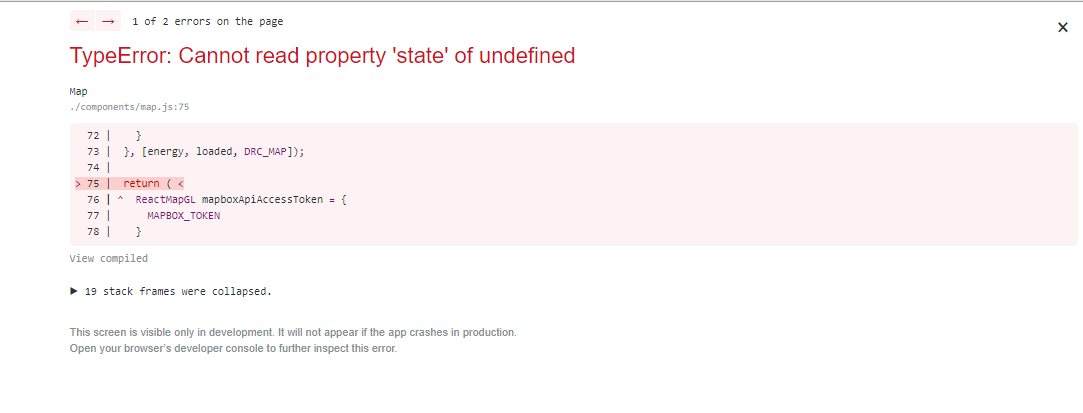
I'm getting the first error with isLoading,for that i've understood that the the name of the state wasn't the same as in the hook definition where it's loaded and after change,i got the 2nd error.
In your code you use the following syntax in the return statement this.state.viewport but we are in a functional component and we cannot use this,also nowhere you've defined the viewport peace of state
jochri3
on 10 Jul 2019
Spot on! Good pickup, you know we need a hook for viewport. I wrote that directly into github and didn't run it. I've updated my comment.
const [viewport, setViewport] = useState(INITIAL_STATE);...this.state.viewport=>...viewport(I copied & pasted from your code, my bad).- corrected vars
isLoaded=>loaded. - removed longitude, latitude from within setViewport (wasn't initialised yet)
- check for specific lon/lat within useEffect, because
viewport !== DRC_MAP
If it still doesn't work, put it in a code sandbox and I will see what's wrong.
mayteio
on 10 Jul 2019
Thank you very much,but i've even lost the initial behavior
With my code(class based Map component),after page loads there is an intial view and then it zooms to DRCongo map.And all that happen before i press any button.Here is how was before with my code.So what i wanted i that when i click on the button Inga1 or Inga2 it can change the view according to the selected place coordinates
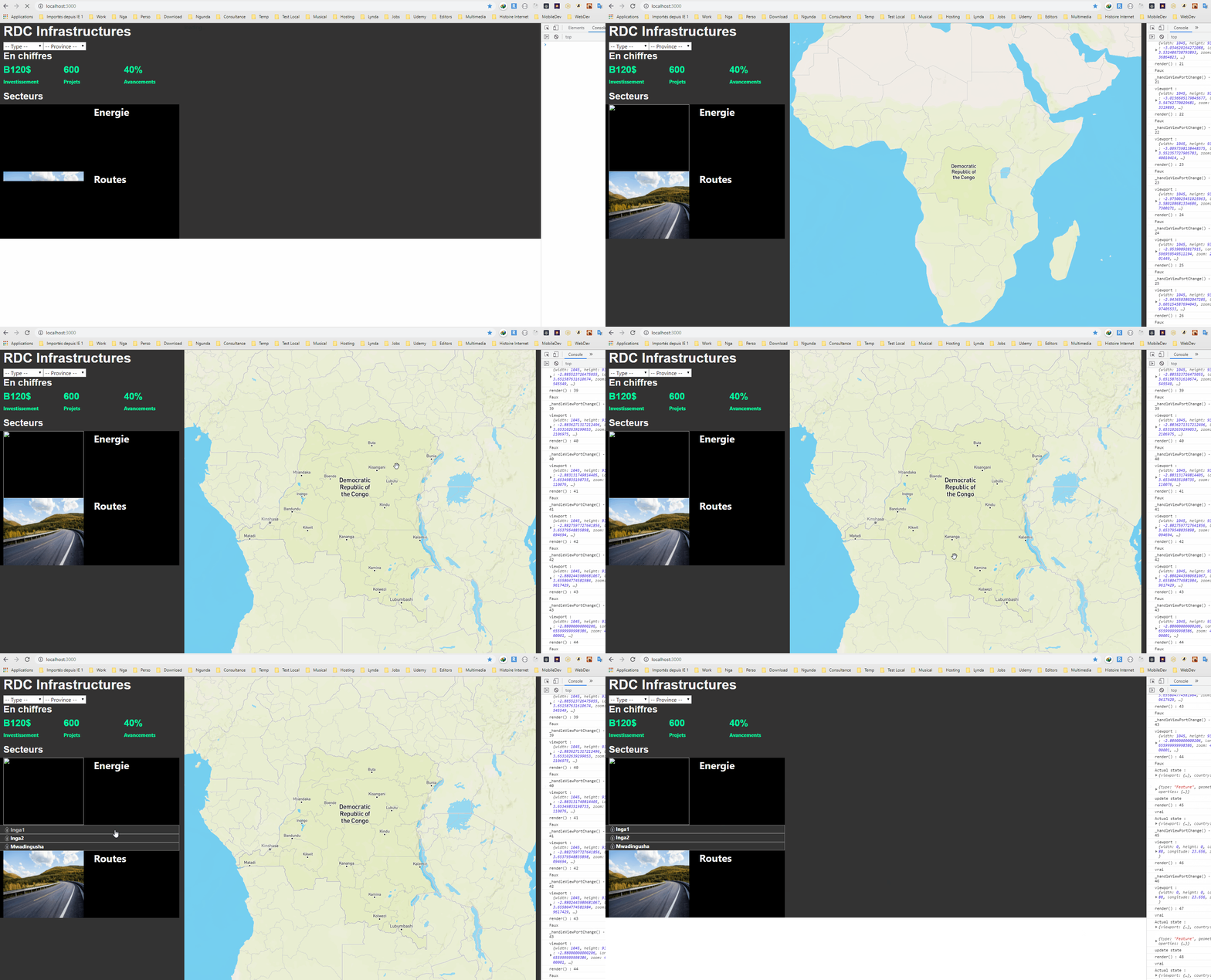
And i've tried what you've suggested(with Hooks),and the behaviour has changed,see what it does now:
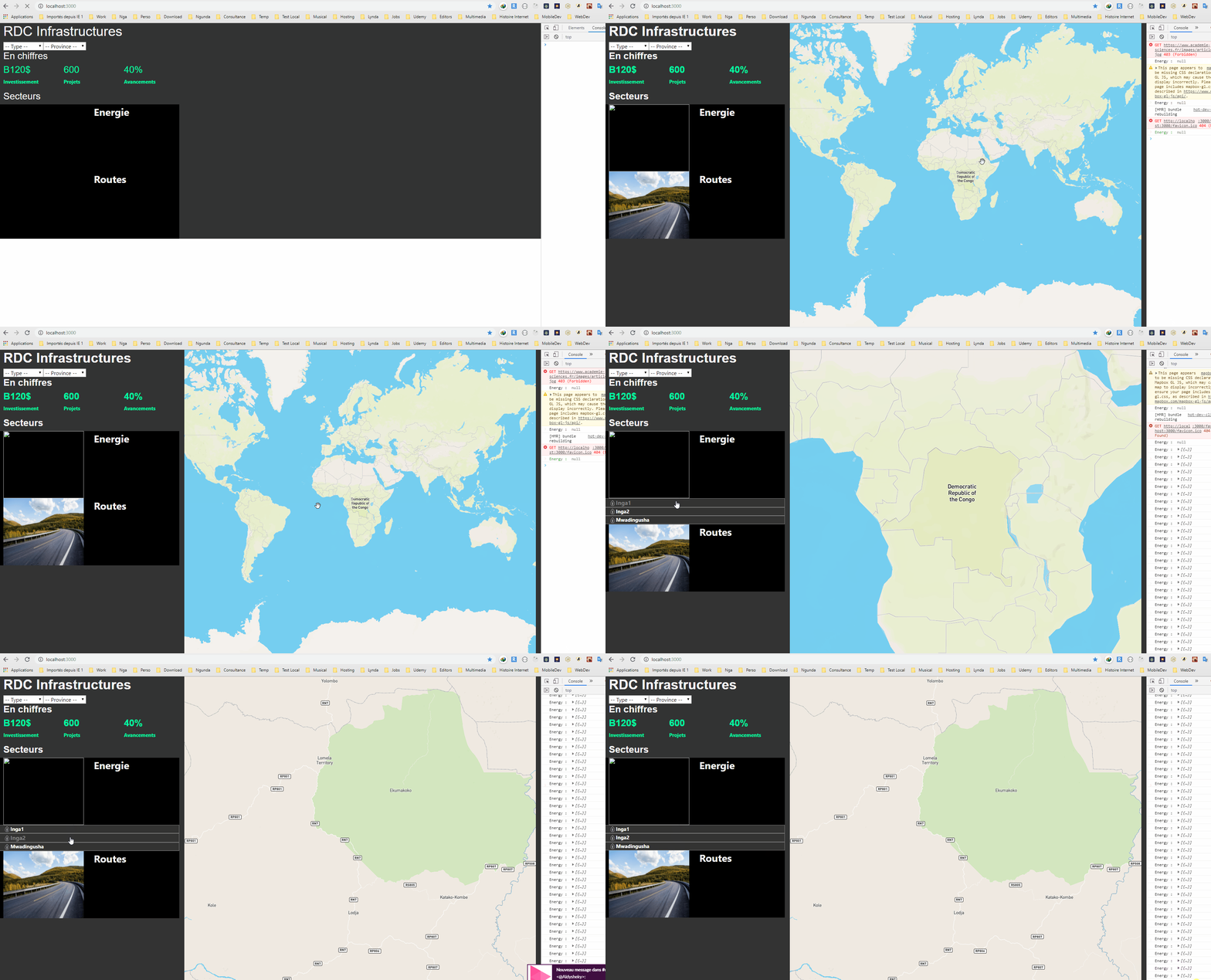
My goal is to have the following behavior:
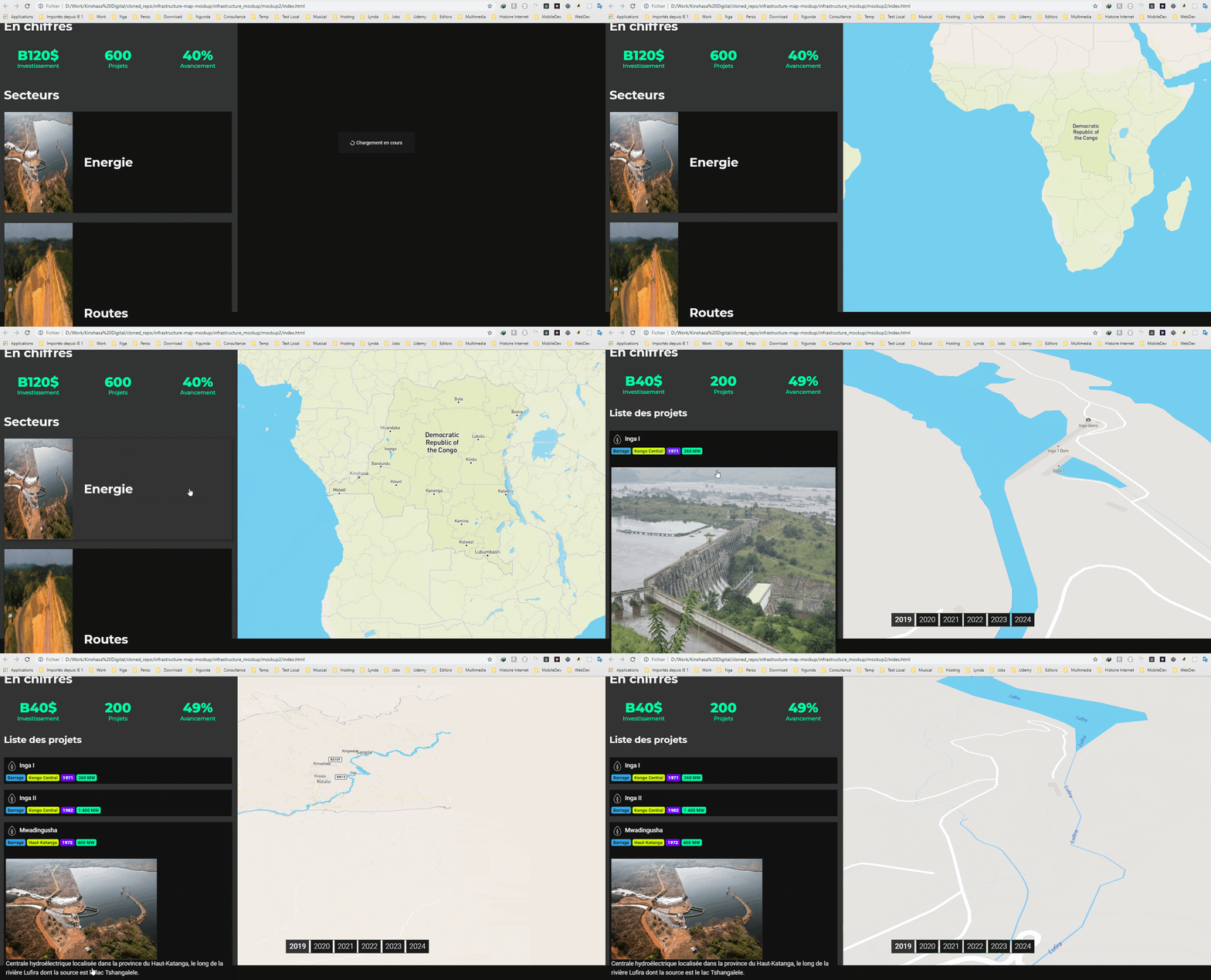
With that one i used jquery longtime a go before learning react,it was so simple to bind click with viewport which are concepts very different from react states,props concpts
jochri3
on 10 Jul 2019
Gotcha, we can do that easily. Please put it into a codesandbox.io and I can have a further look for you.
mayteio
on 10 Jul 2019
Here is the link of the project in Sandbox : https://codesandbox.io/s/h61mk
Thank you very much
jochri3
on 12 Jul 2019
Hey @jochri3 is this closer to what you were after?
I didn't fully understand the architecture of your project so we were putting the code in the wrong place.
The solution is to move setViewport controls into a context provider. Then we can inject it anywhere we wish, for example, in SectorDetails.js where the click happens.
Files I changed:
MapProvider.jsx- create provider that includesviewport,setViewportandonLoad(for initial animation)- _app.js - Wrap app in
MapProvider - map.js - remove all code we worked on before and just get
viewport,setViewportandonLoadfromMapContext - SectorDetails.jsx - get
setViewportmethod fromMapContext. On click, get the coordinates and pass tosetViewport.
The main thing to take away is that we have moved the viewport control out of the map component and into a context that anywhere can use. You can use this context in "Routes" for example to move the map the same way.
Advanced note: It's important to note that by doing this, any component using MapProvider will re-render as the map moves, because the viewport value is constantly changing. Not to worry - I have provided a withMap HOC in MapProvider.jsx. By passing the context values as props (instead of using useContext within render) we can wrap the component in React.memo and manually check for prop updates we care about. I have just returned true in this case, but in future if props.God changes, for example, you might want to re-render.
Let me know if this doesn't make sense.
mayteio
on 14 Jul 2019
Thank you very much @mateiyo,this was the behavior that i wanted
jochri3
on 17 Jul 2019
Thanks guys, this is helpful. I would like to do the same with my app. Any way to look at the code?
https://timelinesapp.netlify.app/timeline/5fc21eec73137500159ca01d
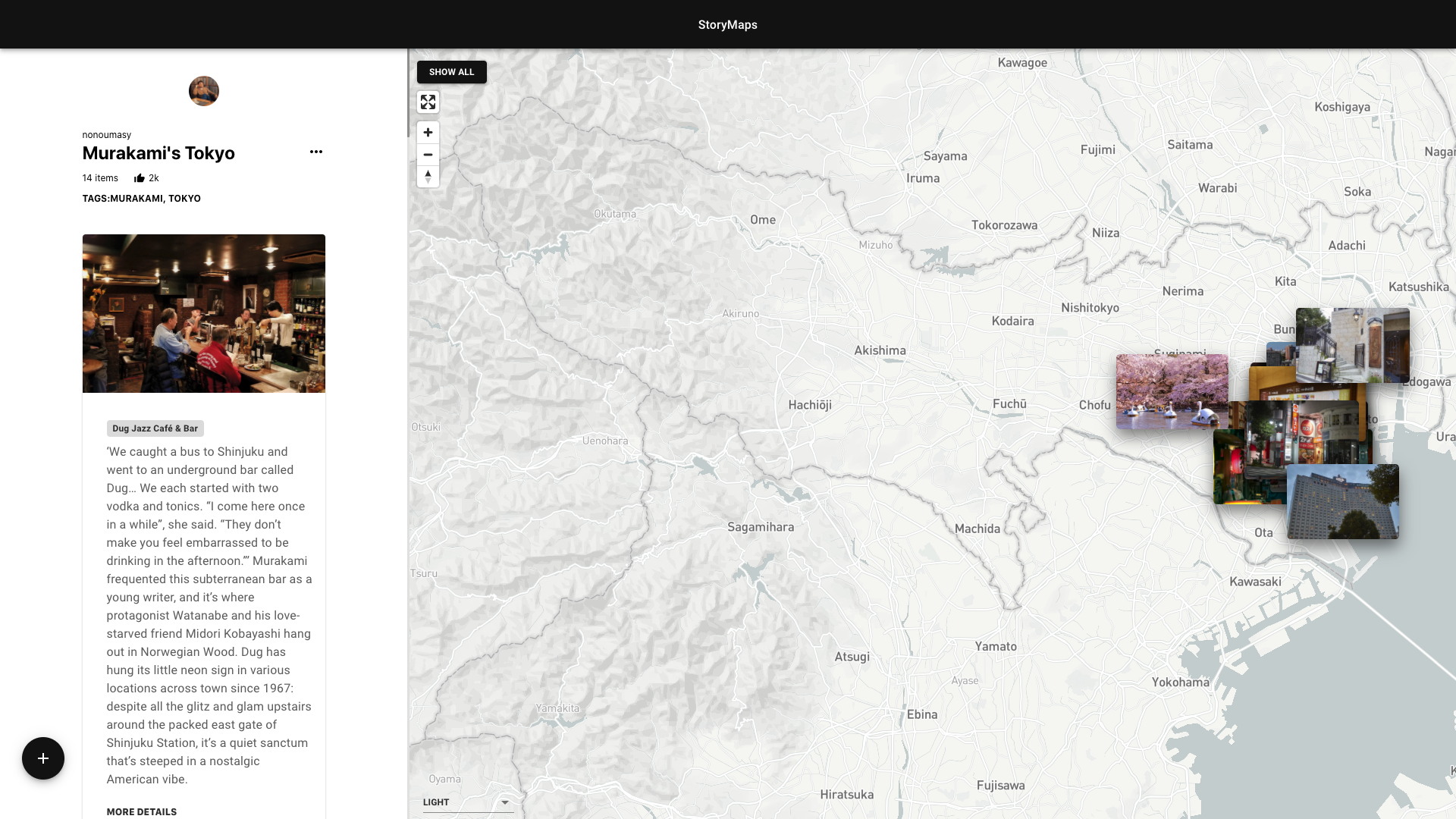
When I click an item on the sidebar, it will zoom into that marker on the mapView. I was thinking of doing this using Context but was unsure. Thanks for confirming. Also, I didn't know about the re-render. It makes sense that when they talk about re-render they usually talk about useMemo hook.
How would you do the opposite behavior though: User clicks on a marker on the mapView and the item is scrollToCenter on the sidebar? Would it be the same, just have as part of the onClick handler on the marker to include a scrollToCenter to the same id? Thanks again. I'll try to implement this today.
 nonoumasy
on 29 Nov 2020
nonoumasy
on 29 Nov 2020
Related issues
 joseomar10
·
5Comments
joseomar10
·
5Comments
 xoddong
·
4Comments
xoddong
·
4Comments
 iamvdo
·
5Comments
iamvdo
·
5Comments
 cjmyles
·
3Comments
cjmyles
·
3Comments
 SethHamilton
·
3Comments
SethHamilton
·
3Comments
Most helpful comment
Hey @jochri3 is this closer to what you were after?
I didn't fully understand the architecture of your project so we were putting the code in the wrong place.
The solution is to move
setViewportcontrols into a context provider. Then we can inject it anywhere we wish, for example, inSectorDetails.jswhere the click happens.Files I changed:
MapProvider.jsx- create provider that includesviewport,setViewportandonLoad(for initial animation)MapProviderviewport,setViewportandonLoadfromMapContextsetViewportmethod fromMapContext. On click, get the coordinates and pass tosetViewport.The main thing to take away is that we have moved the viewport control out of the map component and into a context that anywhere can use. You can use this context in "Routes" for example to move the map the same way.
Advanced note: It's important to note that by doing this, any component using MapProvider will re-render as the map moves, because the
viewportvalue is constantly changing. Not to worry - I have provided awithMapHOC inMapProvider.jsx. By passing the context values as props (instead of using useContext within render) we can wrap the component inReact.memoand manually check for prop updates we care about. I have just returned true in this case, but in future ifprops.Godchanges, for example, you might want to re-render.Let me know if this doesn't make sense.