React-joyride: Error positioning elements
Hi, I'm trying to use this great library, but the selected elements position is wrong. I've been digging into the code, and I've found out one of the problems: in Joyride.jsx (line 736), if I replace const winWidth = window.innerWidth; with my custom maximum width (const winWidth = 480; ), the dot pointing to the element is well positioned. I think that this is because of the max-width of my container, set to 480px and centered.
Anyway, the box which should be located over the selected element is still positioned about 650px, when my container has a max-width of 480px.
Do you have any idea of how to solve this?
 msalsas
All 43 comments
I've forked the repo and fixed it with this commit.
Note that there are two changes: getBoundingClientRectFromElement and document.body.clientWidth.
What do you think about a PR? Any suggestion?
msalsas
on 3 Oct 2016
I've fixed the getBoundingClientRectFromElement function with this SO answer. Check this new commit.
msalsas
on 17 Oct 2016
I'm seeing an offset in the position of my Joyride tooltips from the target selectors as well.
The context is that I'm guiding a tour through a modal that's centered on the page absolutely and has a container positioning relative. Joyride lives within this modal anyhow, but it seems like it's applying some styles that are shifting it down and to the right of the element I'd like to target, which makes me think it's overcompensating when calculating the offset because it's not checking parent positioning rules (what it seems like @msalsas is solving in his PR).
 vhmth
on 24 Dec 2016
vhmth
on 24 Dec 2016
I think this is very important. CSS libs like bootstrap set position relative on their column divs and since the beacon is relative to it, instead of the page the top offset is going to be too large.
For example, I have a div that is position relative at ClientRect.top is 135.
My target div is ClientRect.top 670.
The beacon is going to render at 670 + 135 because it is based on the relative box but the measurement to find my button is not relative.
I think you need to use a different method to get the offsetY like element.offsetTop which considers the relative parent.
 styks1987
on 9 Jan 2017
styks1987
on 9 Jan 2017
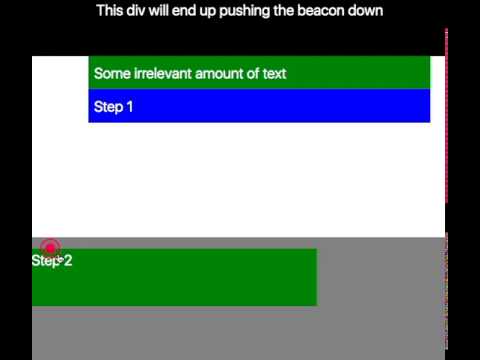
Created a new demo test here
https://github.com/styks1987/react-joyride/commit/cbd499ec088c0be2153dec8c03483b54f2a9da6a
DEMO_DIR=test/demo-relative/ gulp localserver
styks1987
on 10 Jan 2017
This is probably a dumb question, but if the joyride uses position: absolute (meaning isFixed === false), can't we just use offsetLeft and offsetTop?
 IanVS
on 14 Jan 2017
IanVS
on 14 Jan 2017
That looks like it might work, however the tooltip on the first element is off still. Not sure if this is bug or an issue with my demo.
styks1987
on 17 Jan 2017
Is there anything I can do to help fix this? Do you have any current plans or ideas? We really would like to use this (and have started implementing it) but this piece is holding us back on being able to release the tutorials. I don't want to start something if you already have something going. Thanks!
styks1987
on 22 Feb 2017
@styks1987 have you tried forking and using either the fix you proposed in https://github.com/gilbarbara/react-joyride/issues/124#issuecomment-271434049 or perhaps the simpler (but not as robust?) solution I asked about in https://github.com/gilbarbara/react-joyride/issues/124#issuecomment-272635128?
IanVS
on 22 Feb 2017
@styks1987 I'm using this fork which seems to work nice for me.
msalsas
on 22 Feb 2017
@IanVS - Yea, ctrombley's fork fix looks to be exactly what I need. It would be nice to see it brought into the main repo though. I try not to rely on forks because they tend to go stale. I feel his fix is ideal in that you don't have to change much with how things are calculated, you can just specify a different parent.
https://github.com/ctrombley/react-joyride/commit/44eaf3ec51a3b54fd1d798d09775fd7863bddaa1
styks1987
on 22 Feb 2017
@msalsas - Sorry, I did not realize you had a fork. However, I still prefer ctrombley's because his naming is more clear.
getBoundingClientRectFromElement is quite a mouthful.
styks1987
on 22 Feb 2017
@styks1987 - Right, but @ctrombley fork does not work for me. As said before, I think that this is due to the max-width rule that I apply to the main container. If my fork works for you it may be a better solution. Does it?
msalsas
on 22 Feb 2017
Sorry, but how exactly do I run this fix? My issue is https://github.com/gilbarbara/react-joyride/issues/252
and it seems similar to what you guys have experienced. I tried fixing by switching my dependencies in package.json file to both the msalsas and ctrombley forks, but neither works for me. Is there anything I would need to do other that specify the fork (like change some props to the Joyride or change the steps?). Thanks!
 bayweiheng
on 14 Jul 2017
bayweiheng
on 14 Jul 2017
@eternal-echoes What do you see with my fork https://github.com/msalsas/react-joyride
PS: Ensure the package is updated (e.g. deleting it and executing npm install)
msalsas
on 14 Jul 2017
Thanks for the reply!! Actually, I ran a few steps using the original joyride, but when I switched over to your fork, the isFixed steps became as misaligned as the non-Fixed one. Both the isFixed and the non-Fixed ones look like the second picture in my issue now...
I'm just starting out on web development and modifying an existing codebase, so would really really appreciate your kind help sir. My code is at https://github.com/raynoldng/nusmods/tree/development, and it's meant to be a free application to help students in our school build their timetables. The joyride is running at the auto-build timetable tab.
If you could spend a few minutes seeing if the issue is replicated on your side, I would be deeply grateful.
bayweiheng
on 14 Jul 2017
The isFixed prop is from a later commit. I've not merged the last changes, so it won't do anything.
If it helps, the misalignment seems to be caused for the top and left menus. You're maybe rendering the joyride the first time without the menus, and the position it's not correctly calculated.
msalsas
on 14 Jul 2017
Yup, seems like the offsets match up. Any idea how to ensure that the Joyride only renders after the top (navbar) and the left (an AppContainer)? Am currently reading through the code for react-joyride implementation to find out why the isFixed isn't giving me this offset problem.
bayweiheng
on 15 Jul 2017
I fixed the problem - turns out I was using react-routes, and I just shifted the Joyride to the outermost container (with Route /). Probably a ref issue.
bayweiheng
on 15 Jul 2017
@bayweiheng: Thanks for the hint. This basically works, but i don't like it because it breaks my architecture idea. I'd like to add the joyride to a component tree which is a lot deeper in my component structure than the main bootstrap container which adds a margin-left: auto.
@gilbarbara: Do you have any plan for looking into this and probably merging the suggested fix?
 uwolfer
on 21 Nov 2017
uwolfer
on 21 Nov 2017
@uwolfer I'll rewrite this package using Portals. I think this approach is the only way to handle all these z-index problems for good.
 gilbarbara
on 22 Nov 2017
gilbarbara
on 22 Nov 2017
Having a similar problem to this and #252.
Vertical positioning of the hole and tooltip are off by the size of my fixed header/nav (which are outside the React root div, and the total height of which change depending on the viewport size).
I'm also using React Router, so I have multiple joyride components further down the component tree to switch up the steps depending on route. I could in theory move to a single component at the root level like @bayweiheng suggests, but the whole app would still be embedded in a larger site, so I'm not sure that would help. That is, there's no way for me to move the joyride component out to the same DOM level as the header.
Using isFixed does fix the initial positioning, but isn't usable for me due to other z-index problems with the fixed nav and not wanting the overlay hole to move.
Tried both the @msalsas and @ctrombley forks, but neither worked for me - same positioning issues and those forks appear to be pretty far behind. At least one was giving me syntax errors, presumably from using features from a newer commit.
Does anyone have any suggestions on a workaround pending a V2 rewrite by @gilbarbara? Just trying to get my head around understanding what actually causes the alignment issue. I think it would even work for me to just manually subtract 150px or so from the top position for now, but I'm having some trouble figuring out the best spot to apply the offset.
 ashtarcommunications
on 25 Nov 2017
ashtarcommunications
on 25 Nov 2017
hey!
Long overdue but I'm hoping V2 fixes all these positioning issues.
If you're still using this module, please try npm i react-joyride@next
gilbarbara
on 6 Mar 2018
@gilbarbara Hello. I'm having a slightly different positioning issue. The beacons and hole are positioned correctly but my tooltips don't seem to adhere to the step's "position" property. I have one tooltip set to right but always shows on the bottom.
I'm currently on 1.11.4. Is there some trick to getting the tooltip position property to work? Is this a known issue? Is it fixed in v2?
 jamespero
on 7 Mar 2018
jamespero
on 7 Mar 2018
@jamespero I need a demo to see what's going on...
Is there space on the right? The tooltip will prevent the overflow...
gilbarbara
on 7 Mar 2018
@gilbarbara it does appear to be a space available issue. Is there some way via styling attributes that I can specify the width of the tooltip so that it will fit?
jamespero
on 9 Mar 2018
@jamespero you can override the CSS class...
gilbarbara
on 9 Mar 2018
@jamespero I've tried v2 and works even worse than 1.11. This is how it looks like with 1.11:

And this is with v2:

I'll keep investigating.
PS: I had to change selector to target. Are there any other changes to do?
msalsas
on 13 Mar 2018
@msalsas
It's still alpha and I'm updating it constantly.
Can you set up a demo in codesandbox? This would be awesome.
Which version have you installed? Can you try to update it, so the version is bumped to 2.0.0-5 and try to change the scrollParent prop for a step?
[s]
gilbarbara
on 13 Mar 2018
Also, there's a demo here with a few different setups where I'm trying to cover all use cases
gilbarbara
on 13 Mar 2018
@gilbarbara I installed the last one 2.0.0-5.
scrollParent prop for a step? Could you explain it?
Now I see that I can't reproduce the same behaviour at codesandbox because I cannot override the body tag. The problem seems to be that you're adding the element to the end of the body assuming that the body is not restricting the vissibility. I mean, I have these css rules in my app:
body {
    margin: auto;
    max-width: 480px;
    overflow: hidden;
}
If you try to add those rules you'll see the weird positioning.
msalsas
on 13 Mar 2018
Oh, I don't think I'll ever be able to make it work with a modified body style. :/
scrollParent will not work in this case.
gilbarbara
on 13 Mar 2018
@gilbarbara Well, it does work with my fork
Maybe I'll add React 16 compatibility to my fork if you're not in the way of fixing it.
msalsas
on 13 Mar 2018
V2 will use React 16 Portals and popper.js to avoid ALL the positioning and scrolling issues in V1.
And the portal needs to be added to the top level DOM tree (body). If the body has custom styling, I can't see a non-hack way to do it.
gilbarbara
on 13 Mar 2018
All, I was able to address my issue with css in the current live release. For future reference where's the best place to ask questions that are not issue related?
jamespero
on 13 Mar 2018
@jamespero Stack overflow? Open source doesn't have support. :)
gilbarbara
on 13 Mar 2018
@gilbarbara I see an error in v2.0.0-5. If I try to change steps dynamically from an empty array to a filled one and then set run to true, I get:
Uncaught TypeError: Cannot read property 'getState' of undefined
at setSteps"
at Joyride.componentWillReceiveProps
This is the new steps array:
(3) [Object, Object, Object]
0: Object
  content: "Esta es tu respuesta a la pregunta de arriba."
  placement: "bottom"
  target: "#joyride-1-your-answer"
  title: "Tu respuesta"
1: Object
  content: "Aquí eliges qué debería de contestar otra persona para que sea compatible contigo; puedes elegir más de una respuesta."
  placement: "bottom"
  target: "#joyride-2-others-answers"
  title: "Respuestas de otros"
2: Object
   content: "Esta será la importancia que tendrá la pregunta a la hora de hacer los cálculos de compatibilidad."
   placement: "top"
   target: "#joyride-3-answer-importance"
   title: "Importancia"`
I don't get the error if I check steps length before rendering <Joyride .../> (steps.length > 0 ? <Joyride .../> : null)
BTW, how to set mainColor?
msalsas
on 14 Mar 2018
@msalsas
I already fixed that, the setSteps method needed to be bound... It will be in 2.0.0-6. I'm just fixing the scrolling for custom scrolling parents and I'll publish it soon.
The styling in V2 is done with the styles prop and follows this schema: https://github.com/gilbarbara/react-joyride/blob/V2/src/styles.js
You just need to set the properties you want to change and the rest will be merged. I'll probably make a few changes to make it easy to set the "main color" but it won't change much...
You can also use your own component as the tooltip content with the tooltipComponent prop and style it any way you want.
gilbarbara
on 15 Mar 2018
I've finally merged my fork with v1.11.4 for getting React 16 compatibility. It could be useful for someone with a similar problem.
msalsas
on 15 Mar 2018
@msalsas I wouldn't recommend it, as adding size and custom positioning props (such as max-width) to the body is a bad practice.
It would be much better to add a wrapper to handle this positioning.
gilbarbara
on 15 Mar 2018
I'm back again with another issue with position. This time when you try to go to the next step and the next step has the same selector as the step before the tooltip is being positioned at top and left -1000px.
jamespero
on 30 Mar 2018
@jamespero If you are in a hurry, try V2. npm i react-joyride@next
gilbarbara
on 31 Mar 2018
Can you try the latest version 2.0.0-9? I'm planning to release it soon and any feedback is welcome.
gilbarbara
on 18 Apr 2018
Related issues
 snlhnk
·
5Comments
snlhnk
·
5Comments
 pokonski
·
3Comments
pokonski
·
3Comments
 alessapm
·
5Comments
alessapm
·
5Comments
 willgriff0826
·
6Comments
willgriff0826
·
6Comments
 jjordy
·
3Comments
jjordy
·
3Comments
Most helpful comment
I think this is very important. CSS libs like bootstrap set position relative on their column divs and since the beacon is relative to it, instead of the page the top offset is going to be too large.
For example, I have a div that is position relative at ClientRect.top is 135.
My target div is ClientRect.top 670.
The beacon is going to render at 670 + 135 because it is based on the relative box but the measurement to find my button is not relative.
I think you need to use a different method to get the offsetY like element.offsetTop which considers the relative parent.