React-dates: DayPickerRangeController will not display in bootstrap dropdown menu
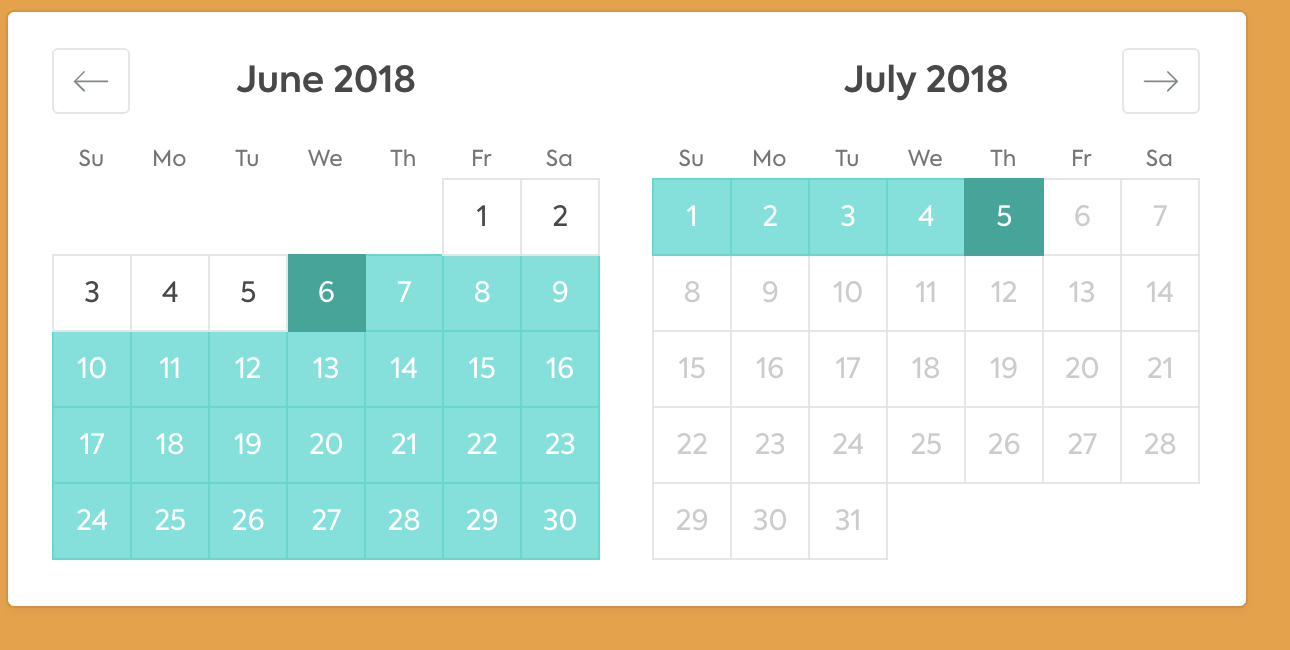
If I put the DPRC in a bootstrap dropdown menu, it takes up space but doesn't display:

If I move it outside of the dropdown menu, it displays correctly:
 toddpeak
All 12 comments
      <div class="dropdown">
        <div class="btn" data-toggle="dropdown">foo</div>
      <div class="dropdown-menu">
<DayPickerRangeController
            startDate={startDate}
            endDate={endDate}
            minimumNights={0}
            numberOfMonths={2}
            onDatesChange={this.handleChange}
            focusedInput={focusedInput || 'startDate'}
            onFocusChange={focusedInput => this.setState({focusedInput})}
            isOutsideRange={this.isOutsideRange}
            hideKeyboardShortcutsPanel={true}
            onClose={this.handleClose}
            isDayHighlighted={this.isToday}
          />
      </div>
      </div>
@toddpeak I am experiencing the same problem. Did you manage to resolve the issue?
 sparrowDom
on 31 Aug 2018
sparrowDom
on 31 Aug 2018
Had to force visibility: visible with
.DayPicker__hidden {

    visibility: visible;

}
 celso-slalom
on 4 Oct 2018
celso-slalom
on 4 Oct 2018
+1 on this, i created a small sandbox repo to look into it, only the DayPickerRangeController is affected:
https://codesandbox.io/s/github/nfabredev/ReactDateDemo_DayPickerRangeController
Would appreciate any input to correct this
 nfabredev
on 1 Nov 2018
nfabredev
on 1 Nov 2018
+1, having the same issue.
 code-wok
on 9 Nov 2018
code-wok
on 9 Nov 2018
My ugly workaround that solves the problem in the meantime:
componentDidMount() {
    /* Workaround for a weird bug where DayPickerRangeController is hidden when in a
     * Bootstrap dropdown
     */
    $('.DayPicker').removeClass('DayPicker__hidden')
  }

  onOpen() {
    /* Ugly hack. Since we forcefully remove 'DayPicker__hidden' class from DayPicker
     * component the component does not trigger vertical resize. For this reason we forcefully
     * resize the component on first show to mitigate the problem.
     */
    if (!this.heighCorrected) {
      $('.DayPicker_transitionContainer').height(320)
      this.heighCorrected = true
    }
  }
This is because the Calendar isn't been rendered in the DOM first place. What you can do to force the render is to render in a JIT way. I'm not sure how the bootstrap dropdown is rendered but it would help if you have an isOpen state.
Pseudo code that hopefully helps:
state={
  isBootstrapDropDownOpen: false;
}

render() {
<>
  <Button onClick={this.setState({ isBootstrapDropDownOpen: true })}>
  {isBootstrapDropDownOpen && <DayPickerRangeController/>
</>
}
 Marinolinderhof
on 1 Jul 2019
Marinolinderhof
on 1 Jul 2019
This is a pretty big problem for us.
We have a pop-up which starts closed, and opens right under its button. We originally fixed the height issue with a solution like @Marinolinderhof suggests.
Now we're trying to fix an issue where the pop-up can be partially out of the screen when the component is low on the UI, by giving it an appropriate translation when it's opened, but since the element doesn't calculate its height immediately on first render, the height of the box is miscalculated and nothing happens.
I've noticed that the CalendarMonth component (which ultimately calculates its height and lets the whole picker calculate its own height) has the following line, presumably to push calculations to the back of the JS event queue.
By using my own setTimeout(() => {}, 0) within a useEffect/useLayoutEffect I was able to get the height after CalendarMonth had caused the DOM to update. It's unclear how robust this is, but at least it's something.
Would be great if the issue could be looked into further, is there a reason react-dates can't use flex/grid itself to give itself a natural height without JS intervention? Or could we get an imperative function to call whenever we want the component to re-calculate its height properly, to avoid the original hack?
 Nick-Lucas
on 23 Sep 2019
Nick-Lucas
on 23 Sep 2019
flex isn’t supported in enough older browsers to be an option.
 ljharb
on 23 Sep 2019
ljharb
on 23 Sep 2019
+1 having this issue with DayPickerSingleDateController
 mmazanec22
on 25 Feb 2020
mmazanec22
on 25 Feb 2020
Ran in to this and @Marinolinderhof's comment was spot on. We were rendering the date picker before it was visible which causes react-dates to hide itself for some reason. As soon as we switched to only rendering the date picker when we knew it would be visible it was fixed
 OrganicPanda
on 3 Jun 2020
OrganicPanda
on 3 Jun 2020
This is because the Calendar isn't been rendered in the DOM first place. What you can do to force the render is to render in a JIT way. I'm not sure how the bootstrap dropdown is rendered but it would help if you have an
isOpenstate.Pseudo code that hopefully helps:
state={
  isBootstrapDropDownOpen: false;
}

render() {
<>
  <Button onClick={this.setState({ isBootstrapDropDownOpen: true })}>
  {isBootstrapDropDownOpen && <DayPickerRangeController/>
</>
}
Life saver!!!!!
 maxwaiyaki
on 3 Sep 2020
maxwaiyaki
on 3 Sep 2020
Related issues
 jpollard-cs
·
3Comments
jpollard-cs
·
3Comments
 prztrz
·
3Comments
prztrz
·
3Comments
 cemremengu
·
3Comments
cemremengu
·
3Comments
 Jesus-Gonzalez
·
3Comments
Jesus-Gonzalez
·
3Comments
 swaritkohli
·
3Comments
swaritkohli
·
3Comments
Most helpful comment