React-dates: Cursor jumps to the end of the input filed when typing or deleting a character
This can easily be reproduced in the live playground:
i.e. in DateRangePicker - default:
- select a date for the start-date and the end-date with the mouse
- now set the cursor on the day or month of start- or end-date
- type one character or backspace
Observed behavior:
The cursor jumps to the end of the date field. This is very annoying if you want to set the date with the keyboard.
Desired behavior:
The cursor should stay where it is when typing in the start- or end-date.
 jbandi
All 12 comments
I think this is due to the date being "committed", e.g. when you type a valid date, it goes back and updates the date value that then gets passed down the tree whereas the dateString that you're currently typing gets cleared... maybe we should wait to do this behavior on blur? Or do some sort of check between dateString and date object.
Hmm, this is definitely a bug. I think probably we just don't want to clear the dateString until blur.
 majapw
on 9 Feb 2018
majapw
on 9 Feb 2018
Encountered the same problem here U_U
Do you have any workarround?
Thanks!
 sauldeleon
on 15 Feb 2018
sauldeleon
on 15 Feb 2018
@majapw im forking and working on it, trying to find a solution.
At the moment, I have made this changes in DateInput.jsx:
onChange(e) {
    const { onKeyDownQuestionMark } = this.props;
    const dateString = e.target.value;

    // In Safari, onKeyDown does not consistently fire ahead of onChange. As a result, we need to
    // special case the `?` key so that it always triggers the appropriate callback, instead of
    // modifying the input value
    if (dateString[dateString.length - 1] === '?') {
      onKeyDownQuestionMark(e);
    } else {
      this.setState({ dateString });
    }
  }

  onBlur(e) {
    const { onBlur } = this.props;
    const dateString = e.target.value;

    this.setState({ dateString }, () => onBlur(dateString));
  }
with additional changes, adding the onBlur to all components, starting with DateRangePickerI nputController.jsx as follows(its exactly the same code as _onStartDateChange_, with its correspondent _onEndDateBlur_):
onStartDateBlur(startDateString) {
    const startDate = toMomentObject(startDateString, this.props.displayFormat);

    let { endDate } = this.props;
    const {
      isOutsideRange,
      minimumNights,
      onDatesChange,
      onFocusChange,
    } = this.props;
    const isStartDateValid = startDate && !isOutsideRange(startDate);
    if (isStartDateValid) {
      if (startDate && isBeforeDay(endDate, startDate.clone().add(minimumNights, 'days'))) {
        endDate = null;
      }

      onDatesChange({ startDate, endDate });
      onFocusChange(END_DATE);
    } else {
      onDatesChange({
        startDate: null,
        endDate,
      });
    }
  }
Your solution seems to work at the moment. Im fighting now with the tests, because the behaviour now changes a lot, and I'm wondering if adding a proptype like
checkOnBlur: PropTypes.boolean
to let the user watch for the onChange or the onBlur events will be nice. What do you think?
sauldeleon
on 19 Feb 2018
this may be wishful thinking, but i think ideally the visual calender would continue to update onChange, but the cursor should not jump until onBlur... does that mean perhaps that the date isn't commited until onBlur, but there is a temporary date which would be internal to the react-dates and I don't think needs exposing to state/props, which is purely to hold the temporary date to update the visual calendar until the onBlur hits..?
 t22james
on 5 Mar 2018
t22james
on 5 Mar 2018
That might actually be better behavior from an accessibility perspective. Maybe @backwardok can weigh in?
The thing to consider though is what do we do in the case that someone blurs and then has entered an invalid date. Maybe this is an opportunity to improve the error states!
majapw
on 9 Mar 2018
That behavior seems reasonable to me - definitely agree that the jumping cursor behavior is problematic.
 backwardok
on 9 Mar 2018
backwardok
on 9 Mar 2018
Are there any plans to include a fix for this in an upcoming release? It would greatly improve the experience for keyboard users.
 caitecoll
on 24 May 2018
caitecoll
on 24 May 2018
A similar issue happens when you want to manually change both the day and the month. I suspect the problem/solution are the same, but I just want to make sure anyone working on a fix also verifies this case.
Steps:
Select today's date for the start date
backspace one character of the day part (thus encountering the original issue)
now enter a valid value for the day part (e.g., 01)
Desired behavior:
The cursor should stay where it is, so that I can change the month as well.
Observed behavior:
Focus switches over to the end date field.
 BrandonWilliamsCS
on 18 Jul 2018
BrandonWilliamsCS
on 18 Jul 2018
Was this actually fixed?
 SethGoodLuckMartin
on 16 Aug 2018
SethGoodLuckMartin
on 16 Aug 2018
Yes, in 17.2.0
 nbakken8
on 17 Aug 2018
nbakken8
on 17 Aug 2018
Ah, perfect! Glad this is fixed
On Thu, Aug 16, 2018, 15:28 nbakken8 notifications@github.com wrote:
Yes, in 17.2.0
—
You are receiving this because you commented.
Reply to this email directly, view it on GitHub
https://github.com/airbnb/react-dates/issues/1013#issuecomment-413703428,
or mute the thread
https://github.com/notifications/unsubscribe-auth/AF0GSKD1bRy3aTeyYkj1R7T8QfkRm5Aqks5uRfHWgaJpZM4R_E_W
.
SethGoodLuckMartin
on 17 Aug 2018
I'm still seeing the issue that @BrandonWilliamsCS reported - so I opened a new issue for that.
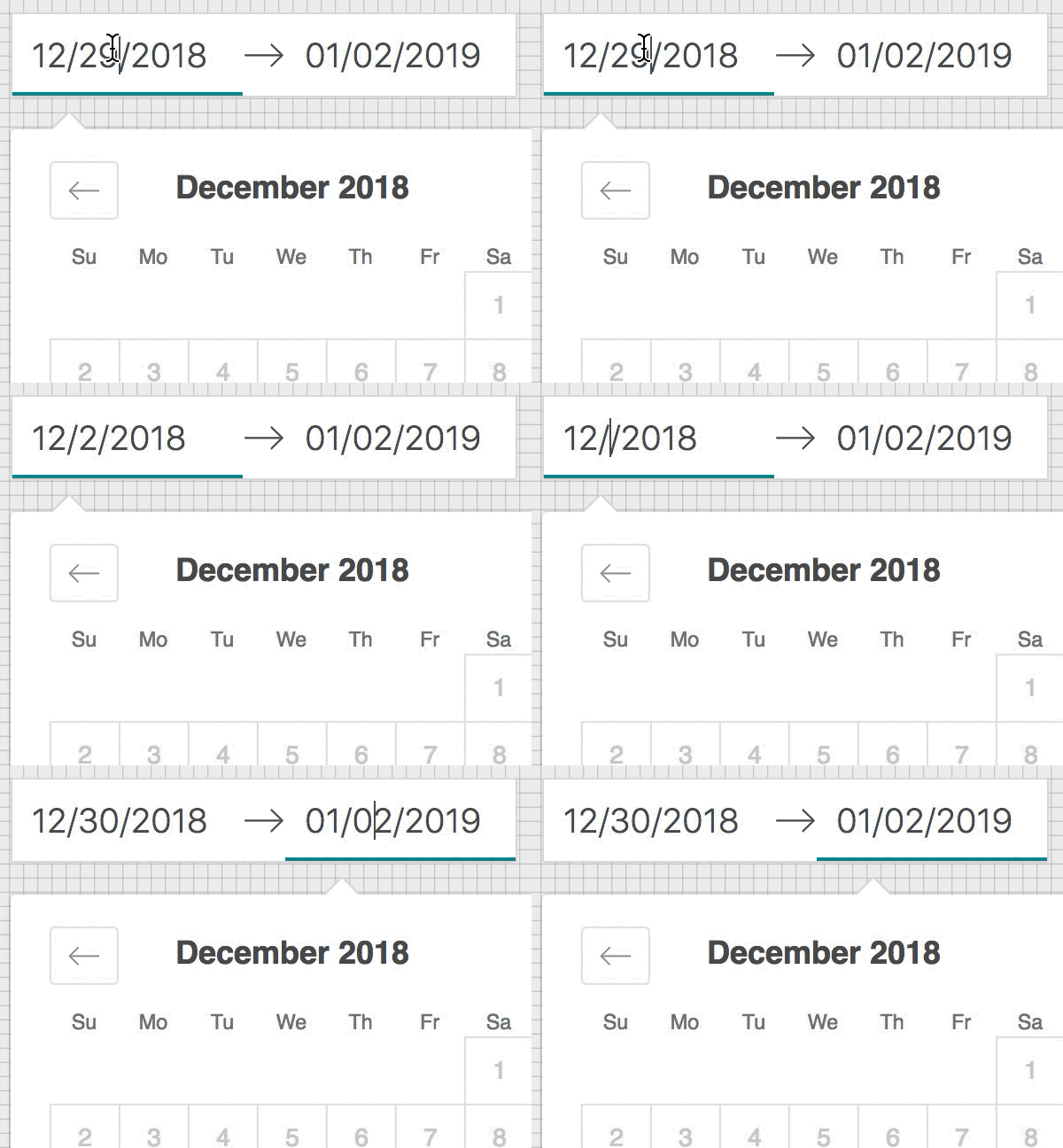
 strokirk
on 27 Dec 2018
strokirk
on 27 Dec 2018
Related issues
 Jesus-Gonzalez
·
3Comments
Jesus-Gonzalez
·
3Comments
 swaritkohli
·
3Comments
swaritkohli
·
3Comments
 Daniel15
·
3Comments
Daniel15
·
3Comments
 arthurvi
·
3Comments
arthurvi
·
3Comments
 sag1v
·
3Comments
sag1v
·
3Comments
Most helpful comment
I think this is due to the date being "committed", e.g. when you type a valid date, it goes back and updates the date value that then gets passed down the tree whereas the dateString that you're currently typing gets cleared... maybe we should wait to do this behavior on blur? Or do some sort of check between dateString and date object.
Hmm, this is definitely a bug. I think probably we just don't want to clear the dateString until blur.