React-dates: theme not working with react 16
I'm trying to apply a custom theme, as shown in the readme:
import ThemedStyleSheet from 'react-with-styles/lib/ThemedStyleSheet';
import DefaultTheme from 'react-dates/lib/theme/DefaultTheme';
ThemedStyleSheet.registerTheme({
  ...DefaultTheme,
  color: {
    ...DefaultTheme.color,
    highlighted: {
      backgroundColor: '#82E0AA',
      backgroundColor_active: '#58D68D',
      backgroundColor_hover: '#58D68D',
      color: '#186A3B',
      color_active: '#186A3B',
      color_hover: '#186A3B',
    },
  },
});
But I'm getting an error:
TypeError: Cannot read property 'DateRangePicker' of undefined
https://www.dropbox.com/s/t6nsd7sklxl1xhy/Screenshot%202017-10-09%2015.56.53.png?dl=0
 jeremymarc
All 18 comments
@jeremymarc can you share the rest of your setup? Is this in storybook or in a standalone app? Are you using the css interface (if you are, you'll have to build your own css file after changing the theme)?
I think the styles prop may be undefined if you have not registered a react-with-styles interface. ... I might need to add more instructions to the theming section of the README.
 majapw
on 9 Oct 2017
majapw
on 9 Oct 2017
I agree that the theming documentation is fairly confusing for someone not familiar with react-with-styles. I've been trying to make stylistic changes to the datepicker for a second day in a row and been finding it incredibly frustrating. Do I need to configure a separate wrapper component to make changes to the theme? Any examples?
 kuldar
on 10 Oct 2017
kuldar
on 10 Oct 2017
I also find the theming section quite hard to follow, I've not used react-with-styles before but I really feel like theming the datepicker ought to be better explained
 opr
on 10 Oct 2017
opr
on 10 Oct 2017
I'm experiencing the same error while trying to implement the DateRangePicker with default styling, via React v16
 nazimjamil
on 10 Oct 2017
nazimjamil
on 10 Oct 2017
I'm on React 15.6.1 and same issue;
In a storybook environment; don't want to deviate from the standard setup with the 'initialize' script, but want to alter some colours - just trying to use the default theme is cause the above error in my case so not a themeing issue:
import React from 'react'
import 'react-dates/initialize'
import {DateRangePicker} from 'react-dates'
import ThemedStyleSheet from 'react-with-styles/lib/ThemedStyleSheet'
import DefaultTheme from 'react-dates/lib/theme/DefaultTheme'
import 'react-dates/lib/css/_datepicker.css'
ThemedStyleSheet.registerTheme(DefaultTheme)
...
Gets me:
The prop
stylesis marked as required inDateRangePicker, but its value isundefined
TypeError: Cannot read property 'DateRangePicker' of undefined
TypeError: Cannot read property 'DateRangePicker' of undefined
 coffeedoughnuts
on 10 Oct 2017
coffeedoughnuts
on 10 Oct 2017
I have it working now by essentially using react-with-styles HOF withStyles to pass computed styles to my wrapper class.
import 'react-dates/initialize';
import DefaultTheme from 'react-dates/lib/theme/DefaultTheme';
import React from 'react';
import { SingleDatePicker } from 'react-dates';
import { withStyles } from 'react-with-styles';
class SingleDatePickerWrapper extends React.PureComponent {
render() {
return(<SingleDatePicker {...this.props} ... />);
}
}
export default withStyles(() => ({
...DefaultTheme,
color: {
...DefaultTheme.color,
highlighted: {
backgroundColor: '#82E0AA',
backgroundColor_active: '#58D68D',
backgroundColor_hover: '#58D68D',
color: '#186A3B',
color_active: '#186A3B',
color_hover: '#186A3B',
},
},
}))(SingleDatePickerWrapper);
Will raise a PR with updated documentation tonight (and clearer example than above) if that's alright with you.
Resources:
nazimjamil
on 10 Oct 2017
Hm, SingleDatePicker should already have withStyles on it, and you shouldn't be able to pass a styles prop to it at all :-/
 ljharb
on 10 Oct 2017
ljharb
on 10 Oct 2017
Hmm, I think (1) I'm going to add some clarification to the theming section about how that requires the registration of an interface as well and (2) I think we need a better solution for theming with the default CSS interface. :/
Right now, if you are using the CSS interface and want to change your own styles using the theme, you will have to build your own stylesheet a la https://github.com/airbnb/react-dates/blob/master/scripts/buildCSS.js. Maybe we should expose a way to pass in a new theme to this script so you can use it directly (right now it just always uses the default).
You can also create your own stylesheet and override styles directly there, a la:
.CalendarDay__highlighted_calendar {
  background: #82E0AA;
  color: #186A3B;
}

.CalendarDay__highlighted_calendar:hover {
  background: #58D68D;
  color: #186A3B;
}

.CalendarDay__highlighted_calendar:active {
  background: #58D68D;
  color: #186A3B;
}
to achieve the same effect. I will look into adding some more helper scripts and clarifying the documentation today.
... If you want to use thing right now out of the box and don't want to mess with react-with-styles too much, I would recommend overriding the classes like above ^^.
majapw
on 10 Oct 2017
@nazimjamil I too am... really really really surprised that that worked. That is not the intended usage so we will try to clarify the documentation tho.
Also @lencioni do you have any idea why double-wrapping the HOC might work? Maybe I'm accidentally exporting the wrong thing somewhere. Hmmmmm.
majapw
on 10 Oct 2017
@majapw Not entirely sure, but something seems amiss based on the shape of the object being passed to withStyles in the code example here: https://github.com/airbnb/react-dates/issues/758#issuecomment-335533296
e.g. all of those properties should be nested under reactDates:, right?
 lencioni
on 10 Oct 2017
lencioni
on 10 Oct 2017
The CSS overwrite was by far the easiest fix if you have never worked with react-with-styles before. Extra documentation for the theming would be appreciated.
 Pixelatex
on 12 Oct 2017
Pixelatex
on 12 Oct 2017
Where are you writing those CSS overrides? Prior to 13.0 I was importing react-dates/css/styles.scss and react-dates/css/variables.scss and overwriting the styles in my own scss files, but now those files don’t exist so my overrides aren’t working.
 mattgabor
on 12 Oct 2017
mattgabor
on 12 Oct 2017
Just made a new file datepicker.scss and overrode all needed files with !important
Pixelatex
on 12 Oct 2017
_Note for people overriding any styles:_ a number of the class names have slightly changed and some have been removed/new ones added. You may need to verify the class names you are overriding have not been changed.
 erin-doyle
on 15 Oct 2017
erin-doyle
on 15 Oct 2017
Hi all, I've clarified the instructions quite a bit in the README. Please let me know if you have any feedback or if anything can still be adjusted!
I will be working on some
majapw
on 16 Oct 2017
How's clarification going? I really have hard time to run react-dates with CSSInterface. All I got is
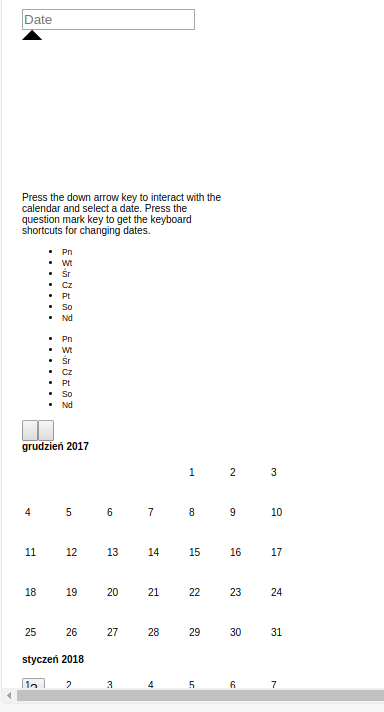
Here is my setup:
import * as React from 'react';
import * as moment from 'moment';
moment.locale('pl');
import 'react-dates/initialize';
import 'style-loader!react-dates/lib/css/_datepicker.css';
import { SingleDatePicker } from 'react-dates';

interface DatepickerState {
  focused: boolean;
  date: string;
}

export class Datepicker extends React.Component<any, DatepickerState> {
  // static defaultProps = defaultProps;

  constructor(props) {
    super(props);
    this.state = {
      focused: props.autoFocus,
      date: props.initialDate,
    };

    this.onDateChange = this.onDateChange.bind(this);
    this.onFocusChange = this.onFocusChange.bind(this);
  }


  onDateChange(date) {
    this.setState({ date });
  }

  onFocusChange({ focused }) {
    this.setState({ focused });
  }

  render() {

    const { focused, date } = this.state;

    // autoFocus and initialDate are helper props for the example wrapper but are not
    // props on the SingleDatePicker itself and thus, have to be omitted.
    const props = omit(this.props, [
      'autoFocus',
      'initialDate',
    ]);


    return (
      <div style={{
        width: '20rem',
      }}>
        <SingleDatePicker
          {...props}
          date={date}
          focused={focused}
          onDateChange={this.onDateChange}
          onFocusChange={this.onFocusChange}
        />
      </div>
    );
  }
}
 gitowiec
on 22 Jan 2018
gitowiec
on 22 Jan 2018
@gitowiec it's going! I'm focusing on writing up detailed prop descriptions rn. Um, for your code in particular, it kind of looks like the css is not being loaded at all! Can you check that (a) the classes are being applied as expected and (b) that the stylesheet is being loaded correctly?
majapw
on 22 Jan 2018
@majapw thank You for fast reply, You are right, I had missing loader in webpack.config of storybook.
But I have another problem with styling. I would like to use CSSInterface with this approach
import reactWithStylesInterfaceCss  from 'react-with-styles-interface-css';
import ThemedStyleSheet from 'react-with-styles/lib/ThemedStyleSheet';
import DefaultTheme from 'react-dates/lib/theme/DefaultTheme';
ThemedStyleSheet.registerInterface(reactWithStylesInterfaceCss);
ThemedStyleSheet.registerTheme(DefaultTheme);
But all I got on a screen is

Here is my whole SingleDatePicker Wrapper (using TypeScript)
import * as React from 'react';
import * as moment from 'moment';
import * as classNames from 'classnames';
import { ErrorIcon } from '~components/Elements/Input/Input';
// import 'react-dates/lib/css/_datepicker.css';
// import 'react-dates/initialize';

import reactWithStylesInterfaceCss  from 'react-with-styles-interface-css';
import ThemedStyleSheet from 'react-with-styles/lib/ThemedStyleSheet';
import DefaultTheme from 'react-dates/lib/theme/DefaultTheme';
ThemedStyleSheet.registerInterface(reactWithStylesInterfaceCss);
ThemedStyleSheet.registerTheme(DefaultTheme);

import { SingleDatePicker, SingleDatePickerShape } from 'react-dates';

const inputStyles = require('../Input/Input.less');
const styles = require('./Datepicker.less');
const omit = require('lodash/omit');


export interface DatePickerState {
  focused: boolean;
  date: string;
}

export interface DatePickerShape {
  autoFocus?: boolean;
  initialDate?: moment.Moment;
  label?: string;
  error?: string;
}

export interface SingleDatePickerProps extends SingleDatePickerShape {

  verticalSpacing: undefined | number;

}

export const defaultConfiguration: SingleDatePickerProps | DatePickerShape = {
  // input related props
  date: null,
  onDateChange: (date: moment.Moment | null) => {
  },
  focused: false,
  onFocusChange: (arg: { focused: boolean | null }) => {
  },
  id: '',
  noBorder: true,
  placeholder: '', // disable default placeholder
  readOnly: true,
  block: true, // input display:block
  verticalSpacing: 11, // tooltip arrow distance, 11 is smallest that keeps it visible
  // calendar presentation and interaction related props
  withPortal: false,
  withFullScreenPortal: false,
  numberOfMonths: 1,
  hideKeyboardShortcutsPanel: true,
  isOutsideRange: () => false, // allows all days, including past days
};


export class Datepicker extends React.Component<any, any> {

  static defaultProps = defaultConfiguration;

  render() {

    // props to omit (props of Datepicker wrapper, not SingleDatePicker)
    const props = omit(this.props, [
      'label',
      'error',
    ]);

    return (
      <div className={classNames(styles.Datepicker, { error: this.props.error })}>
        <div className={inputStyles.labels}>
          {this.props.label && <div className={inputStyles.label}>{this.props.label}</div>}
          {props.required && <div className={inputStyles.required}>*</div>}
        </div>
        <div style={{ position: 'relative' }}>
          <SingleDatePicker
            {...props}
          />
          {this.props.error && <ErrorIcon error={this.props.error} style={{ top: 0 }}/>}
        </div>
      </div>
    );
  }
}
Related issues
 prztrz
·
3Comments
prztrz
·
3Comments
 aishwarya-bote
·
3Comments
aishwarya-bote
·
3Comments
 Adam-Pendleton
·
3Comments
Adam-Pendleton
·
3Comments
 augnustin
·
3Comments
augnustin
·
3Comments
 maciej-w
·
3Comments
maciej-w
·
3Comments
Most helpful comment
Hmm, I think (1) I'm going to add some clarification to the theming section about how that requires the registration of an interface as well and (2) I think we need a better solution for theming with the default CSS interface. :/
Right now, if you are using the CSS interface and want to change your own styles using the theme, you will have to build your own stylesheet a la https://github.com/airbnb/react-dates/blob/master/scripts/buildCSS.js. Maybe we should expose a way to pass in a new theme to this script so you can use it directly (right now it just always uses the default).
You can also create your own stylesheet and override styles directly there, a la:
to achieve the same effect. I will look into adding some more helper scripts and clarifying the documentation today.
... If you want to use thing right now out of the box and don't want to mess with
react-with-stylestoo much, I would recommend overriding the classes like above ^^.