React-dates: Custom input — change DayPickerSingleDateController's visible month when date changes
Hi,
I have a set up with my own custom input which allows user to type the date string in the preferred format. If the date string is valid — <DayPickerSingleDateController /> is then used to preview the typed date (or to select the date from the calendar). The problem is when the user types the date that's out of the range of the visible month then <DayPickerSingleDateController /> does not re-render itself and I've got no 'preview'.
There is an initialMonth prop which takes the function and uses it to set the calendar to preferred month on component initialization, but after that function won't be invoked. Is there a way to force <DayPickerSingleDateController /> to change the visible month every time the date changes?
I was able to fix my problem with commenting out
https://github.com/airbnb/react-dates/blob/master/src/components/DayPicker.jsx#L197
and https://github.com/airbnb/react-dates/blob/master/src/components/DayPicker.jsx#L238 so that hasSetInitialVisibleMonth is never true, therefore <DayPicker /> runs initialMonth function every time it renders, but probably that's not the most elegant way to solve the problem.
Am I missing something here?
 volodymyr-kushnir
All 11 comments
hi @volodymyr-kushnir did you find any hack for this one?
 achtan
on 20 Jul 2017
achtan
on 20 Jul 2017
Hey @achtan, no, no, I didn't. As I said in my first post — you can workaround the problem by commenting out hasSetInitialVisibleMonth so that it'll always be false and that will force the calendar to re-render itself every time the date changes.
I couldn't decide on whether this is a flaw in the library that has to be fixed or simply an edge case scenario that shouldn't affect the design of the library — so instead of forking the react-dates I switched to react-day-picker for the time being.
volodymyr-kushnir
on 20 Jul 2017
Hi @volodymyr-kushnir, initialVisibleMonth currently only updates the month when the calendar is closed and then reopened. The reason for this is that we don't currently have a solution for handling the animation if you wanted to say, navigate 10 months into the future. This is something we're def still looking to solve.
 majapw
on 22 Jul 2017
majapw
on 22 Jul 2017
I've run into the need to snap the calendar in the DRP to a certain date range, as described in #931 and #929. Seems to me that both these issues require solving it first for the SDP, as described here by OP.
@majapw, you mentioned above that the solution would require an animation for navigating more than a single month at a time.
So I thought I'd suggest the animation used by the folks at Google Calendar, who solved this nicely by a left/right shift followed by a quick fade out and in.
Maybe someone would be ready to take on this challenge if the maintainers expressed interest in a PR.
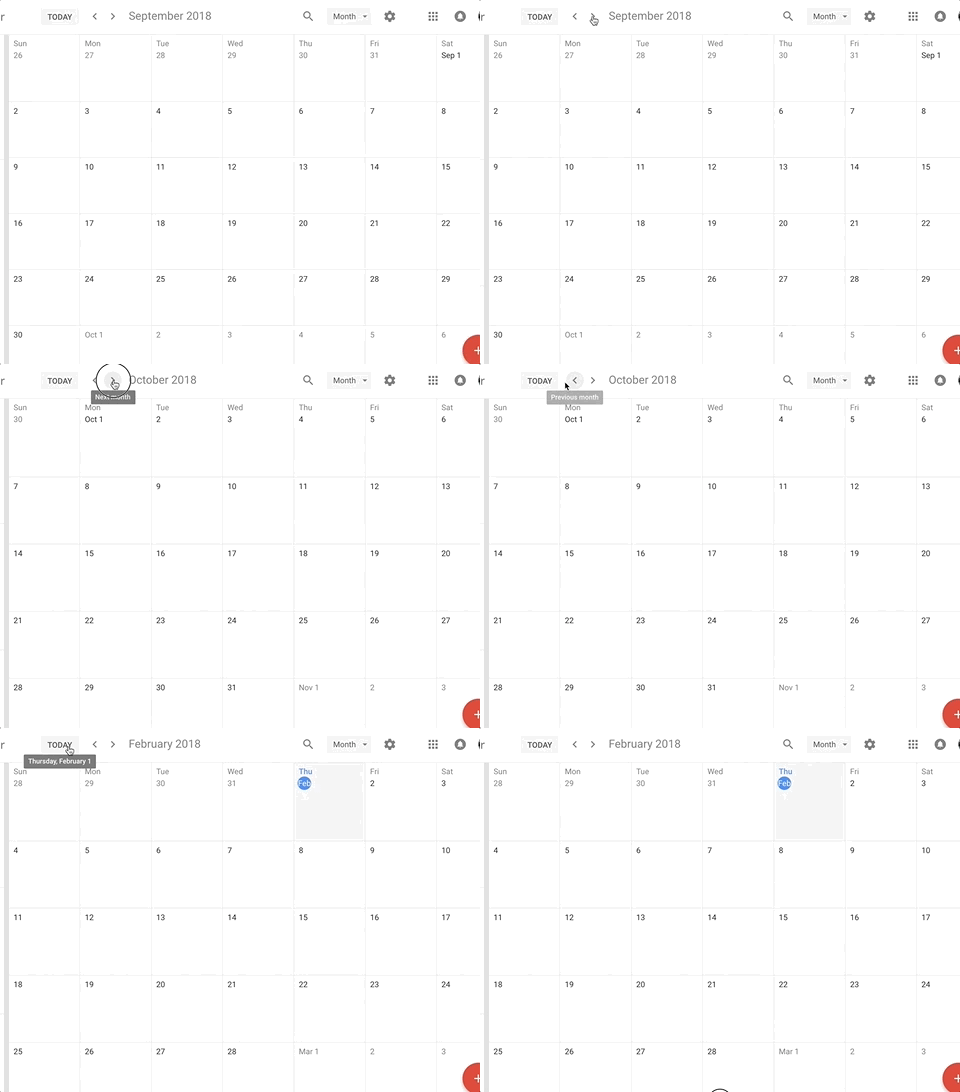
Higher quality: https://imgur.com/a/Mheqg
 burtyish
on 1 Feb 2018
burtyish
on 1 Feb 2018
I was able to get a workaround for this by changing the key of the component whenever I want to change the month, which forces a re-mount. It would be great to see this issue solved so we don't have to rely on these hacky ways to go about this :)
 jabsatz
on 3 Apr 2018
jabsatz
on 3 Apr 2018
Running into the same issue for the DRP. I've updated from v12 to v16 and now I'm seeing a glitch when switching the start date (to another month not visible). I'm using the key approach to force a re-mount, it wasn't an issue on v12 but it is now on v16.
Would that be related to react-with-styles (wild guess) ? I have the same issue on v13 and that was the only change I've seen there 🤔
If I remove the key, there's no glitch but the initialVisibleMonth is not updated (as intended since it's the initial month on mount)
Any workaround to prevent the glitch on change ?
 pedroabreu
on 22 May 2018
pedroabreu
on 22 May 2018
Any news about this?
 ignaciosantise
on 3 Aug 2018
ignaciosantise
on 3 Aug 2018
@jabsatz Could you elaborate more on how you achieved that by changing the key please?
 swaritkohli
on 3 Oct 2018
swaritkohli
on 3 Oct 2018
It was a while ago, but if you update initialVisibleMonth and change the key at the same time, you force the component to re-mount with the "initial" month as the "current" month. What you use as a key is up to you, I think I used an additive (0,1,2...), but you could really use anything as long as it's different from your previous key.
jabsatz
on 3 Oct 2018
@jabsatz I'm sorry I'm not exactly able to follow your solution. I don't know how I'll update my key in response to my date getting selected along with updating the initial visible month. Also, I did not get why it will re-mount if I change the initialVisibleMonth and the key at the same time. Could you show an example of how you implemented it? A snippet, perhaps? Also, thanks for the answer!
swaritkohli
on 4 Oct 2018
This feature would be very useful
 khanilov
on 18 Nov 2019
khanilov
on 18 Nov 2019
Related issues
 aaronvanston
·
3Comments
aaronvanston
·
3Comments
 mrseanbaines
·
3Comments
mrseanbaines
·
3Comments
 augnustin
·
3Comments
augnustin
·
3Comments
 aishwarya-bote
·
3Comments
aishwarya-bote
·
3Comments
 yokomizor
·
3Comments
yokomizor
·
3Comments
Most helpful comment
I was able to get a workaround for this by changing the
keyof the component whenever I want to change the month, which forces a re-mount. It would be great to see this issue solved so we don't have to rely on these hacky ways to go about this :)