React-datepicker: calender is not displayed
Describe the bug
the popup calender is not displayed correctly, all i have is the month showed vertically without any style.
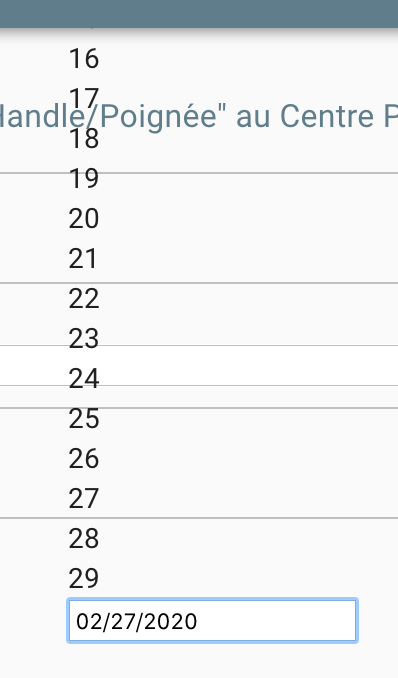
To Reproduce
import React from "react";
import {useField, useFormikContext, Form, FormikProps, Formik} from "formik";

import DatePicker from "react-datepicker";
import "react-datepicker/dist/react-datepicker.css";
import "react-datepicker/dist/react-datepicker-cssmodules.css";

export class MyDatePickerField extends React.Component {
  state = {
    startDate: new Date()
  };

  handleChange = date => {
    this.setState({
      startDate: date
    });
  };

  render() {
    return <DatePicker selected={this.state.startDate} onChange={this.handleChange} />;
  }
}


<Formik
    initialValues={{data}}
    onSubmit={values => {
      // same shape as initial values
      console.log(values);
    }}>
    <Form>
      <MyDatePickerField name="startDate" label="START_DATE" format="dd/MM/yyyy" />
     </Form>
Desktop (please complete the following information):
Browser firefox
Any tips ?
thank you
 alainib
👍3
All 3 comments
you have to import react datepicker css
import "react-datepicker/dist/react-datepicker.css";
 asimalali
on 3 Mar 2020
asimalali
on 3 Mar 2020
👍7
I am having the same problem, and I am importing the css like in you example, did you fix the problem?
 dgamboaestrada
on 6 May 2020
dgamboaestrada
on 6 May 2020
Hello
i imported the css in my code but this doesn't work for me
i found another solution :
import {MuiPickersUtilsProvider} from "@material-ui/pickers";
import DateFnsUtils from "@date-io/dayjs";
import {Field} from "formik";
import {KeyboardDatePicker, KeyboardDateTimePicker} from "formik-material-ui-pickers";
import React from "react";
import {locale} from "dayjs";

/**
 * @param {boolean} pickTime - Show a Datetime picker instead of time picker.
 * @param {object} props - Props to pass to picker. @see https://stackworx.github.io/formik-material-ui/docs/api/material-ui-pickers#keyboarddatepicker
 */
export const DatePickerField = ({pickTime, ...props}) => {
  return (
    <MuiPickersUtilsProvider utils={DateFnsUtils}>
      <Field component={pickTime ? KeyboardDateTimePicker : KeyboardDatePicker} format={locale() === "fr" ? "DD/MM/YYYY" : "YYYY/MM/DD"} {...props} />
    </MuiPickersUtilsProvider>
  );
};
and usage :
<Formik
initialValues={...}
onSubmit={...}
validateOnChange={...}
validateOnBlur={...}
validationSchema={...}
>
    <DatePickerField name="birthday" label={t("PERSON.BORN_ON")} />

</Formik>
👍1
Was this page helpful?
0 / 5 - 0 ratings
Related issues
 jjjss94
·
3Comments
jjjss94
·
3Comments
 ali-master
·
3Comments
ali-master
·
3Comments
 evolve2k
·
3Comments
evolve2k
·
3Comments
 ahribori
·
3Comments
ahribori
·
3Comments
 ro-savage
·
3Comments
ro-savage
·
3Comments
Most helpful comment
you have to import react datepicker css
import "react-datepicker/dist/react-datepicker.css";