React-datepicker: Locale error when using date-fns
I'm trying to load es locale from date-fns and it throws an error, maybe this is related to date-fns itself.
It also happens with locales that are different than 'en-GB'
Expected behavior
Load different locale than en-GB
Actual behavior
It crashes with this message:
RangeError: locale must contain localize property
    at format (modules.js?hash=6c38037b3206d378e63fb830a74ef56e49e3a6a4:8675)
    at formatDate (modules.js?hash=6c38037b3206d378e63fb830a74ef56e49e3a6a4:12089)
    at safeDateFormat (modules.js?hash=6c38037b3206d378e63fb830a74ef56e49e3a6a4:12
Steps to reproduce
import es locale and load it to DatePicker component
Can anyone try it out ?
Thanks in advance
 cbh6
cbh6
All 16 comments
Which version of date-fns are you using? To take advantage of the latest date-fns localization file features (and to better match the previous moment localization), the alpha version was used in react-datepicker, so you may need to try a new version of date-fns: npm install date-fns@next
Another option if you don't want to go alpha is just grab the latest date localization files and use those independently: https://github.com/date-fns/date-fns/tree/master/src/locale
 Darrken
on 20 Nov 2018
Darrken
on 20 Nov 2018
Thanks a lot for your answer.
I was using date-fns v1.29.0. Switched to alpha and it worked like a charm !
:dancer:
cbh6
on 21 Nov 2018
Alpha version. Brilliant...
 philippov
on 27 Nov 2018
philippov
on 27 Nov 2018
Yes, that was for trying some features :smile:
Finally grabbed needed locale files and it also worked withouth having to use alpha version
cbh6
on 28 Nov 2018
How could you change from lowercase to the first letter to upper case and the rest to lowercase?
 lidiaramirezn
on 2 Jan 2019
lidiaramirezn
on 2 Jan 2019
Hi Lidia, cannot understand. What do you mean? Can you provide an example (code, pic or something)?
cbh6
on 2 Jan 2019


The months and days are in lowercase according to code, as it is with camelCase
lidiaramirezn
on 2 Jan 2019
Here is explained why Spanish locale has months in lowercase https://github.com/date-fns/date-fns/issues/674.
I didn't try to format locale months to achieve what you want and I don't know if that's possible in react-datepicker. If you are using local locale files maybe you can modify these fields manually.
cbh6
on 2 Jan 2019
Hi. how do i switch to alpha
 1S3L
on 2 Apr 2019
1S3L
on 2 Apr 2019
@1S3L to install a specific version of date-fns you can use npm install [email protected] --save for example, but as @Darrken said, is preferable to only grab the files you need from that version.
cbh6
on 3 Apr 2019
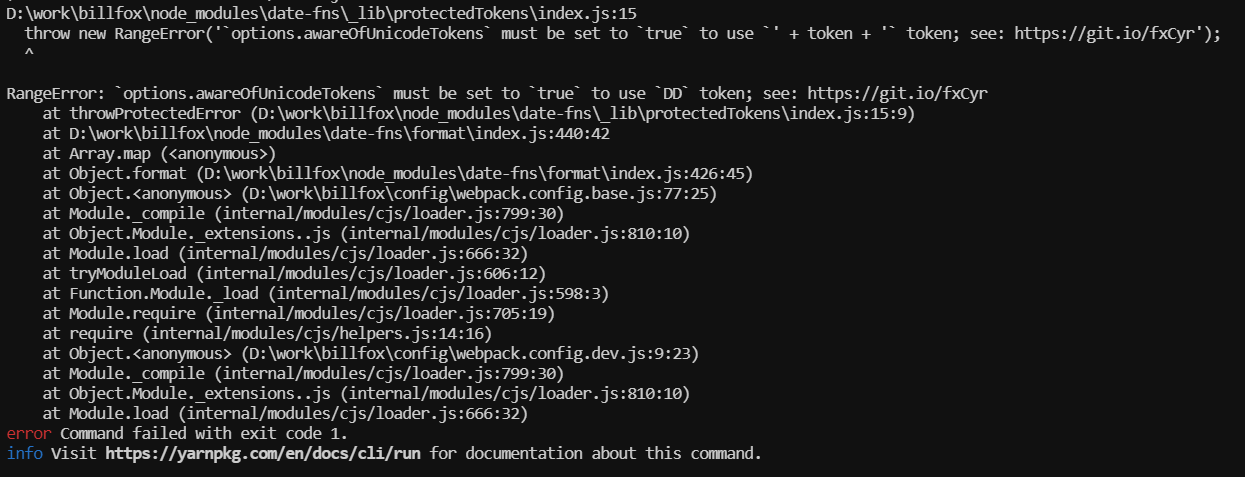
Hi, I'm getting this when I'm trying to use the alpha version. I'm not using DD or + token + anywhere.
 KumailP
on 3 Apr 2019
KumailP
on 3 Apr 2019
Thats maybe related with date-fns itself. If you need some localization files from date-fns I think its better to grab and use them locally rather than installing alpha version.
cbh6
on 4 Apr 2019
That worked! Thanks!
Just a follow-up. How do I integrate it with my React app that's deployed on Firebase? Because when I deploy it on Firebase it would install fresh packages.
KumailP
on 5 Apr 2019
I think that doesn't matter. I mean, if you have some localization files locally and import them instead of node_modules/date-fns ones, it doesn't matter if your deploy install fresh packages. No ?
cbh6
on 6 Apr 2019
I don't think switching to alpha version of that package is a good enough solution to justify closing this issue. I bet I'm not alone in not wanting to use unstable software on production.
 LosEagle
on 15 Jul 2019
LosEagle
on 15 Jul 2019
Which version of date-fns are you using? To take advantage of the latest date-fns localization file features (and to better match the previous moment localization), the alpha version was used in react-datepicker, so you may need to try a new version of date-fns:
npm install date-fns@nextAnother option if you don't want to go alpha is just grab the latest date localization files and use those independently: https://github.com/date-fns/date-fns/tree/master/src/locale
Hello, May I asked how to use them independently?
Thanks! :)
 lxcusp
on 25 Jul 2019
lxcusp
on 25 Jul 2019
Related issues
 YOO629
·
48Comments
YOO629
·
48Comments
 kesavan49
·
18Comments
kesavan49
·
18Comments
 ashishlal91
·
21Comments
ashishlal91
·
21Comments
 johhansantana
·
19Comments
johhansantana
·
19Comments
 steinarb
·
26Comments
steinarb
·
26Comments
Most helpful comment
Which version of date-fns are you using? To take advantage of the latest date-fns localization file features (and to better match the previous moment localization), the alpha version was used in react-datepicker, so you may need to try a new version of date-fns:
npm install date-fns@nextAnother option if you don't want to go alpha is just grab the latest date localization files and use those independently: https://github.com/date-fns/date-fns/tree/master/src/locale