React-datepicker: preventing increment and decrements year drop down ?
Hi ,
Thanks for wonderful library.
is there any way to prevent increment and decrement year in drop down ?
Thanks in advance.
 kesavan49
All 18 comments
Hi @kesavan49, could you elaborate more on this? Which example on https://hacker0x01.github.io/react-datepicker/ are you currently referring to? =0
 tohjustin
on 29 Aug 2017
tohjustin
on 29 Aug 2017
Hi tohujstin,
Thanks for response.
I am referring example24 (https://hacker0x01.github.io/react-datepicker/#example-24).
There is one requirement where i need to restrict user to not select more current year(Ex. 2017).
i dont know wheter i can touch this source code. But changed source and made build.
The changes are,
- year_dropdown.jsx
renderDropdown = () => {
    const minYear = this.props.minDate ? this.props.minDate.year() : 1900
    const maxYear = this.props.maxDate ? this.props.maxDate.year() : 2100
    return (
    <WrappedYearDropdownOptions
        key="dropdown"
        ref="options"
        year={this.props.year}
        onChange={this.onChange}
        onCancel={this.toggleDropdown}
        scrollableYearDropdown={this.props.scrollableYearDropdown}
        yearDropdownItemNumber={this.props.yearDropdownItemNumber}
        minYear={minYear}
        maxYear={maxYear} />
    )
  }
- year_dropdown_options.jsx
function generateYears (year, noOfYear) {
  var list = []
  for (var i = 0; i < noOfYear; i++) {
    list.push(year - i)
  }
  return list
}
incrementYears = () => {
    if (this.state.maxYear && (this.state.maxYear <= this.state.yearsList[0])) {
      return
    } else {
      return this.shiftYears(1)
    }
  }
its working as expected. But its done locally and i thought to share here and will helpful to others
kesavan49
on 29 Aug 2017
Hmm the current API for specifying the range of the year dropdown feels a bit awkward & your way of specifying a minYear & maxYear seems to make more sense!
I'm not really sure whether the maintainer is currently interested in making break changes to our API but it would be great to submit a PR for this change =)
tohjustin
on 29 Aug 2017
Hi tohjustin,
Thanks and let us see response from maintainer.
kesavan49
on 29 Aug 2017
i'm also interested in a min & max.
 mikeyc7m
on 5 Sep 2017
mikeyc7m
on 5 Sep 2017
hey wait, you can just use minDate and maxDate!
mikeyc7m
on 5 Sep 2017
Yes I am using Min and Max Date.
const minYear = this.props.minDate ? this.props.minDate.year() : 1900
const maxYear = this.props.maxDate ? this.props.maxDate.year() : 2100
kesavan49
on 5 Sep 2017
yeah right. so set maxDate to date(2017,1,1,0,0,0) and this means the year picker won't go beyond 2017.
mikeyc7m
on 5 Sep 2017
https://hacker0x01.github.io/react-datepicker/#example-24. check this example and from the year drop down i want to restrict. If you have solution please share with me.
Thanks
kesavan49
on 5 Sep 2017
here's my code...
<DatePicker
    onChange={ this.moveToDate }
    selected={ this.props.selectedDate }
    dropdownMode="select"
    showMonthDropdown
    showYearDropdown
    maxDate={ moment().add(10,'years')}
    minDate={ moment().subtract(10,'years')}
/>
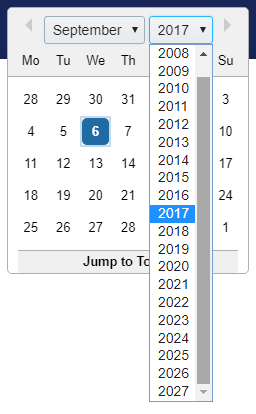
Here's a screenshot, see how it ends at 2027...
mikeyc7m
on 6 Sep 2017
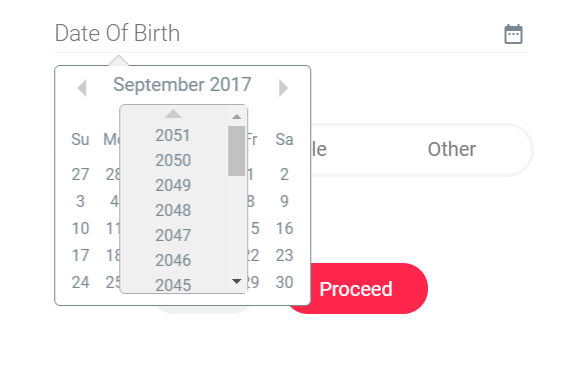
@mikeyc7m thanks . but your solution is not working for me and testing purpose added 0 years
Please find the attachement

kesavan49
on 6 Sep 2017
Also experiencing issues with Year dropdown when enabled via config setting. We have set maxDate with moment value of today which is honoured by the Month/Day selector (won't let you go beyond current day/month) but the Year dropdown still shows 2018. 2019, 2020.. etc.
 blakegilchrist
on 8 Sep 2017
blakegilchrist
on 8 Sep 2017
Same problem about Year Drop Down. How i can fix it ?
 DonikaV
on 13 Sep 2017
DonikaV
on 13 Sep 2017
don't use the fancy styled year dropdown, use the <select> dropdown.
dropdownMode="select"
mikeyc7m
on 21 Sep 2017
@mikeyc7m thanks. But this is not valid answer to tell my clients
kesavan49
on 21 Sep 2017
The select dropdown (when using a min, max date) its not working in safari/ios for me. Does anyone have the same problem?
 mfmora
on 21 Sep 2017
mfmora
on 21 Sep 2017
any news ?
DonikaV
on 5 Oct 2017
I am getting years in year dropdown in descending order but i want it in ascending.Any suggestions??
 mohitkhurana1812
on 23 Oct 2020
mohitkhurana1812
on 23 Oct 2020
Related issues
 tadjohnston
·
42Comments
tadjohnston
·
42Comments
 plazma-prizma
·
18Comments
plazma-prizma
·
18Comments
 mir3z
·
24Comments
mir3z
·
24Comments
 steinarb
·
26Comments
steinarb
·
26Comments
 gamesover
·
27Comments
gamesover
·
27Comments