React-datepicker: Styles are broken when used with time picker in Bootstrap's col
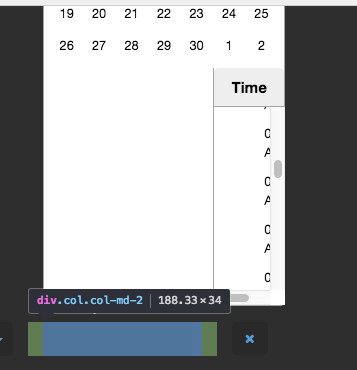
Datepicker alone looks ok, but when I want to use it with time picker, it's all broken when used in Bootstrap 4 column.
react-datepicker: 0.61.0
bootstrap: 4.0.0-beta.2
wontfix
 BorisTB
👍7
All 4 comments
I have a similar issue were stuffing it into a bootstrap column causes loss of styling.
react-datepicker: 0.61.0
bootstrap 4.0.0-alpha.6
Also running with Typescript if that matters.
 JeffLoo-ong
on 9 Dec 2017
JeffLoo-ong
on 9 Dec 2017
👍4
I still have the same issue, when Col is small enough to not fit the Popper the time selector wrap at the bottom like the image shown.
"bootstrap": "^4.1.3",
"react-datepicker": "^1.8.0",
 naishe
on 17 Nov 2018
naishe
on 17 Nov 2018
A workaround that worked for me was to set the following in CSS:
.react-datepicker-popper {
    width: max-content;
}
 pdanem
on 11 Jan 2019
pdanem
on 11 Jan 2019
👍5
❤4
This issue has been automatically marked as stale because it has not had recent activity. It will be closed if no further activity occurs. Thank you for your contributions.
![stale[bot] picture](https://avatars3.githubusercontent.com/in/1724?v=4&s=40) stale[bot]
on 30 Aug 2019
stale[bot]
on 30 Aug 2019
Was this page helpful?
0 / 5 - 0 ratings
Related issues
 steinarb
·
26Comments
steinarb
·
26Comments
 ashishlal91
·
21Comments
ashishlal91
·
21Comments
 yy8597
·
19Comments
yy8597
·
19Comments
 johhansantana
·
19Comments
johhansantana
·
19Comments
 delijah
·
38Comments
delijah
·
38Comments
Most helpful comment
A workaround that worked for me was to set the following in CSS: