React-datepicker: problem with using react-modal
There is a problem using react-modal after version 0.49.0.
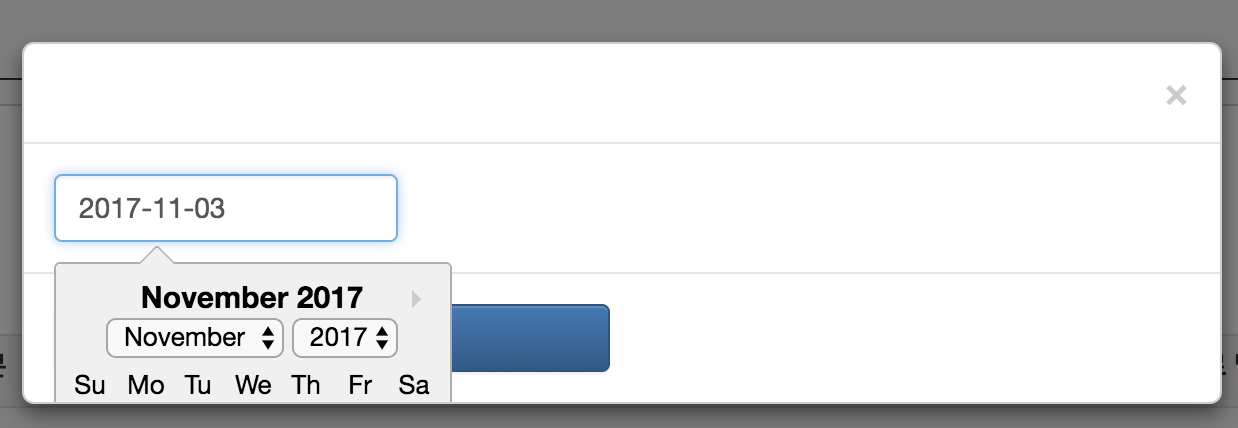
Calendar component is expected to place above all of any components, but it is placed into modal like this image.
 blueshw
All 8 comments
I have the same issue. https://codesandbox.io/s/pkx0qwzlm7 My guess is that this is a limitation from using popper.js vs. Tether.
 anthonyLukes
on 10 Nov 2017
anthonyLukes
on 10 Nov 2017
I forked that and added
~overflow: show;~
overflow: visible;
to the modal
https://codesandbox.io/s/pylqqj0y27
 skvale
on 15 Nov 2017
skvale
on 15 Nov 2017
It's not exactly related to overflow: hidden.
I ran into similar issue as @blueshw with my custom modal.
I build a PoC: https://codepen.io/anon/pen/rpNeVW?editors=1111
If you add position: relative it breaks.
It would be nice if popper.js could provide something similar to Tether: attach popper into body.
 wonskarol
on 12 Dec 2017
wonskarol
on 12 Dec 2017
@skvale
thank you for your answer.
but, can overflow property set value of show?
is it better?
overflow: initial;
it also works well.
blueshw
on 13 Dec 2017
@blueshw Yeah show is not a valid option for overflow
visible is what I was looking for. Using initial and visible are the same, the initial value of overflow is visible
skvale
on 13 Dec 2017
Had similar problem, and according to PR https://github.com/Hacker0x01/react-datepicker/pull/1074 i was able to "fix" datepicker in modals and scroll containers
const CalendarContainer = ({children}) => children ? (
    createPortal(React.cloneElement(children, {
        className: "YOUR_DATEPICKER_CSS_CLASS_HERE react-datepicker-popper"
    }), document.body)
) : null;
....

<DatePicker
  ...
  popperContainer: CalendarContainer,
/>
You need to set proper classname (according to where you have imported react-datepicper styles) instead of YOUR_DATEPICKER_CSS_CLASS_HERE and set its z-index to some big value (bigger than modals have in your app)
 ArcanisCz
on 6 Mar 2018
ArcanisCz
on 6 Mar 2018
This issue has been automatically marked as stale because it has not had recent activity. It will be closed if no further activity occurs. Thank you for your contributions.
![stale[bot] picture](https://avatars3.githubusercontent.com/in/1724?v=4&s=40) stale[bot]
on 30 Aug 2019
stale[bot]
on 30 Aug 2019
Thank you @ArcanisCz for your solution. Almost pulled my hair out with this.
I just had to apply a z-index to the popper-container and it works flawlessly.
 elebumm
on 7 Aug 2020
elebumm
on 7 Aug 2020
Related issues
 kesavan49
·
18Comments
kesavan49
·
18Comments
 martijnrusschen
·
25Comments
martijnrusschen
·
25Comments
 yy8597
·
19Comments
yy8597
·
19Comments
 YOO629
·
48Comments
YOO629
·
48Comments
 lgrapenthin
·
22Comments
lgrapenthin
·
22Comments
Most helpful comment
Had similar problem, and according to PR https://github.com/Hacker0x01/react-datepicker/pull/1074 i was able to "fix" datepicker in modals and scroll containers
You need to set proper classname (according to where you have imported react-datepicper styles) instead of YOUR_DATEPICKER_CSS_CLASS_HERE and set its z-index to some big value (bigger than modals have in your app)