React-date-picker: Unable to get the /'s in the date display to line up

Reproduced in "react-date-picker": "^6.2.0", and 6.2.2
Is it currently possible to target the "/" between the dd/mm/yyyy with css? I am not sure what could be causing this, I had tried toggling all styles around the date picker. The closets thing I had was disabling display: flex on react-date-picker__button__input which works at first but as soon as you click on it, the spacing all collapses and only shows one character each (See below gif).
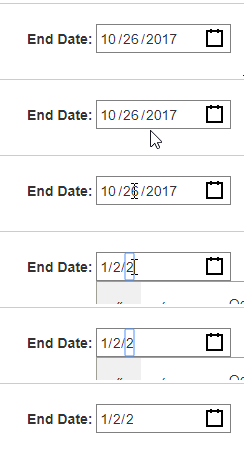
I could see having something to target the / helpful to anyone who wants to change the style of how the /'s look. Could have multi colored lines, or change the colors based on some other input (making them red to show users they need to select something)
Any help would be appreciated, thanks!
 DaveyEdwards
All 3 comments
My current workaround has been to add alittle bit of padding top to the input (not quite perfect, but will do)
.react-date-picker__button__input {
  padding-top: 6px;
}

DaveyEdwards
on 7 Nov 2017
Hey @DaveyEdwards, that's a fair point - I'll add .react-date-picker__button__divider in the next release!
 wojtekmaj
on 9 Nov 2017
wojtekmaj
on 9 Nov 2017
Thank you for the report! The issue has been fixed in v6.2.4, as well as the alignment issue. It should be well aligned out of the box.
wojtekmaj
on 10 Nov 2017
Related issues
 vanmanh49
·
4Comments
vanmanh49
·
4Comments
 jameskraus
·
4Comments
wojtekmaj
·
7Comments
jameskraus
·
4Comments
wojtekmaj
·
7Comments
 adityatandon007
·
4Comments
adityatandon007
·
4Comments
 JMS-1
·
7Comments
JMS-1
·
7Comments