React-date-picker: Overflows when near the top of the page
Fails to detect when an element goes right off the page:

This is a minor issue for me, but it occurred when the item was the first element on the page.
Repro repo:
https://github.com/jameskraus/react-date-picker-overflow
Just a guess, it may be if the page isn't large enough, a collision is detected at the bottom of the
, so the selector is moved above the input, but then it's hidden. jameskraus
All 4 comments
Maybe a good fix would be to take the selector's height, the body's top position, and check if the selector would be off screen if moved?
Edit: I did manage to get it to work, but due to complication of the logic being in the ref callback, I can only get it to work correctly once, then it will only appear below the component.
jameskraus
on 27 Feb 2018
Hey @jameskraus,
the fix has been made and is going to be published with v6.8.3. I hope it will make it better in your situation; if not, please let me know and we'll work further.
 wojtekmaj
on 7 Mar 2018
wojtekmaj
on 7 Mar 2018
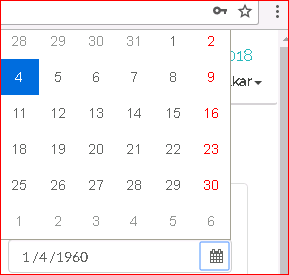
Hi,
Experiencing the same issue in version 6.9.0
 rohitketkar87
on 15 Mar 2018
rohitketkar87
on 15 Mar 2018
Thanks. Currently it measures collisions between the calendar and <body>, clearly there's a room for improvement there.
Workaround for now: If you have body set to width and height equal window size, and have scrollable content inside
Will see what else I can do.
wojtekmaj
on 16 Mar 2018
Related issues
 dozoisch
·
4Comments
dozoisch
·
4Comments
 bijay-ps
·
5Comments
bijay-ps
·
5Comments
 vanmanh49
·
4Comments
vanmanh49
·
4Comments
 hyxos
·
4Comments
hyxos
·
4Comments
 aladinflux
·
3Comments
aladinflux
·
3Comments
Most helpful comment
Hi,

Experiencing the same issue in version 6.9.0