React-chartjs-2: Testing with jest / enzyme / jsdom - Failed to create chart: can't acquire context from the given item
Using the DoughnutChart example
doughnutChart.js
import React from 'react'
import { Doughnut } from 'react-chartjs-2'

const data = {
  labels: [
    'Red',
    'Green',
    'Yellow',
  ],
  datasets: [{
    data: [
      300,
      50,
      100,
    ],
    backgroundColor: [
      '#FF6384',
      '#36A2EB',
      '#FFCE56',
    ],
    hoverBackgroundColor: [
      '#FF6384',
      '#36A2EB',
      '#FFCE56',
    ],
  }],
}

const DoughnutChart = props => (
  <div className="chart-wrapper">
    <Doughnut
      data={data}
    />
  </div>
)

export default DoughnutChart
doughnutChart.spec.js
import React from 'react'

import DoughnutChart from './doughnutChart'

it('Renders a DoughnutChart', () => {
  const wrapper = mount(
    <DoughnutChart />,
  )
  expect(wrapper).toMatchSnapshot()
})
Error
Failed to create chart: can't acquire context from the given item

      at CustomConsole.Object.<anonymous>.console.error (tools/jestSetup.js:37:9)
      at Chart.construct (node_modules/chart.js/src/core/core.controller.js:116:13)
      at new Chart (node_modules/chart.js/src/core/core.js:7:8)
      at ChartComponent.renderChart (node_modules/react-chartjs-2/lib/index.js:259:29)
      at ChartComponent.componentDidMount (node_modules/react-chartjs-2/lib/index.js:81:12)
      at node_modules/react-dom/lib/ReactCompositeComponent.js:264:25
      at measureLifeCyclePerf (node_modules/react-dom/lib/ReactCompositeComponent.js:75:12)
      at node_modules/react-dom/lib/ReactCompositeComponent.js:263:11
      at CallbackQueue.notifyAll (node_modules/react-dom/lib/CallbackQueue.js:76:22)
      at ReactReconcileTransaction.close (node_modules/react-dom/lib/ReactReconcileTransaction.js:80:26)
      at ReactReconcileTransaction.closeAll (node_modules/react-dom/lib/Transaction.js:209:25)
      at ReactReconcileTransaction.perform (node_modules/react-dom/lib/Transaction.js:156:16)
      at batchedMountComponentIntoNode (node_modules/react-dom/lib/ReactMount.js:126:15)
      at ReactDefaultBatchingStrategyTransaction.perform (node_modules/react-dom/lib/Transaction.js:143:20)
      at Object.batchedUpdates (node_modules/react-dom/lib/ReactDefaultBatchingStrategy.js:62:26)
      at Object.batchedUpdates (node_modules/react-dom/lib/ReactUpdates.js:97:27)
      at Object._renderNewRootComponent (node_modules/react-dom/lib/ReactMount.js:319:18)
      at Object._renderSubtreeIntoContainer (node_modules/react-dom/lib/ReactMount.js:401:32)
      at Object.render (node_modules/react-dom/lib/ReactMount.js:422:23)
      at Object.renderIntoDocument (node_modules/react-dom/lib/ReactTestUtils.js:91:21)
      at renderWithOptions (node_modules/enzyme/build/react-compat.js:200:24)
      at new ReactWrapper (node_modules/enzyme/build/ReactWrapper.js:94:59)
      at mount (node_modules/enzyme/build/mount.js:19:10)
      at Object.<anonymous> (src/elements/doughnutChart/doughnutChart.spec.js:6:17)
          at Promise (<anonymous>)
      at Promise.resolve.then.el (node_modules/p-map/index.js:42:16)
          at <anonymous>
 csi-lk
All 15 comments
i'm getting the same error
 rafaelmmathias
on 9 Jul 2017
rafaelmmathias
on 9 Jul 2017
Workaround is to mock out the chart for enzyme mounting (or just use a shallow wrapper)
    jest.mock('react-chartjs-2', () => ({
      Doughnut: () => null,
    }))
Hey, if you use enzime library you can do this.
const wrapper = shallow(<DoughnutChart />, { lifecycleExperimental: true });
//here any assert or expect
 anjopater
on 12 Sep 2017
anjopater
on 12 Sep 2017
In my case the solution provided by csi-lk wasn't working because I was calling jest.mock() inside describe() and even inside it(), but it must be outermost scope. Perhaps that's obvious but it wasn't for me.
 Parziphal
on 20 Jun 2018
Parziphal
on 20 Jun 2018
@csi-lk's solution worked for me, be sure to put it in your setup-jest.js file.
 CWSites
on 28 Dec 2018
CWSites
on 28 Dec 2018
@csi-lk @CWSites can't get that to work with create react app and enzyme - can you show an example of the setup-jest.js file and where it's located?
 schlattk
on 4 Jan 2019
schlattk
on 4 Jan 2019
@schlattk this is my setup-jest.js
import React, { Component } from 'react';

import Enzyme from 'enzyme';
import Adapter from 'enzyme-adapter-react-16.3'; // change depending on what version of react

Enzyme.configure({ adapter: new Adapter() });

import $ from 'jquery';
global.$ = global.jQuery = $;

jest.mock('react-chartjs-2', () => ({
  Bar: () => null, // add any additional chart types here
  Line: () => null
}));
What type of charts are you attempting to use? Make sure you add it inside of the mock where my comment is at.
CWSites
on 4 Jan 2019
ok thanks that's what I had as well but doesn't have any effect, however I got it to work now by putting the line
jest.mock('react-chartjs-2', () => ({ Line: () => null }))
on top of the test file as per @cheshire137
schlattk
on 5 Jan 2019
@schlattk do you have the setup-jest.js file setup properly in your package.json similar to this.
  "jest": {
    "setupFiles": [
      "./shim.js",
      "./setup-jest.js"
    ]
Hi, yes but apparently setup files are not supported in create react app - according to the error message in terminal, it works fine in any case though!
schlattk
on 14 Jan 2019
@schlattk I see, I'm using https://github.com/timarney/react-app-rewired so that's probably where the difference is. Glad it's working for you!
@csi-lk I believe this can be closed, unless you're wanting @jerairrest to build this into react-chartjs-2?
CWSites
on 14 Jan 2019
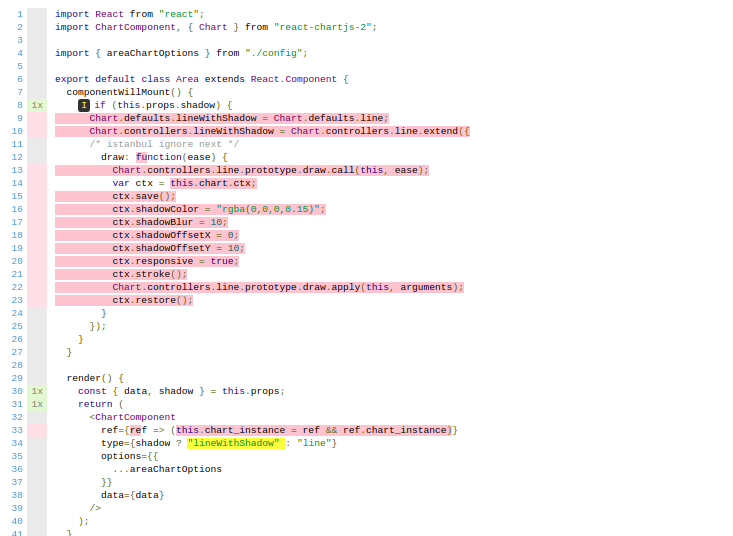
I am having an issue every line inside draw function is not covered in the test coverage .See the attached photo you will find those highlighted lines there.
I am using following dependencies
"devDependencies": {
"@babel/plugin-proposal-class-properties": "^7.7.4",
"@babel/plugin-transform-react-jsx": "^7.7.7",
"@babel/preset-env": "^7.7.7",
"@babel/preset-react": "^7.7.4",
"axios-mock-adapter": "^1.17.0",
"enzyme": "^3.11.0",
"enzyme-adapter-react-16": "^1.15.2",
"jest-dom": "^4.0.0",
"node-sass": "^4.11.0",
"react": "^16.12.0",
"react-test-render": "^1.1.2"
}
 rajatchugh2431
on 21 Jan 2020
rajatchugh2431
on 21 Jan 2020
@rajatchugh2431 Are you able to get the test coverage of highlighted lines from your 'draw' function?
 DPK101
on 17 May 2020
DPK101
on 17 May 2020
@schlattk do you have the
setup-jest.jsfile setup properly in yourpackage.jsonsimilar to this."jest": { "setupFiles": [ "./shim.js", "./setup-jest.js" ]I was trying to configure this in CRA generated app but it didn't allow me.
I searched and found that you can directly add following piece of code in 'src/setupTests.js' file. No need to do any additional jest configs.
import React, { Component } from 'react';

jest.mock('react-chartjs-2', () => ({
  Bar: () => null, // add any additional chart types here
  Line: () => null
}));
 imsangram
on 8 Aug 2020
imsangram
on 8 Aug 2020
The issue with this mock is
jest.mock('react-chartjs-2', () => ({
  Bar: () => null, // add any additional chart types here
  Line: () => null
}));
you can't then test against canvas, it won't render canvas inside your screen container! This test will fail!
 const canvas = screen.getByTestId('testdiv').querySelector('canvas') ;
 expect(canvas).toBeInTheDocument();
 sgavathe
on 16 Apr 2021
sgavathe
on 16 Apr 2021
Related issues
 flyingpath
·
5Comments
flyingpath
·
5Comments
 jbbae
·
5Comments
jbbae
·
5Comments
 RamonBeast
·
4Comments
RamonBeast
·
4Comments
 davidcalhoun
·
5Comments
davidcalhoun
·
5Comments
 LuizMoreira
·
3Comments
LuizMoreira
·
3Comments
Most helpful comment
Workaround is to mock out the chart for enzyme mounting (or just use a shallow wrapper)