React-calendar: tileClassName adds class to wrong day
In this example (also available on CodeSandbox), the className is added to the wrong day (next day). So the tile for 2018-12-25 gets the classes underline 2018-12-24.
function tileClassName({ date }) {
  const dateFormatted = date.toISOString().split("T")[0];

  return dateFormatted === "2018-12-24" ? `underline ${dateFormatted}` : dateFormatted;
}

function App() {
  return (
    <div className="App">
      <Calendar
        activeStartDate={new Date("2018-12-01")}
        tileClassName={tileClassName}
      />
    </div>
  );
}
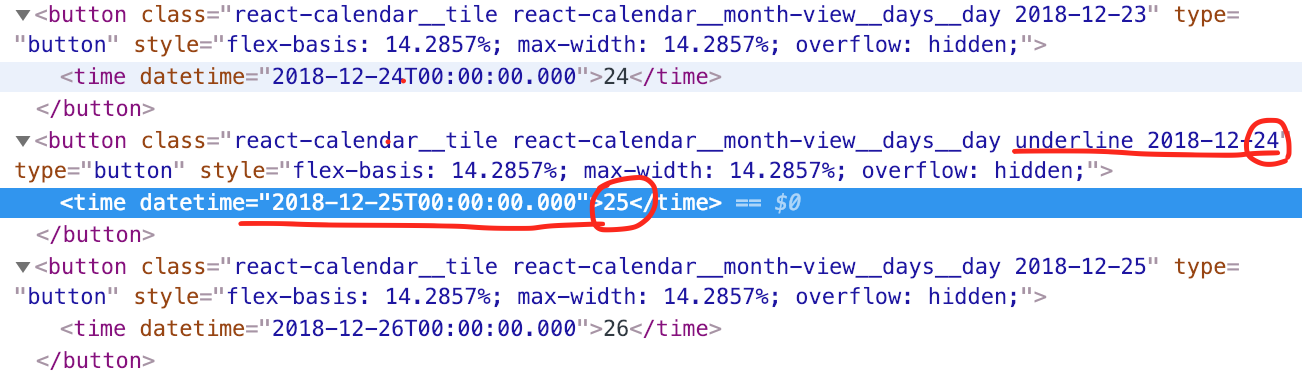
My timezone is "GMT+0100".
 jorenvanhee
All 2 comments
I'm in the same timezone so this one's easy ;)
> new Date(2018, 11, 25).toISOString()
< "2018-12-24T23:00:00.000Z"
.toISOString() returns an ISO date in UTC timezone (Z at the end without the time after it equals Z+0:00), while the date you underlined is a local is missing the Z - meaning it's a local time. Clearly, getting "2018-12-24" from December 25th is not something we would like. You can reverse-engineer this by creating a Date from these strings:
> new Date("2018-12-24T00:00:00Z")
< Mon Dec 24 2018 01:00:00 GMT+0100 (czas środkowoeuropejski standardowy)
> new Date("2018-12-24T00:00:00")
< Mon Dec 24 2018 00:00:00 GMT+0100 (czas środkowoeuropejski standardowy)
So technically, what you wrote is: Underline whichever day which midnight happens on December 24th in UTC timezone.
Here's a correct solution: https://codesandbox.io/s/7w58p0n1ox
Of course, much easier way to underline would be to just check date.getMonth() === 11 && date.getDate() === 24 instead of implementing all of this, unless you really need local formatted date in className :)
 wojtekmaj
on 25 Dec 2018
wojtekmaj
on 25 Dec 2018
Thanks! I really appreciate you taking the time to explain this thoroughly.
jorenvanhee
on 25 Dec 2018
Related issues
 guydewinton
·
3Comments
wojtekmaj
·
3Comments
guydewinton
·
3Comments
wojtekmaj
·
3Comments
 tranvula
·
4Comments
tranvula
·
4Comments
 amansur
·
6Comments
amansur
·
6Comments
 mikeyharris89
·
4Comments
mikeyharris89
·
4Comments