React-calendar: Rerender titleDisabled
Hi there,
This might be an obvious question but what or how can you trigger the titleDisabled to re-render?
We have dropdown that when changed would update the titleDisabled based on the dates returned by the async call.
<Calendar
    onChange={this.onChange}
    value={this.state.date}
    tileDisabled={this.tileDisabled}
/>
tileDisabled = ({ date }) => {
    var theDate = moment(date);
    if (!moment(theDate).isBefore(moment(), "day")) {
        return this.dateHasTimeSlots(date);
    } else {
        return true;
    }
}
async getAvailableDays() {
    const serviceId = this.props.match.params.serviceId;
    const response = await fetch(url);
    const data = await response.json();
    this.setState({ availableDays: data, loading: false });
}
Thanks!
question
 tranvula
All 4 comments
React Hooks
Use useMemo to update tileDisabled function when needed & when needed only.
function MyApp() {
  const [availableDates, setAvailableDates] = useState([]);
  const [date, setDate] = useState(null);

  useEffect(() => {
    (async () => {
      const nextAvailableDates = await fetch(…);
      setAvailableDates(nextAvailableDates);
    })();
  }, []);

  const tileDisabled = useCallback(({ date }) => {
    return !availableDates.includes(date);
  }, [availableDates]);

  return (
    <Calendar
      onChange={setDate}
      value={date}
      tileDisabled={tileDisabled}
    />
  );
}
React (legacy)
Redefine the function so that it's _referentially unequal_ after re-render:
class MyApp extends React.Component {
  state = {
    availableDates: [],
    date: null,
  }

  componentDidMount() {
    this.getAvailableDates();
  }

  async getAvailableDates() {
    const availableDates = await fetch(…);

    this.tileDisabled = ({ date }) => {
      return !availableDates.includes(date);
    }

    this.setState({
      availableDates,
    });
  }

  onChange(date) {
    this.setState({
      date,
    });
  }

  render() {
    return (
      <Calendar
        onChange={this.onChange}
        value={this.state.date}
        tileDisabled={this.tileDisabled}
      />
    );
  }
}
Alternatively, you can define the function in class body and re-bind the function instead of re-defining it, so that it's referentially unequal:
this.tileDisabled = this.tileDisabled.bind(this);
 wojtekmaj
on 22 Jun 2020
wojtekmaj
on 22 Jun 2020
👍2
👀1
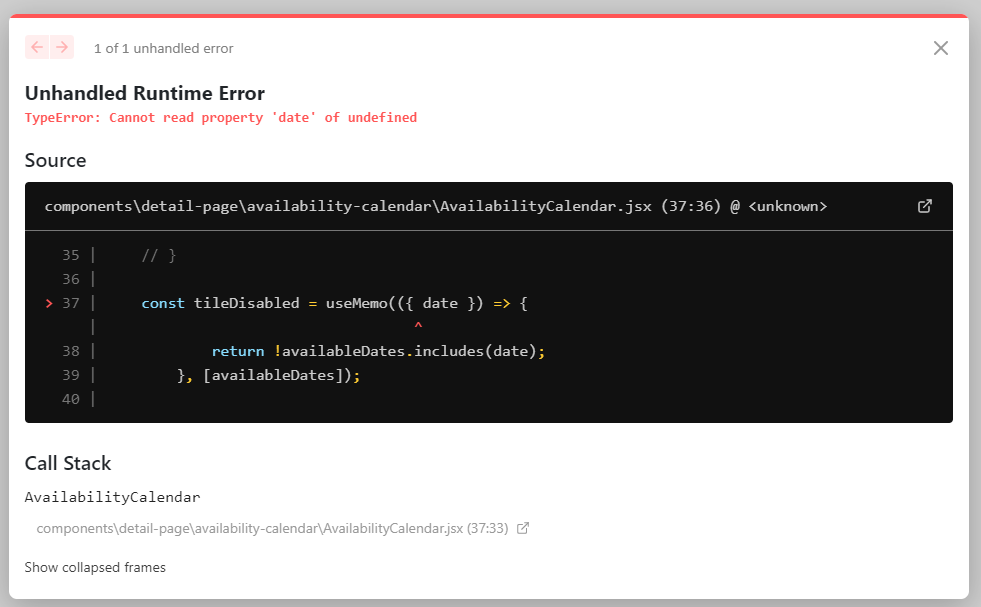
@wojtekmaj The React Hooks example doesn't works anymore :(
I copied the exact example, but got a error with the useMemo hook? Does anyone know a fix? 👀
 aaron5670
on 22 Feb 2021
aaron5670
on 22 Feb 2021
Fixed the example, sorry
wojtekmaj
on 22 Feb 2021
❤1
Thank you for the quick response! 🙏
aaron5670
on 22 Feb 2021
Was this page helpful?
0 / 5 - 0 ratings
Related issues
 akabab
·
4Comments
akabab
·
4Comments
 dumkanki
·
4Comments
dumkanki
·
4Comments
 spoldman
·
4Comments
spoldman
·
4Comments
 mikeyharris89
·
4Comments
mikeyharris89
·
4Comments
 rmccue
·
4Comments
rmccue
·
4Comments
Most helpful comment
React Hooks
Use useMemo to update tileDisabled function when needed & when needed only.
React (legacy)
Redefine the function so that it's _referentially unequal_ after re-render:
Alternatively, you can define the function in class body and re-bind the function instead of re-defining it, so that it's referentially unequal: