React-calendar: Broken layout in IE11
The layout is broken in IE11:

Compared to Chrome:

Right now I'm unsure if (1) the problem is on my end, or (2) if it's because of the quirky flexbox implementation in IE11, or (3) if you're not supporting IE?
Can I remove the standard stylesheet somehow so I can style it myself?
 larsnystrom
All 9 comments
Hello,
I do support IE11. This might be a bug on our or your side. I'm unable to test it at the moment. I see you're using custom styles, maybe you're missing something like container width?
 wojtekmaj
on 5 Mar 2018
wojtekmaj
on 5 Mar 2018
The only style I've added is:
.panel-body > .react-calendar {
    border: 0;
    width: 100%;
}
That is to make react-calendar expand to use the entire width of the panel-body (I'm using bootstrap 3) and also to remove the default border.
larsnystrom
on 7 Mar 2018
Hello,
I’ve implemented the calendar today in a new project an observed the same behaviour.
In Chrome everything is ok but in IE11 the date-items flow over the calendar borders.
Maybe some bug with the percentage calculation of the flex-basis?
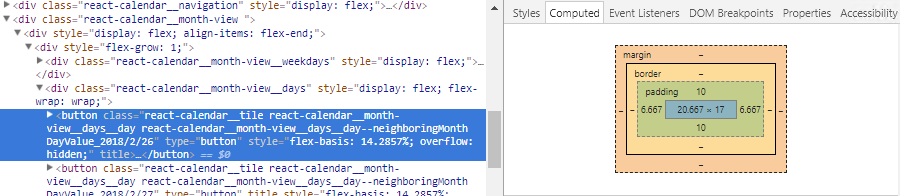
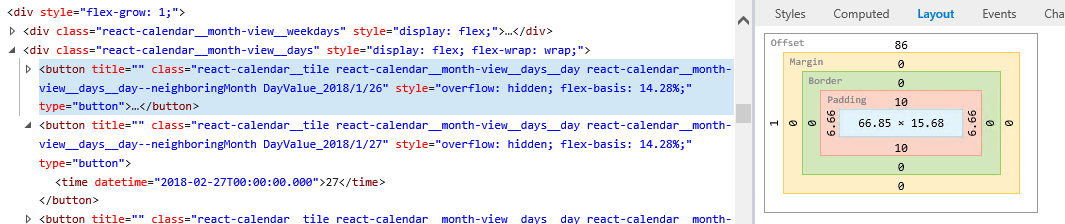
E.g. the Buttons for the day-items have a style "flex-basis: 14.2...%;"
In Chrome this is displayed about 20px and in IE 66px.
Chrome:
IE:
 PiTomar
on 7 Mar 2018
PiTomar
on 7 Mar 2018
Hello,
I've been facing some environment issues after switching machines, I'll look into this ASAP.
wojtekmaj
on 7 Mar 2018
Thank you for your patience. The issue has been fixed and will be public in incoming version v2.13.2.
wojtekmaj
on 7 Mar 2018
Thanks for your fast response.
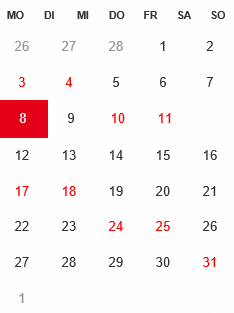
Now the Items are in the calendar but on my test environment still not on the right place. The day-items seems to big so the new-line-break is at the wrong place. (3 and 4 should be under Saturday/ Sunday)
Or is there any fixed width the calendar must have? (in Chrome it works with any width)
PiTomar
on 8 Mar 2018
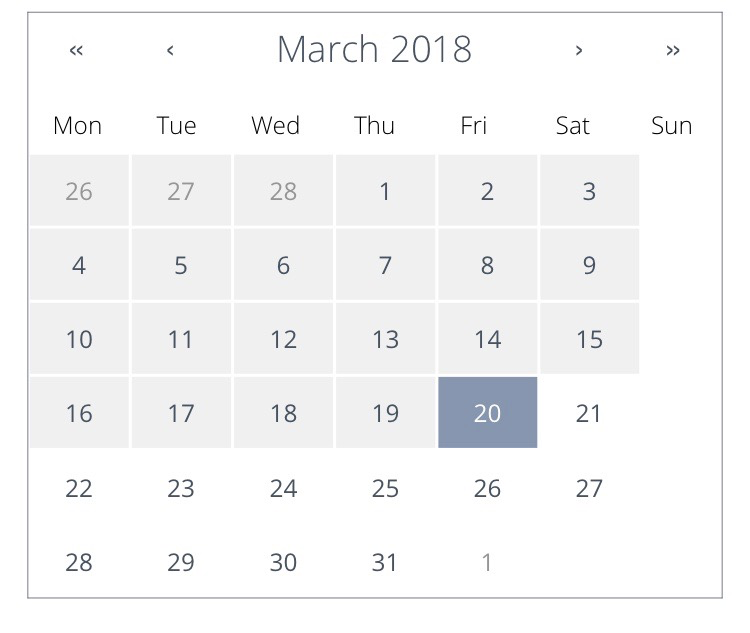
I am experiencing a similar issue with mobile view in chrome
 lisahoong
on 12 Mar 2018
lisahoong
on 12 Mar 2018
@PiTomar did you ever determine how to fix this? Running into the same issue
 nathan-haines
on 15 Mar 2018
nathan-haines
on 15 Mar 2018
@nathan-haines Please see issue #45 "Broken layout in Safari mobile". There we currently also discus the IE11 positioning issue.
As temporary workaround, you can try to remove some margins/ paddings of the '.react-calendar button' items.
PiTomar
on 15 Mar 2018
Related issues
 rmccue
·
4Comments
rmccue
·
4Comments
 mikeyharris89
·
4Comments
mikeyharris89
·
4Comments
 fasmart4
·
6Comments
fasmart4
·
6Comments
 tranvula
·
4Comments
tranvula
·
4Comments
 Hubro
·
3Comments
Hubro
·
3Comments