React-calendar-timeline: Improve performance of timeline
This timeline performs very well when there are a few number of items passed in, however perf and framerate drops once you reach a non-trivial amount of items (around 50 or so). This is especially the case when fullUpdate=true. This thread can be used to list out situations when performance degrades and ideas on how to improve performance. Obviously reducing the number of items passed to the calendar helps but there should be alternatives/refactors that can be done to support a lot of items by default.
 mcMickJuice
All 37 comments
fullUpdate=true is generally always desired since we want the item content in each item to be "sticky" when the item is exiting the timeline to the left. However, it is very expensive as the left value needs to be computed on every render...which occurs on scroll, zoom etc.
Some options/possibilities
- use
position: stickyon item contents so that computing the left style for items is unnecessary - only calculate the "dimensions" (i.e. left, top) values of items that are within the viewport (both horizontally and vertically). This would require a complete refactor of how the timeline works.
mcMickJuice
on 20 Feb 2018
maybe use react-virtualized's collection component for rendering of the timeline:
https://github.com/bvaughn/react-virtualized/blob/master/docs/Collection.md
Maybe this is an opt-in
mcMickJuice
on 26 Feb 2018
@jabidof what are your use cases when you see performance degradation in the timeline?
mcMickJuice
on 27 Feb 2018
@mcMickJuice I'm preparing some directions...
Our main use case is to represent 1000's of items of different activities (possible with different colors, etc.)
See https://i.imgur.com/duWtcpN.png and https://i.imgur.com/MKuYKN8.png
 jabidof
on 27 Feb 2018
jabidof
on 27 Feb 2018
any update on this one? I have a similar requirement as @jabidof over the next few months. If I know the direction I can potentially help out with this one.
 vasdee
on 13 Mar 2018
vasdee
on 13 Mar 2018
react-virtualized would definitely help.
 AymericG
on 23 Mar 2018
AymericG
on 23 Mar 2018
@vasdee sorry for the late response on this. I haven't really had much time to work on this library...plus performance diagnosis and improvement is a long and often frustrating endeavor.
When zoomed out in the timeline and there are a number of items rendered, the timeline becomes unresponsive. Hell, even when there aren't many items rendered on the timeline, the framerate is pretty poor (<30fps).
Run the project locally and check out the performance demo (fullUpdate is off in this demo)
I've identified a number of areas where this timeline can be approved:
fullUpdate is a performance killer
When fullUpdate is true, a ton of work is done every time you scroll, including recalculating styles for every item and recalculating group orders...just everything. For what i can tell, fullUpdate's value is for:
- have item contents "stick" to the left of the timeline when an item is clipped (i.e. not 100% of the item is visible in the timeline from the left)
- expand/contract height of a row if an item is no longer visible
The former can be solved with position: sticky while the latter can be done using a debounce on scroll and updating after the user is done interacting with the timeline
Item.js dom structure
<div className="rct-item-overflow">
          <div className="rct-item-content">{this.renderContent()}</div>
 </div>
I notice that if you zoom out, there are items that are very narrow, however their children (in rct-item-content) still maintain their normal width (we don't have width applied to rct-item-content, only the root node in Item.js so there's a lot of potential for overlap amongst these items. _I think_ this is causing additional render layers to be created by the browser and is a performance killer when you do anything that updates the timeline (which is scrolling, timeline cursor, etc). After simplifying this dom structure, i noticed some performance improvement
Header rerenders styles on scroll
This one is similar to fullUpdate; on scroll (or whenever the timeline range changes) the Header component rerenders and recalculates all of the inline styles to position the top and bottom header and causes layout thrashing.
To confirm this, I turned off fullUpdate, simplified the dom structure in Item.js and removed the Header from rendering and performance was quite good.
I'm going to start on fullUpdate as it'll lay the foundation for restructuring how this timeline is laid out. I'll then move on to the Header refactor and then Item.js. Any help I can get will be greatly appreciated.
mcMickJuice
on 26 Mar 2018
@vasdee @jabidof I'm getting close on the three items above. There are some regressions that I've introduced and some of the features related to cell contents being sticky have been removed in the time being. Will post in this thread in a few days when I take care of the last item (Item.js dom structure).
Will probably ask you two to audit these changes before I go forward with merging and released. All work is being done on the develop branch
mcMickJuice
on 4 Apr 2018
Nice work @mcMickJuice I look forward to seeing the improvements
vasdee
on 9 Apr 2018
FYI you can test these perf improvements by installing react-calendar-timeline using the beta tag e.g. yarn add react-calendar-timeline@beta
mcMickJuice
on 14 Apr 2018
@mcMickJuice I just updated the lib to beta. Will make some tests and let you know about the results.
So far so good; no error.
jabidof
on 16 Apr 2018
Any and all feedback you can give @jabidof would be awesome.
I've got two more things to focus on (one being more speculative and might not work out):
- occlusion culling - dont render any element thats not visible
- dont render item elements if the container item is small - this would help in situations where you zoom out and you have a ton of really small items (<20 px). The item content is not visible however its elements are still in the dom. This causes there to be n items * x subelements in the dom which is a performance drag.
Hope to get the latter checked in soon (its a relatively simple change) and the former will work on this week. If that works, we should see some awesome perf gains!
mcMickJuice
on 16 Apr 2018
@mcMickJuice about occlusion culling.
I have a situation where the item start maybe a year ago and ends tomorrow. Now consider the viewPort is this month, I need to see this particular item. Occlusion culling thus needs to handle such case. Let me know if this is not clear.
I fully agree with second point.
jabidof
on 16 Apr 2018
It would be very nice to see the progress of this improvement in scrolling speed. also loading speed.
I have a usage where sometimes I want to click and expand and add a lot of groups (avg 500+ groups, each group has a lot of micro events, most of them on average 30+) into the calendar at a time, and the loading speed is very bad, it takes a long time and froze the entire page for 30s+ before the calendar renders with those added groups.
And the horizontal scroll speed is also very bad with this kind of load, it is a completely slideshow, only update the screen every 10s+ before frozen again.
Unfortunately no luck with beta, still very slow.
 pencilcheck
on 22 Apr 2018
pencilcheck
on 22 Apr 2018
Just made a pull request that pushes the performance a bit to be more on the steady side when there are a lot of items when scrolling. I hope it helps.
pencilcheck
on 22 Apr 2018
Some details from my side.
I managed to get "acceptable" performances by tinkering the Timeline the following:
- use of recompose:
withState('timeView', 'setTimeView', { timeStart: Math.round(moment().startOf('month').valueOf() / 1000), timeEnd: Math.round(moment().endOf('month').valueOf() / 1000) }), withState('deltaTimeView', 'setDeltaTimeview', Math.round((moment().endOf('month').valueOf() - moment().startOf('month').valueOf()) / 1000)), - now depending on "deltaTimeView", filter the data that will be visible within the deltaTimeView interval
- debounced the two following handlers:
onTimeChange={debounce(onTimeChangeHandler(props), 50)}
onZoom={debounce(onZoomHandler(props), 50)}
What i'm trying to achieve is some virtualization of the rendered data within the Timeline.
It works but it would be way better to have it directly within the lib.
Hope it helps.
J.
jabidof
on 22 Apr 2018
@jabidof
I have a situation where the item start maybe a year ago and ends tomorrow. Now consider the viewPort is this month, I need to see this particular item. Occlusion culling thus needs to handle such case. Let me know if this is not clear.
Yes, I'd take this into account. Any item that is at all visible in the visible time range (plus/minus some padding).
I'm more concerned with rendering (or not rendering) items that are not visible vertically. I'm going to work on hiding subelements with the item width is under a certain amount now. Seems like a quick solution.
mcMickJuice
on 22 Apr 2018
I thought of using the https://stanko.github.io/react-window-decorators/
to filter the line that do not need rendering because not in the viewport.
jabidof
on 22 Apr 2018
@jabidof @pencilcheck check out latest version of beta (0.16.0.beta-2 specifically). It has https://github.com/namespace-ee/react-calendar-timeline/pull/285 merged in when item contents are not rendering if the item is less than a certain width.
Comparison:
latest (0.15.11)
https://qlj6qvjrnw.codesandbox.io/
beta (0.16.0.beta-2)
https://rwxm498z4o.codesandbox.io/
Scrolling is far superior both when you are at default view (one month) and scroll out (one year).
@pencilcheck can you try out this version in your app to see if there is an improvement? These changes don't preclude me from utilizing your changes in https://github.com/namespace-ee/react-calendar-timeline/pull/283.
mcMickJuice
on 22 Apr 2018
Cool, sure let me test it out. Btw, the updated pull request has been sent. You can find it here: https://github.com/namespace-ee/react-calendar-timeline/pull/286
----- Updates
After using the beta, let me report that the speed of scrolling is still very very very slow (slideshows), especially when you scroll on top of the timeline (scrolling down over the left sidebar is pretty fast).
One thing I noticed when I was testing out the code, I noticed if I comment out (in master branch) this part of the code that calls setState, in Timeline.js, line around 537, inside the function of updateScrollCanvas
    this.setState(newState, () => {
      // are we changing zoom? Well then let's report it
      // need to wait until state is set so that we get current
      // timeline context
      if (this.props.onZoom && oldZoom !== newZoom) {
        this.props.onZoom(this.getTimelineContext())
      }
    })
Btw I don't also need to comment the whole setState out to get speed improvements, as long as I don't setState on anything else but visibleTimeStart or visibleTimeEnd scrolling will be fast. For example
    this.setState({
        visibleTimeStart: newState.visibleTimeStart,
        visibleTimeEnd: newState.visibleTimeEnd
    }, () => {
      // are we changing zoom? Well then let's report it
      // need to wait until state is set so that we get current
      // timeline context
      if (this.props.onZoom && oldZoom !== newZoom) {
        this.props.onZoom(this.getTimelineContext())
      }
    })
The scrolling inside the timeline becomes super smooth, but the caveat is that the items are not being updated, and the header time disappears if you scroll far left or right.
So I'm guessing something about calculating the header or the items is causing render thrashing or something, and that causes browser to reflow/repaint for a very long amount of time, so if we can find out the real cause of this issue that I think would be a substantial improvement.
pencilcheck
on 23 Apr 2018
Thanks for getting back to me:
- what specific version of the library are you using? Can you explicitly install [email protected]?
- how many items total are being rendered on the timeline (i.e.
document.querySelectorAll('.rct-item').length) - are the items on the timeline super close together like so?
I'll look at the header render. If you enable paint flashing in chrome, you can see the header repaint on scroll which might be the issue!
mcMickJuice
on 23 Apr 2018
@mcMickJuice I was using the latest stable 0.15.10 with some of the optimization I did in the pull request I made.
The slowdown happens after I expand and fetch a lot of items to be rendered and here are the numbers:
document.querySelectorAll('.rct-item').length = 617It renders almost one per day, and each one takes up a day block and no overlaps, so technically they are all close together, but not like all zoomed out actually. Let me give you a quick peek.
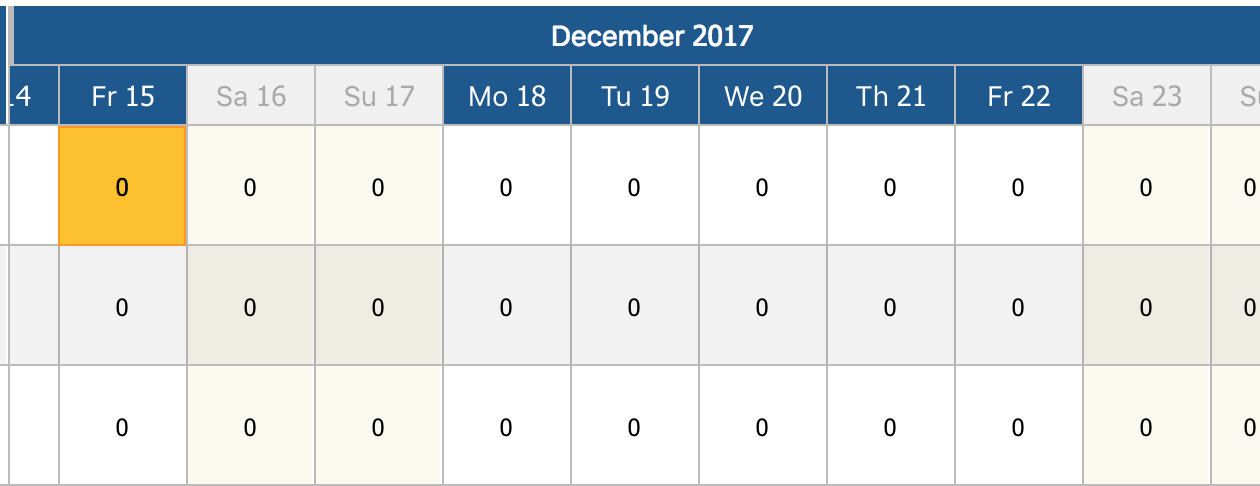
pencilcheck
on 25 Apr 2018
For these performance discussions, can you please make sure you're on [email protected] ? That version has the most up to date performance optimizations that I hope to release soon. There are some visual bugs on that branch though so it's not yet ready to be released.
Also, have you done any benchmarking or investigation into why your app is slow? Have you looked at the performance tab in chrome and profiled its performance when you are performing that action that you mention?
mcMickJuice
on 25 Apr 2018
Yes, when I replied 3 days ago I followed what you said and tried 0.16.0-beta.2 but it doesn't make any improvements, still slow and a lot of visual are not working because the props are different.
pencilcheck
on 25 Apr 2018
@mcMickJuice
Hi
_Sorry I could not do the testing before._
I made an on-the-field comparison between BETA you proposed above and version [email protected].
The vertical scrolling is much much much better with the BETA version. The test is made using thousands of items and ~500 groups (see below picture); so I guess the test has some meaning.
My conclusion is the changes you made to the BETA have a significant performance boost.
I understood it was not the goal but FYI the header and sideBars are not rendered correctly in the BETA.
Let me know if I can do some more testing.
J.
PS: I removed my "recompose" virtualization approach to do the test.

jabidof
on 4 May 2018
thanks for the feedback @jabidof .
For the header and columns:
- are you applying custom css to those columns, groups or the header?
- which version of beta are you on? 0.16.3 removed the import of css in the library and puts the onus on the user to import the css
mcMickJuice
on 4 May 2018
Ok, I need to check this CSS as I apply some...
I used [email protected]
Is this new way of CSS import (good thing btw!) documented somewhere?
jabidof
on 4 May 2018
Upgrade to latest of beta (0.16.0-beta.4)
Change is documented in a couple places in the README of develop branch:
Will likely also have release notes that can be linked from the README with details on the changes in Beta
mcMickJuice
on 4 May 2018
Closing this thread with 0.16.x release.
https://github.com/namespace-ee/react-calendar-timeline/issues/296
Will continue to look at further improvements in performance related to:
- virtualizing the canvas/ only showing items that are visibile
- improving canvasReset and the stuttering it sometimes causes
- zoom in and out
@jabidof if your issue persists, please open up a separate issue. Let's get this timeline perf as smooth as butter!!!
mcMickJuice
on 5 May 2018
@mcMickJuice
All good with CSS! I'll go ahead and test latest release.
Peanutbutter?
jabidof
on 5 May 2018
@mcMickJuice
FYI, up to now no particular issue/bug found. Performance is noticeably better and I could simplify part of my code.
jabidof
on 20 May 2018
0.16.1 is still very slow, scrolling on the calendar result in 5+ secs delay until it renders. Unfortunately I don't really see any improvements from my end.
pencilcheck
on 1 Jun 2018
@pencilcheck until you can post a repo or codesandbox that replicates the issues you are running into, I can not help you.
mcMickJuice
on 1 Jun 2018
@mcMickJuice Just a naive comment from my side.
I did some "why-did-you-update" react analysis and I converted all React.Component from the TImeline lib to React.PureComponent. _I could remove a tremendous amount of useless re-render_.
Wouldn't that be an simple optimization approach?
jabidof
on 14 Jun 2018
Not naive at all @jabidof . There was a PR opened a month or so back that addressed this:
https://github.com/namespace-ee/react-calendar-timeline/pull/304
However, the use of deepEqual on arrays (separate from PureComponent) was troubling and i didnt want to include that in code. I agree that PureComponent should be used more here but I want to address the causes of the need for deepEqual and rework how and when we rerender before I jump into adding PureComponent.
One of the main culprits of unneeded rendering was the cursorline. When showCursor prop was true, every time you mousemoved over the canvas the entire timeline would rerender. That is being addressed now in a forthcoming PR related to https://github.com/namespace-ee/react-calendar-timeline/issues/327 . After that I'm going to try to address how items are positioned, when we recalculate positioning etc etc which will give me a lot better insight into when we need to rerender and when we dont.
I created an additional performance issue that you can submit your ideas to: https://github.com/namespace-ee/react-calendar-timeline/issues/338
mcMickJuice
on 21 Jun 2018
I noticed one of the source of slowdown on my end when using version 0.16.1 was that I implemented onTimeChange and passed that into the props along with visibleTimeStart and visibleTimeEnd as I recall was following a tutorial.
The performance went a lot faster and smoother after removing the props mentioned above.
I hope this helps others who also might be struggling.
pencilcheck
on 9 Jul 2018
- @mcMickJuice I was using the latest stable 0.15.10 with some of the optimization I did in the pull request I made.
- The slowdown happens after I expand and fetch a lot of items to be rendered and here are the numbers:
document.querySelectorAll('.rct-item').length = 617- It renders almost one per day, and each one takes up a day block and no overlaps, so technically they are all close together, but not like all zoomed out actually. Let me give you a quick peek.
is there an example for formatting or the latest component of that style? (intervals divided into days)
 engmsilva
on 17 Feb 2020
engmsilva
on 17 Feb 2020
Related issues
 capt-obvious
·
6Comments
capt-obvious
·
6Comments
 fredrik-bjaras
·
5Comments
fredrik-bjaras
·
5Comments
 rosanzheng
·
3Comments
rosanzheng
·
3Comments
 nirchernia
·
3Comments
nirchernia
·
3Comments
 riflemanIm
·
3Comments
riflemanIm
·
3Comments
Most helpful comment
react-virtualized would definitely help.