React-calendar-timeline: How can I change the background color of cell?
Hello.
I try to use your great component.
I have our calendar data which include milestones (e.g. our regular release days).
I want to change the background color of cells based on our calendar data.
It seems that weekend cells color are changed by default.

Is it possible?
Thanks!
 gyarasu
All 15 comments
@gyarasu there is a feature called ranges developed by @meengit
with it you can mark some ranges in the background of the timeline component. right now it works but it's not 100% ready for a pull request. but you can already use it. with ranges you can do something similar what you are asking for. Here you finde the repo: https://github.com/meengit/react-calendar-timeline/tree/feature/range#ranges (branch: feature/range)
Here you see two ranges:

 signalwerk
on 27 Feb 2017
signalwerk
on 27 Feb 2017
@signalwerk
Thanks for your response.
I successfully installed #ranges branch into my project
and I confirmed that I can add the property.
I have a question.
How should I set a color for ranges?
I added the ranges property like below.(other properties are omitted this time)
<Timeline
    ranges={{
          id: 2,
          start_time: moment().add(-1, 'day'),
          end_time: moment().add(4, 'day'),
          className: 'weekend'
     }
/>
Next, I prepared css.
.weekend {
  background-color: #99cc00
}
Unfortunately, I can't see it seems to be something wrong.
gyarasu
on 28 Feb 2017
Hmmm... the current branch has other property names (start instead of start_time, end instead of end_time). That will be fixed before the final pull request comes. Here my Ranges definition:
<Timeline
    ranges={[{
          id: 2,
          start: moment().add(-1, 'day').toDate(),
          end: moment().add(4, 'day').toDate(),
          className: 'weekend'
     }]}
/>
result:

signalwerk
on 2 Mar 2017
Just an additional question.
I have a use case where i need to grey out the background as ranges are doing it.
But the ranges are per employee (Valid Worktime is defined differently for every employee)
Is it possible?
Thanks for any enlightment
 fopsdev
on 13 Jun 2017
fopsdev
on 13 Jun 2017
no unfortunately not with the current implementation of ranges. hmm... maybe you should implement a horizontal-line-renderer like the itemRenderer?
signalwerk
on 13 Jun 2017
ok
thanks for pointing me to the right direction. do you know a sample of a itemRenderer?
fopsdev
on 13 Jun 2017
i can't see how to achieve that after having a quick look at the code
i think it will fail because of the stacking
it looks like i really would need to access the background cell.
will dig further
fopsdev
on 13 Jun 2017
Well, would be great if somebody would have another tip for me
fopsdev
on 13 Jun 2017
@fopsdev sorry if my answer was not clear. the itemRenderer was just an example how to implement a custom renderer and then pass it to the component. But this work is not done for your case.
You need to externalise the handling first and then implement your custom logic. probably something like:
<Timeline
  groups={groups}
  items={items}
  horizontalLineRenderer={... here the reference to your function ...}
  ...
/>
Have a look here; HorizontalLines.js
Thats probably the part you need to work on.
signalwerk
on 13 Jun 2017
@signalwerk 👍
thanks, that got me started now :)
fopsdev
on 14 Jun 2017
Hey! The fresh out of the oven v0.15 contains support for plugins.
@fopsdev you may look at the plugin example for a way to color the background in whatever way you wish. It's still a limited example (it colors the entire row, not specific days), but it's a starting point.
When @signalwerk and @meengit release the ranges plugin, it can serve as an additional piece of the puzzle :). Combining these two should give you what you need, if I understand correctly.
 mariusandra
on 6 Jul 2017
mariusandra
on 6 Jul 2017
@signalwerk
Thanks for your responding.
I'm waiting for and looking forward to merge the feature!
gyarasu
on 19 Jul 2017
Closing, created specific issue here: https://github.com/namespace-ee/react-calendar-timeline/issues/228
 mcMickJuice
on 18 Jan 2018
mcMickJuice
on 18 Jan 2018
In case someone comes across the same question. I found a hacky way to accomplish the above and that also allows the onClick on the item to be disabled by setting the z index on the item to 40.
See a picture below. In this case I want to see when professors are working and who is assisting them. I want to be able to change the assistant shift, but not the professor's.
Here we have two items:
ProfessorItem:
- canMove = false
- className = 'disabledShift'
AssistantItem: this is just a regular item.
in the css file :
.react-calendar-timeline .rct-items .rct-item.shiftBlock {
   background-color: #00D1BD !important;
   border: none ;
   z-index: 40;
 }
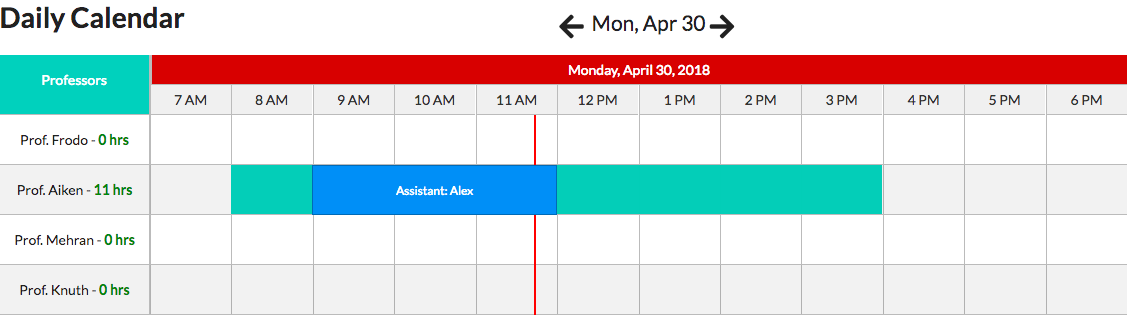
Hope it helps.
 tuancaraballo
on 30 Apr 2018
tuancaraballo
on 30 Apr 2018
It seems that weekend cells color are changed by default.
The default css shows weekend colours as a light yellowrgba(250, 246, 225, 0.5). You can override those or any other days with CSS:
.rct-day-6,
.rct-day-7 {
  background: transparent!important;
}
 stahlmanDesign
on 1 Aug 2020
stahlmanDesign
on 1 Aug 2020
Related issues
 forki
·
5Comments
forki
·
5Comments
 pvtran1995
·
6Comments
pvtran1995
·
6Comments
 rosanzheng
·
3Comments
rosanzheng
·
3Comments
 neartik
·
4Comments
neartik
·
4Comments
 sabina4
·
4Comments
sabina4
·
4Comments
Most helpful comment
Hey! The fresh out of the oven
v0.15contains support for plugins.@fopsdev you may look at the plugin example for a way to color the background in whatever way you wish. It's still a limited example (it colors the entire row, not specific days), but it's a starting point.
When @signalwerk and @meengit release the
rangesplugin, it can serve as an additional piece of the puzzle :). Combining these two should give you what you need, if I understand correctly.