React-beautiful-dnd: Droppable zone is shifted to the left relative to the Component it's attached to
Expected behavior
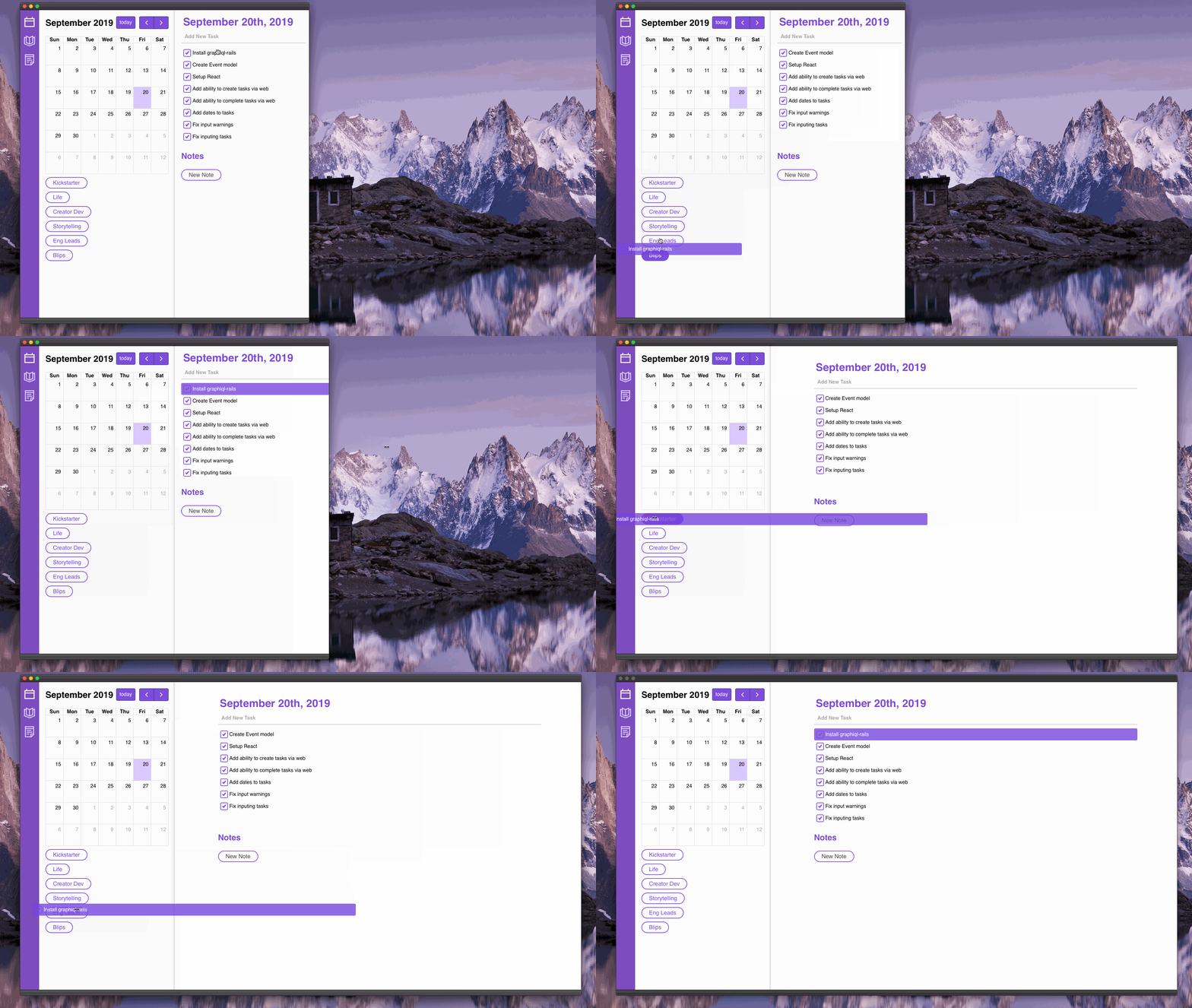
A Draggable can be dropped on the entire area of the Component with dropableProps

Where I expect the zone to be
Actual behavior
The area where I can drop a Draggable is the same size as the component with dropableProps, but shifted to the left about 50% of the width of the Component with dropableProps

Where it actually is
Steps to reproduce
Suggested solution?
What version of React are you using?
16.9.0
What version of react-beautiful-dnd are you running?
11.0.5
What browser are you using?
Chrome 76.0.3809.87
Demo
I legally can't provide the code, but the general idea for what I'm trying to achieve is:
- Take a value from a list
- Drop it on one of the rows in a table
- Assign that row in the table a value based on what you drop from the list
The result is that I have a big list with a lot of draggable elements, and multiple droppables, and I make sure in onDragEnd that there is only one value in each droppable
 draganczukp
All 5 comments
I have same issue. Droppable area is clearly offsetted to the left.
react-beautiful-dnd v11.0.3
 Nedgeva
on 21 Oct 2019
Nedgeva
on 21 Oct 2019
Hmm. i think i figured out what happens when i dragging a draggable and it's wont to land at droppable. It's because we need at least to point center of draggable to the droppable zone. So when draggable is far more wider than droppable's width then it looks confusingly as we need to drag it with some kind of offset (or "shift"). It's not landed when only corner of draggable hovered over droppable. I think it's by intent, not a bug.
Nedgeva
on 22 Oct 2019
@Nedgeva That makes a ton of sense and is consistent with what I'm seeing too. I have very thin, wide draggables and the consistency of the drop point is very dependent on the width of my viewport.
(Granted I'm using these button droppables in an unorthodox way and it might be best to eject from react-beautiful-dnd for this particular use case)
 willmanduffy
on 22 Oct 2019
willmanduffy
on 22 Oct 2019
Related issue/change request: https://github.com/atlassian/react-beautiful-dnd/issues/930
Nedgeva
on 22 Oct 2019
I'll close this in favour of #930. It would be good to tackle that!
 alexreardon
on 5 Nov 2019
alexreardon
on 5 Nov 2019
Related issues
 heymartinadams
·
3Comments
alexreardon
·
3Comments
heymartinadams
·
3Comments
alexreardon
·
3Comments
 ibash
·
3Comments
ibash
·
3Comments
 JESii
·
3Comments
JESii
·
3Comments
 WJKwok
·
3Comments
WJKwok
·
3Comments
Most helpful comment
Hmm. i think i figured out what happens when i dragging a draggable and it's wont to land at droppable. It's because we need at least to point center of draggable to the droppable zone. So when draggable is far more wider than droppable's width then it looks confusingly as we need to drag it with some kind of offset (or "shift"). It's not landed when only corner of draggable hovered over droppable. I think it's by intent, not a bug.