React-beautiful-dnd: Invariant failed: provided.innerRef has not been provided with a HTMLElement
Bug or feature request?
Bug
Expected behavior
Expected to be able to simply display my existing list after applying the Draggable - not even trying to drag-n-drop any items yet.
Actual behavior
I've tried it with ref={provided.innerRef} and also withinnerRef={provided.innerRef}
When opening a list of Draggable items, and using innerRef={provided.innerRef}, I get the error:
Invariant failed: Cannot get Draggable ref from drag handle
When using ref={provided.innerRef} I get the error:
Invariant failed: provided.innerRef has not been provided with a HTMLElement
Tried both even though I'm not using styledComponents
Steps to reproduce
What version of React are you using?
16.3.1
What version of react-beautiful-dnd are you running?
10.0.4
What browser are you using?
Chrome
Demo
I wish I could give you a demo, but I've got four components, rather than a single simple instance as in your demo... I'll try but don't hold out much hope. Also, this is an internal application for a client of mine so cannot share all the code.
What I can do for starters is provide key elements of the code and hope that this will be sufficient for some pointers. I'm guessing that I may just have a n00b issue here.
Data Structure
Each category is a Droppable element, and each individual errorString is a Draggable:
[
  {
    "category": "Data",
    "errorStrings": [
      {
        "id": "initial-5",
        "value": "ERROR - DATA"
      },
      {
        "id": "initial-9",
        "value": "Data refresh"
      }
    ],
    "id": "initial-1"
  },
  {
    "category": "Time ENV",
    "errorStrings": [
      {
        "id": "initial-10",
        "value": "The expected element was not visible after performing a hover 3 times"
      },
    ],
    "id": "initial-2"
...etc
ErrorCategoriesParameters
    return (
      <div>
        <DragDropContext
          onDragStart={onDragStart}
          onDragUpdate={onDragUpdate}
          onDragEnd={onDragEnd}
        >
          <ErrorCategories />
        </DragDropContext>
      </div>
    );
ErrorCategories
             <Droppable droppableId={category.id}>
                {provided => (
                  <ErrorItems
                    ref={provided.innerRef}
                    {...provided.droppableProps}
                    errorItems={category.errorStrings}
                    errorCategory={category.category}
                    handleNewItem={this.handleNewItem}
                    saveNewItem={this.saveNewItem}
                    handleDeleteItem={this.handleDeleteItem}
                  >
                    {provided.placeholder}
                  </ErrorItems>
                )}
                </Droppable>
ErrorItems
      itemJSX.push(
        <Draggable key={item.id} draggableId={item.id} index={index}>
          {(provided) => (
            <div style={{ textAlign: 'left', padding: '0px 24px' }}
              ref={provided.innerRef}
              {...provided.draggableProps}
              {...provided.dragHandleProps}
            >
              <span style={{ textAlign: 'left', width: '80%', fontWeight: 'bold' }}>
                <TextField
                  required
                  id={item.id}
                  name={item.value}
                  value={item.value}
                  style={errorItemsStyle}
                  margin="normal"
                  onChange={event => handleChangeItem(event, item, title, errorItemSlug)}
                  onBlur={event => validateField(event, item, title)}
                />
              </span>
              <span>
                [
                <button type="button" onClick={event => handleDeleteItem(event, item, title)} style={{ padding: '0px 12px' }}>
                  {themeIcons.delete}
                </button>
                ]
              </span>
            </div>
          )}
        </Draggable>
      );
Output
Categories are initially closed, like so:

When opening a category, the errorStrings are displayed,
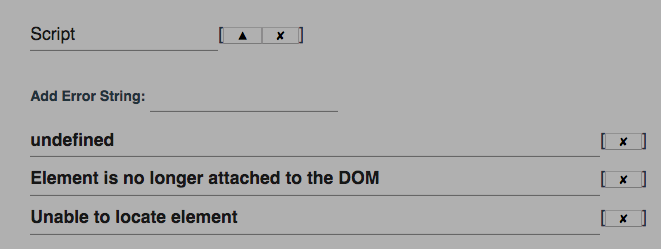
Then it immediately crashes with the titled error:

 JESii
JESii
All 3 comments
Have you had a read through our using inner ref guide?
 alexreardon
on 29 Jan 2019
alexreardon
on 29 Jan 2019
Tutorial but not that one; will do now. Thanks.
JESii
on 29 Jan 2019
Perfect; I just wrapped <ErrorItems...> in a <div> and now it's displaying. Thanks for the quick response :=)
JESii
on 29 Jan 2019
Related issues
 crapthings
·
3Comments
crapthings
·
3Comments
 ibash
·
3Comments
ibash
·
3Comments
 lukyth
·
3Comments
alexreardon
·
3Comments
alexreardon
·
3Comments
lukyth
·
3Comments
alexreardon
·
3Comments
alexreardon
·
3Comments
Most helpful comment
Have you had a read through our using inner ref guide?