React-beautiful-dnd: Item being dragged is offset to the right instead of "inline".
Bug or feature request?
Bug
Expected behavior
When dragging an element, the element is positioned near the cursor.
Actual behavior
The element is offset to the right by roughly 50% of the element's width.
Steps to reproduce
Grab an element, begin to drag. The element is offset to the right instead of "inline"
Browser version
Version 66.0.3359.139 (Official Build) (64-bit)
react-beautiful-dnd version: 6.0.2
EDIT React version 16.3.2. I noticed some places in the docs where "When we move to react 16..." perhaps this is the issue?
Demo
I do not have a workable demo, but it is important to note that I am using the implementation outlined in the "Simple Vertical List" found here. https://codesandbox.io/s/k260nyxq9v
I am also using the Material-UI theme, which I have found to be cumbersome with its styles, but was able to reproduce this even w/o the MUI elements.
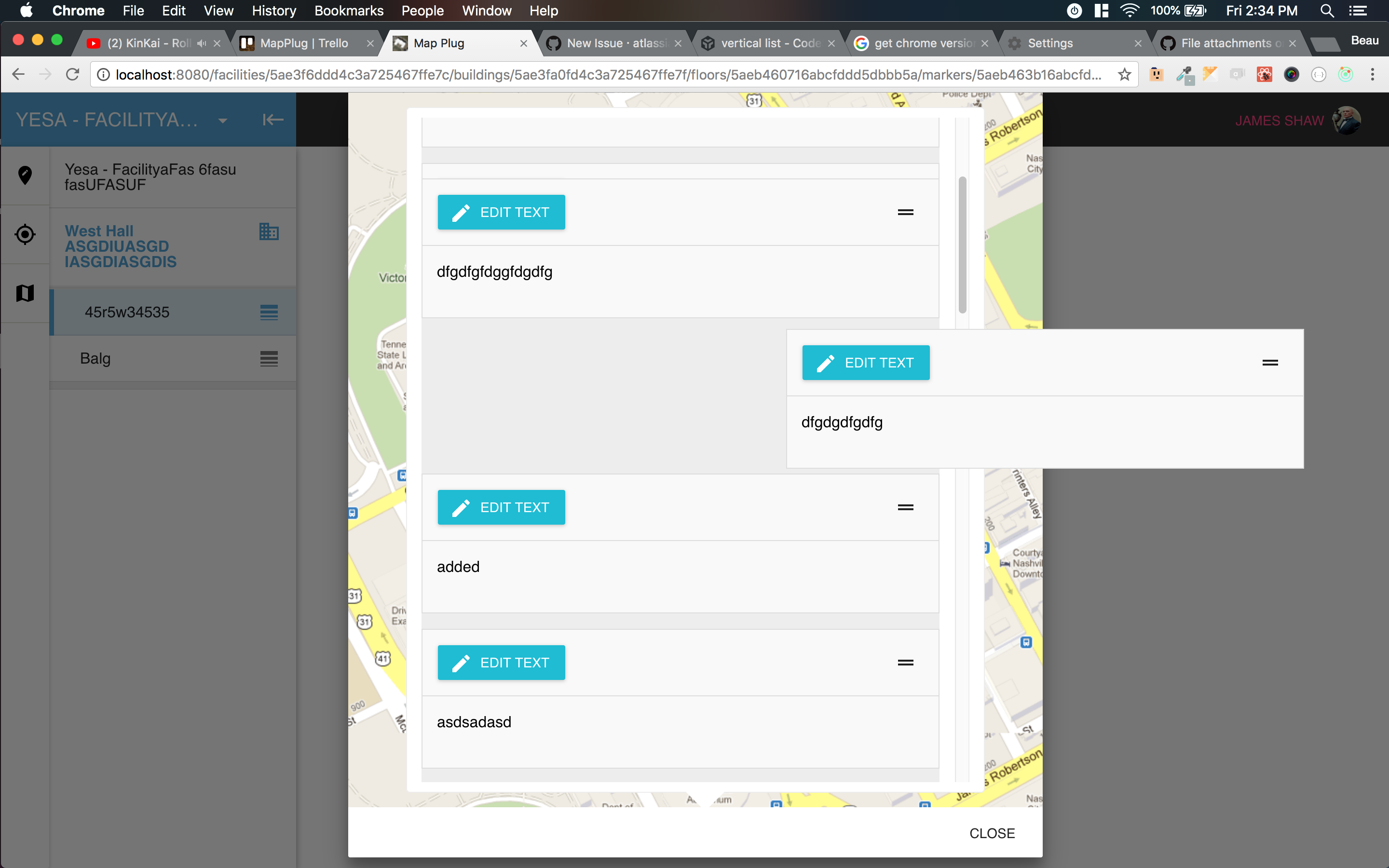
The above screenshot does not show my cursor, by the cursor is located directly in the middle of the droppable area.
Snippet:
<DragDropContext onDragEnd={this.onDragEnd}>
                  <Droppable droppableId='droppable'>
                    {(provided, snapshot) => (
                      <div
                        ref={provided.innerRef}
                        style={getListStyle(snapshot.isDraggingOver)}
                      >
                        {items.toList().map((item, index) => {
                          const infographic = item.get('infographic')
                          const { _id } = infographic
                          return (
                            <Draggable
                              key={_id}
                              draggableId={_id}
                              index={index}
                            >
                              {(provided, snapshot) => (
                                <div>
                                  <div
                                    ref={provided.innerRef}
                                    {...provided.draggableProps}
                                    {...provided.dragHandleProps}
                                    style={getItemStyle(
                                      snapshot.isDragging,
                                      provided.draggableProps.style
                                    )}
                                  >
                                    <EditableInfographic
                                      touched={item.get('touched')}
                                      editing={item.get('editing')}
                                      fetching={item.get('fetching')}
                                      infographic={infographic}
                                      onChange={(change) => this.handleChange(_id, change)}
                                      onSubmit={() => this.handleSubmit(_id)}
                                      onDelete={() => this.handleRemove(_id)}
                                      onEdit={() => this.handleEdit(_id)}
                                    />
                                  </div>
                                </div>
                              )}
                            </Draggable>
                          )
                        })}
                      </div>
                    )}
                  </Droppable>
                </DragDropContext>
const getItemStyle = (isDragging, draggableStyle) => ({
  // some basic styles to make the items look a bit nicer
  userSelect: 'none',
  // change background colour if dragging
  background: isDragging ? '#ededed' : '#fff',
  // styles we need to apply on draggables
  ...draggableStyle
})

const getListStyle = isDraggingOver => ({
  background: isDraggingOver ? '#ededed' : ''
})
Thanks in advance! This library has been very pleasurable to work with in comparison to others I have used!
 DaddyWarbucks
All 7 comments
Hi @DaddyWarbucks, I think you will find this guide will help you resolve your issue:
https://github.com/atlassian/react-beautiful-dnd/blob/master/docs/patterns/using-a-portal.md
 alexreardon
on 14 May 2018
alexreardon
on 14 May 2018
this is problem with calculating offset wrong as offset left it for example 600px while there is no reason for it to be, it should be even fixed in vertical lists
portal is ok, but really not needed, this is more of a bug
 alexgvozden
on 16 May 2018
alexgvozden
on 16 May 2018
I think it is calculating the wrong left offset due to the reasons outlined in the using a portal guide. We are using position:fixed for the dragging element which can be impacted by other parent styles such as a transform on a parent. Our recommended approach to get around this is to use a portal
alexreardon
on 17 May 2018
Thanks for the speedy response and help! I can confirm this was a result of a transform CSS property present on a parent node. So weird...I never new fixed and transform could clash like that.
I chose to get rid of the material-ui dialog and just created my own dialog, which does not use transform. This seemed easier than using a portal, particularly because I was already overriding much of the dialog style.
DaddyWarbucks
on 17 May 2018
ok, it would be cool maybe to pass property transformOffset :)
thanks for fast response!
alexgvozden
on 17 May 2018
For me the issue was a "filter" css-property in one of the ancestors (to add shadows).
Thankfully, the portal API is really straight-forward, so I got it resolved in ~2 minutes once I looked at the code here: https://github.com/atlassian/react-beautiful-dnd/blob/master/stories/src/portal/portal-app.jsx
It's basically just:
let portal = document.createElement("div");
document.body.appendChild(portal);

function MyDraggableItem_render(props) {
  let result = (
    <div>[...]</div>
  );

  if (props.snapshot.isDragging) {
    return ReactDOM.createPortal(result, portal);
  }
  return result;
}
 Venryx
on 10 Mar 2019
Venryx
on 10 Mar 2019
I had the same issue and like previously mentioned here it was a result of a conflict with another style.
I had added transform: translateZ(0) to all my <ul> lists to force the GPU to help render them.
Unfortunately, this transform (and maybe others) causes position: fixed to behave unexpectedly (not bound to the window).
 SandMoshi
on 11 May 2020
SandMoshi
on 11 May 2020
Related issues
alexreardon
·
33Comments
 rd-dev-ukraine
·
49Comments
alexreardon
·
50Comments
rd-dev-ukraine
·
49Comments
alexreardon
·
50Comments
 rogerjak
·
103Comments
alexreardon
·
42Comments
rogerjak
·
103Comments
alexreardon
·
42Comments
Most helpful comment
Thanks for the speedy response and help! I can confirm this was a result of a
transformCSS property present on a parent node. So weird...I never newfixedandtransformcould clash like that.I chose to get rid of the material-ui dialog and just created my own dialog, which does not use
transform. This seemed easier than using a portal, particularly because I was already overriding much of the dialog style.