React-beautiful-dnd: Drag position is offset and very choppy when inside a Semantic UI pushable
Bug or feature request?
bug
Expected behavior
position is accurate and dragging is as smooth as normal
Actual behavior
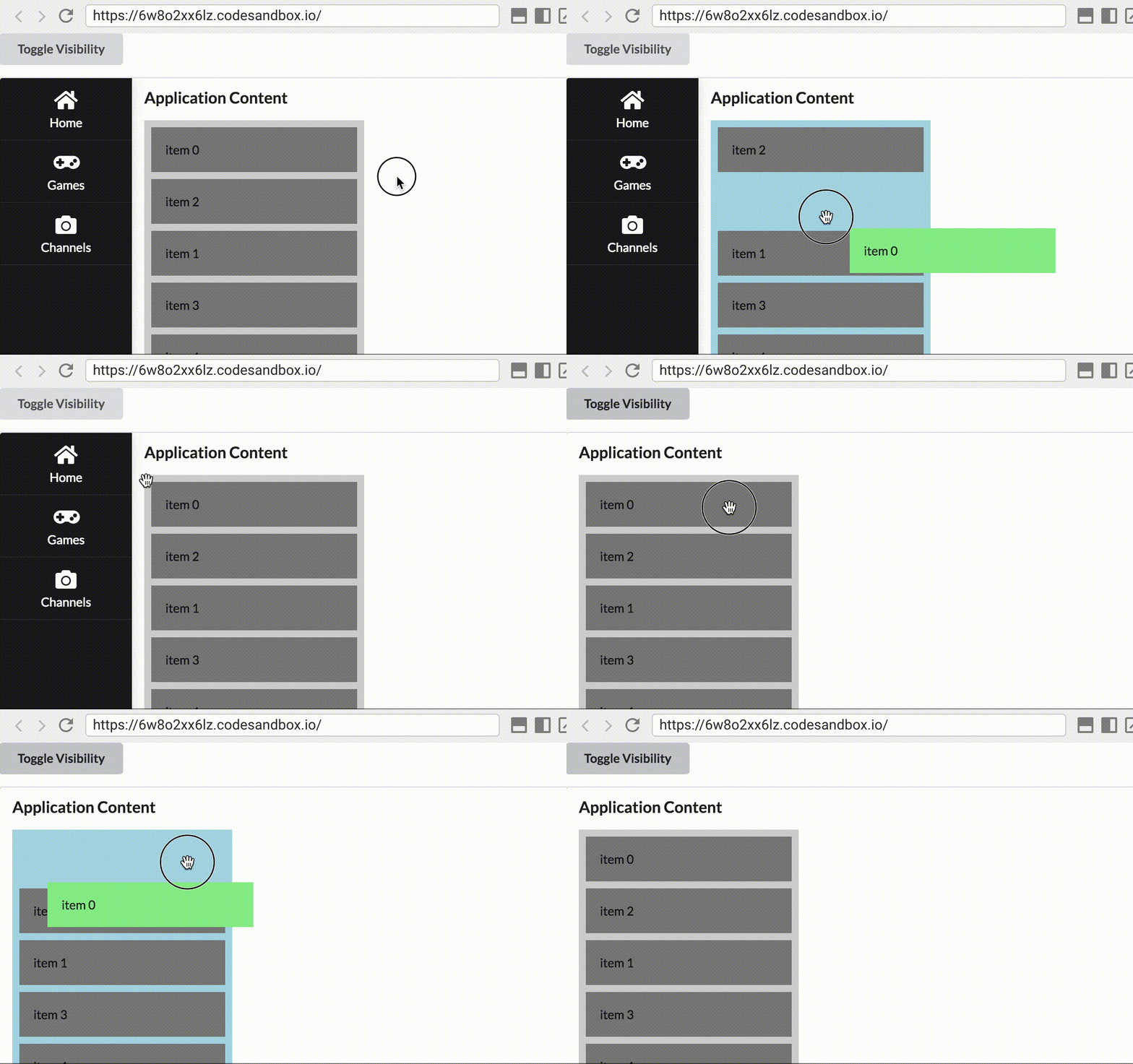
drag position top and left is offset by the width of the pusher when it's opened and when it's closed the top is offset... Looks like it's related to the pusher using transform: translate3d() on the pushable and DND is not taking this into account when calculated the fixed position values.
Steps to reproduce
nest a Droppable with some Draggables inside a semantic UI Push (https://react.semantic-ui.com/modules/sidebar#sidebar-example-left-push), open the pushable, drag a Draggable
Browser version
Google Chrome | 65.0.3325.181 (Official Build) (64-bit)
-- | --
Revision | dc3469be277cc962ba01d9c0cb5bb1a265676c36-refs/branch-heads/3325@{#725}
OS | Mac OS X
JavaScript | V8 6.5.254.41
Flash | 29.0.0.140 /Users/username/Library/Application Support/Google/Chrome/PepperFlash/29.0.0.140/PepperFlashPlayer.plugin
User Agent | Mozilla/5.0 (Macintosh; Intel Mac OS X 10_13_3) AppleWebKit/537.36 (KHTML, like Gecko) Chrome/65.0.3325.181 Safari/537.36
Demo
https://codesandbox.io/s/6w8o2xx6lz
 tsdexter
All 10 comments
Yep, this is caused by us using position: fixed for draggable items. You will need to use a React.Portal. See our using a portal pattern
 alexreardon
on 2 May 2018
alexreardon
on 2 May 2018
Thanks for the detailed and actionable issue @tsdexter
alexreardon
on 2 May 2018
@alexreardon no problem...thanks for the awesome package - appreciate all the hard work going into it!
Two quick questions (#2 is not really related but I don't think it needs its own issue)
- In the future will you check for any
transformvalues and account for it in calculations to avoid thePortalperformance penalty (or is that way to error prone)? - Maybe I missed it in the docs, but is there a flag to conditionally style all
Droppables during a drag so the user knows where they can/cant drop it rather than just theDroppablethey are over? I'm currently doing this withonDragStartandonDragEndby setting astateprop to the draggingtypeand checking that in theDroppable
  handleDragStart = result => {
    this.setState({
      dragging: result.type,
    });
  }

  ...

  // isDropDisabled: false
  style={{
    minHeight: dragging === 'CHECK' ? '60px' : 'initial',
    backgroundColor: dragging === 'CHECK' ? '#e0ffe0' : 'initial',
    border: dragging === 'CHECK' ? '4px dashed #66ff66' : 'initial'
  }}

  // isDropDisabled: true
  style={{
    backgroundColor: dragging === 'CHECK' ? '#FFC1C1' : 'initial',
    border: dragging === 'CHECK' ? '4px dashed #FF6666' : 'initial'
  }}
is this the best practice or did I miss something?
tsdexter
on 2 May 2018
- Not at this stage
- Nope, there is not first class way of doing this. Your approach seems logical
alexreardon
on 2 May 2018
Great, thanks again! 👌
tsdexter
on 2 May 2018
Regarding #1538 can you describe how to implement this using portal. @tsdexter @alexreardon
 suryarsp
on 15 Oct 2019
suryarsp
on 15 Oct 2019
https://github.com/atlassian/react-beautiful-dnd/blob/master/docs/patterns/using-a-portal.md gives a 404, is it still available somewhere?
 xian
on 27 Jul 2020
xian
on 27 Jul 2020
As mentioned by @xian, I also cannot find the docs of using-a-portal, is it still available? @alexreardon
 samkahchiin
on 11 Aug 2020
samkahchiin
on 11 Aug 2020
There's at least this code I've found: https://github.com/atlassian/react-beautiful-dnd/blob/master/stories/src/portal/portal-app.jsx
 framerate
on 14 Aug 2020
framerate
on 14 Aug 2020
Found the solution here (Thanks @renaudtertrais providing a custom hook with the create portal feature)
https://github.com/atlassian/react-beautiful-dnd/issues/128#issuecomment-669083882
Hope can help those people suffering from positioning issue with Semantic UI React.
 applelok
on 17 Nov 2020
applelok
on 17 Nov 2020
Related issues
 humphreybc
·
43Comments
alexreardon
·
41Comments
alexreardon
·
32Comments
alexreardon
·
50Comments
alexreardon
·
46Comments
humphreybc
·
43Comments
alexreardon
·
41Comments
alexreardon
·
32Comments
alexreardon
·
50Comments
alexreardon
·
46Comments
Most helpful comment
Yep, this is caused by us using
position: fixedfor draggable items. You will need to use aReact.Portal. See our using a portal pattern