React-beautiful-dnd: Droppable placeholder size does not include margin
Question
From what I can tell, droppable placeholders do not include margins in their size, but draggable placeholders do. I'm not sure what the expectation is regarding margins on draggables, nor if the difference between droppable and draggable placeholders is intended.
My scenario is that I'd like some vertical spacing between my draggables, so I used a margin-top to achieve it. However during a drag the positioning is not completely correct, and I'm not sure if this is actually supported.
Re-adding margins to the placeholder‘s width/height doesn't seem like the right solution either, as the synthetic space wouldn't collapse with margins of adjacent elements (the way real margins do). Instead perhaps margins should be applied to the placeholder separately from width and height — so that its layout more closely matches the real draggable.
(See 243eb12d for the introduction of the behaviour)
 bradleyayers
All 18 comments
hey @bradleyayers would you be able to create a simple replication of your set-up? You can use this as a starting point: https://www.webpackbin.com/bins/-Kr9aE9jnUeWlphY8wsw 🙂
Cheers!
 jaredcrowe
on 25 Oct 2017
jaredcrowe
on 25 Oct 2017
Have a look at https://www.webpackbin.com/bins/-KxGpHnimNe1IRi8geHC, specfically the container height change during item drag.
bradleyayers
on 25 Oct 2017
Hello btw @bradleyayers
 alexreardon
on 25 Oct 2017
alexreardon
on 25 Oct 2017
Heya 👋🏻!
bradleyayers
on 25 Oct 2017
I am itching to fix this but i have decided not to do any more dev while on leave. I'll leave it with @jaredcrowe to address
alexreardon
on 26 Oct 2017
After sleeping on this, I'm wondering if it might be appropriate to support a placeholder render hook that provides more flexibility.
import { Draggable } from 'react-beautiful-dnd';
import * as styles from "./styles.css";

<Draggable
  draggableId="draggable-1"
  type="PERSON"
  renderPlaceholder={provided => (
    <div
      style={provided.placeholderSize}
      className={styles.item}
    />
  )}
>
  {(provided, snapshot) => (
    <div>
      <div
        ref={provided.innerRef}
        style={provided.draggableStyle}
        className={styles.item}
        {...provided.dragHandleProps}
      >
        <h4>My draggable</h4>
      </div>
      {provided.placeholder}
    </div>
  )}
</Draggable>;
Being able to provide a class name is attractive because it allows pseudo-selectors like :first-child and :last-child to be used, which is handy for stripping top & bottom margins from a list of items.
I realised that my original proposal of copying margins separately from the content size is flawed in that it assumes a draggable maintains the same margins regardless of its position in the droppable.
Perhaps it's possible to approximate this today by peeking inside provided.placeholder’s props, extracting the width/height and then rendering a different item instead… but even if it’s technically possible it’s a hack that won’t be supported after #8 lands.
A few things outstanding:
- bike-shedding on naming
- should size be lazy? (e.g. via a
provided.getPlaceholderSize()function)
bradleyayers
on 27 Oct 2017
Might be relevant @jaredcrowe but i found that margin calc's are also off in this example: https://www.webpackbin.com/bins/-Kx6cpTfejn4FO1iYpWl
alexreardon
on 27 Oct 2017
@bradleyayers the other complication is that we are hoping to animate these placeholders soon #77. So having more control might not be ideal. And as you mentioned, we are hoping to hide them altogether. Technically you could get the ref of the placeholder itself as it is a dom node using ref={ref => this.ref = ref} of similar. Then you could add a class name if you wish to. Or you could just spread the className prop onto it as we always ensure that it is a React element.
I have not tested it, but this should work:
// add a class name to the placeholder
provided.placeholder ? React.cloneElement(provided.placeholder, {className: 'foobar'}) : null
Also @bradleyayers, to your original question: the droppable placeholder should 'just work' and should work the same way as the droppable placeholder
alexreardon
on 27 Oct 2017
Ah! animation is an important point that I didn't consider. I'll give that some thought.
React.cloneElement(provided.placeholder, {className: 'foobar'})
This is along the same lines I was thinking too. The only issue I can see is that because width & height of the placeholder _incorporate_ margins, a developer would need to remember to not apply additional margins via foobar. If we pulled margins out as separate styles, this would be more viable. Then the only problem I can imagine is position-dependent styling via :first-child etc.
Perhaps just documenting that draggables should not have position-dependent styling is enough of a solution.
bradleyayers
on 27 Oct 2017
Perhaps just documenting that draggables should not have position-dependent styling is enough of a solution.
Can you elaborate a little more @bradleyayers ?
alexreardon
on 31 Oct 2017
I would argue that despite the work probably involved, draggables should be able to have margins. Otherwise, you wind up doing fairly un-pragmatic coding to get from design to reality -- not so dev friendly. That's my 2¢
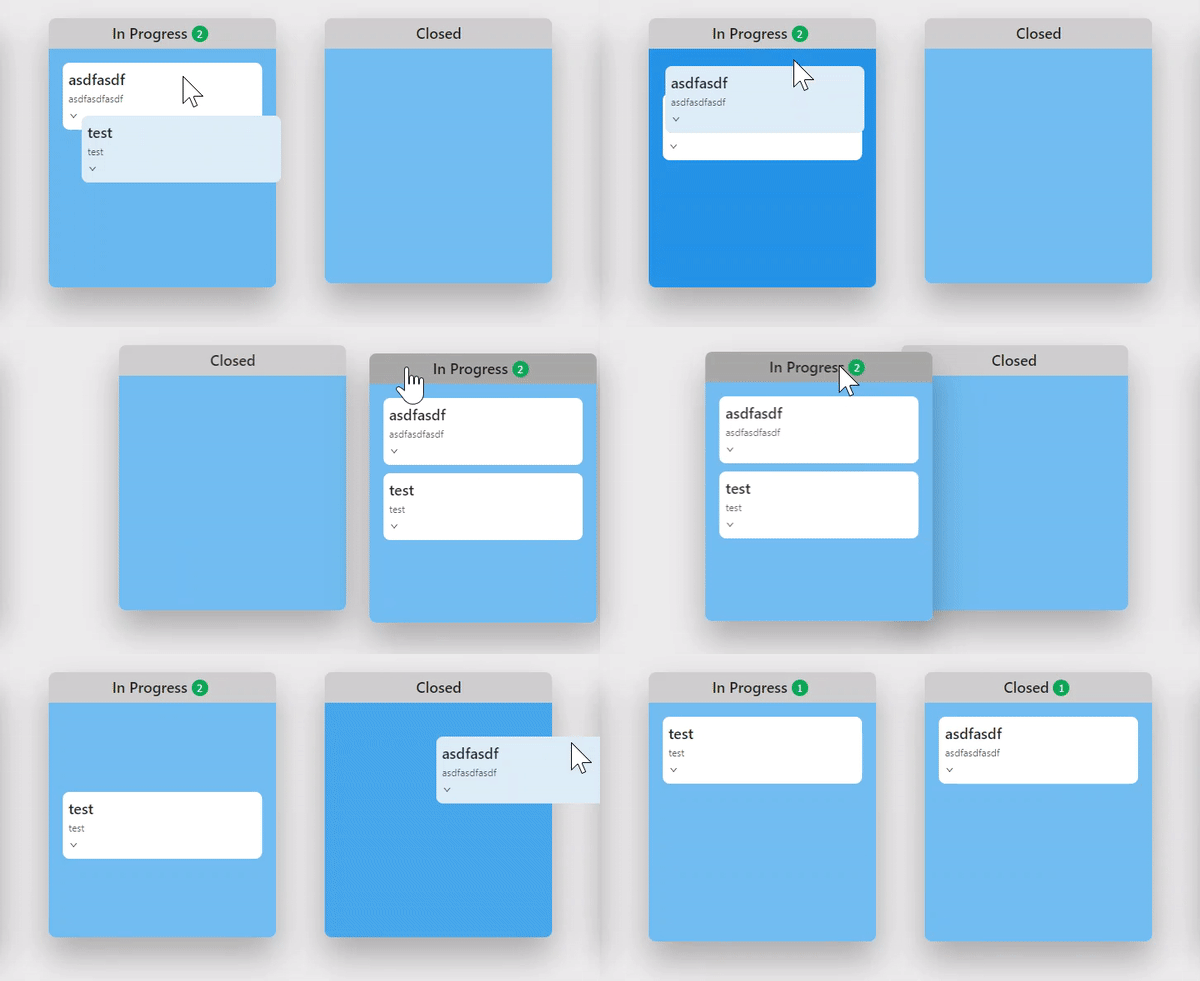
Strangely I can't reproduce the smoothness of the storybook demo, even with nearly identical styling/structure. I wind up with this jankiness after a drop, which I think is related to margins
 tim-soft
on 31 Oct 2017
tim-soft
on 31 Oct 2017
My understanding is that they can have margins. All our examples use margins on the Draggables. I can look into the original issue closer. I suspect there is some margin collapsing going on which is causing your issue
alexreardon
on 31 Oct 2017
It looks like there is an issue here. I will look into it soon
alexreardon
on 31 Oct 2017
@alexreardon thanks! You guys are doing some awesome work here
tim-soft
on 31 Oct 2017
By "position-dependent styling" I was trying to describe the scenario where margins on the first draggable in the droppable (i.e. "first position"), differ from the margins of the other draggables. (I'm using "first" in this example, but really this applies to any position-based styling)
The way this could be implemented is via something like .draggable:first-child { margin-top: 0; }. So in this way the CSS rules that apply to the draggable, depend on the position of the draggable in the droppable.
Here's an example: https://www.webpackbin.com/bins/-KxoFvj65qUlLvrlOVR1
bradleyayers
on 31 Oct 2017
Okay I think this is two different things we are seeing.
First, I would recommend against using marginTop or marginBottom inline properties: #153.
Given that this issue has hit a few people now it could be worth adding margin-* properties set to 0 to most probably avoid this strange inline style issue.
Second, the examples are falling victim to margin collapsing. When we pull the item out it gives it the exact height and width it had previously. However, this can impact margin collapsing. We have seen this before also. To create a super robust experience for people we should probably set the placeholder height and width without margins and add the exact margins that the draggable itself had. This would preserve pre-drag margin collapsing.
alexreardon
on 2 Nov 2017
I will close this and track this work under #158
alexreardon
on 2 Nov 2017
Related issues
 lukyth
·
3Comments
lukyth
·
3Comments
 screenmeet
·
3Comments
screenmeet
·
3Comments
 joshmillgate
·
3Comments
joshmillgate
·
3Comments
 erganmedia
·
3Comments
erganmedia
·
3Comments
 OmriAharon
·
3Comments
OmriAharon
·
3Comments
Most helpful comment
I am itching to fix this but i have decided not to do any more dev while on leave. I'll leave it with @jaredcrowe to address